The Ultimate Guide to Retrieval APIs for AI Agents (2026)
Written by
Emil Sorensen
•
Updated
Summary
A retrieval API is the tool your agent calls when it needs to know something about your product. Query in, ranked passages with source URLs out, nothing generated. Your agent does the reasoning.
This guide covers what that layer actually is, how the pipeline behind it works, the metrics that decide whether it is any good, the five categories of option available in 2026, how to tune context size, how to wire it into an agent, the six ways it fails in production, and a protocol for testing any of it against your own data in an afternoon.
Contents
What a retrieval API is, and what it is not
How retrieval for agents actually works
The metrics that matter
Eight criteria for evaluating a retrieval API
The five categories of option
How much context should retrieval return?
Wiring retrieval into your agent
Six failure modes and how to diagnose them
What retrieval actually costs
Security, scoping and governance
How kapa.ai's Retrieval API fits
Where kapa is the wrong choice
The evaluation protocol
Glossary
1. What a retrieval API is, and what it is not
Four things get called the same thing and sit at different layers.
Layer | What it gives you | What you still own |
|---|---|---|
Vector database | Storage and similarity search over embeddings you supply | Ingestion, chunking, embedding, hybrid search, reranking, sync |
Orchestration framework | Glue for assembling a pipeline | Every component the glue connects |
Search API | An index plus ranking, usually keyword and vector | Ingestion, chunking strategy, sync, citation handling |
Web search API | Passages from the public web | Everything about your own content |
Retrieval API (what we're covering) | Query to ranked passages, ingestion included | Prompting your agent, and the agent itself |
The practical test is what happens on day one. If your first task is "write a script to chunk and embed our docs," you bought an index. If your first task is "point it at our docs site and call the endpoint," you bought a retrieval API.
Neither is wrong. But teams routinely compare a vector database against a managed retrieval service on price per query, which compares a component to a service and reliably picks the option with more hidden work attached.
One more distinction that matters for agents specifically: a retrieval API should return passages, not answers. An API that returns written prose has already made the reasoning decision your agent exists to make, and it makes citation harder because you cannot see which passage produced which claim.
2. How retrieval for agents actually works
Every serious retrieval pipeline is a funnel. It narrows a knowledge base of hundreds of thousands of chunks down to the handful your agent can actually hold in context. Understanding the stages is what lets you diagnose it when it goes wrong.
Stage 1: Ingestion
Content is pulled out of the systems it lives in, converted to text, and kept current. This is the largest and most underestimated part of the job. PDFs must be converted to structured text, images must be annotated to be retrievable at all, and every source needs its own change-detection strategy because most APIs cannot tell you what changed. Connecting multiple data sources to one RAG knowledge base covers this stage in depth.
Stage 2: Chunking
Documents are split into chunks: short, self-contained snippets from a single page or item. Chunk size sets a ceiling on citation precision. If your chunks span a whole page, the best citation you can honestly offer is "somewhere on this page."
Chunking should differ by source type. A support ticket, an API specification, a wiki page and a pull request have different natural boundaries, and one splitting rule produces good retrieval for whichever you tuned on and mediocre retrieval for the rest.
Stage 3: Indexing
Chunks are embedded into vectors for semantic search and indexed for keyword search. Both matter. Semantic search finds conceptually related content when the wording differs; keyword search finds exact identifiers, error codes and function names that embeddings blur together. Technical corpora need both, which is why hybrid retrieval is standard.
Stage 4: Query understanding
The user's question is rarely the best search query. Strong pipelines decompose a complex question into sub-questions, generate keyword variants alongside semantic ones, and may rewrite the query for clarity. This is the stage that separates a single embedding lookup from an agentic retriever.
Stage 5: Retrieval
The generated queries run against the index, usually several in parallel, producing a few hundred candidate chunks.
Stage 6: Reranking
A dedicated reranking model scores every candidate against the original question and orders them. This is a different and more accurate operation than the first-stage similarity score, and it is where a lot of quality comes from.
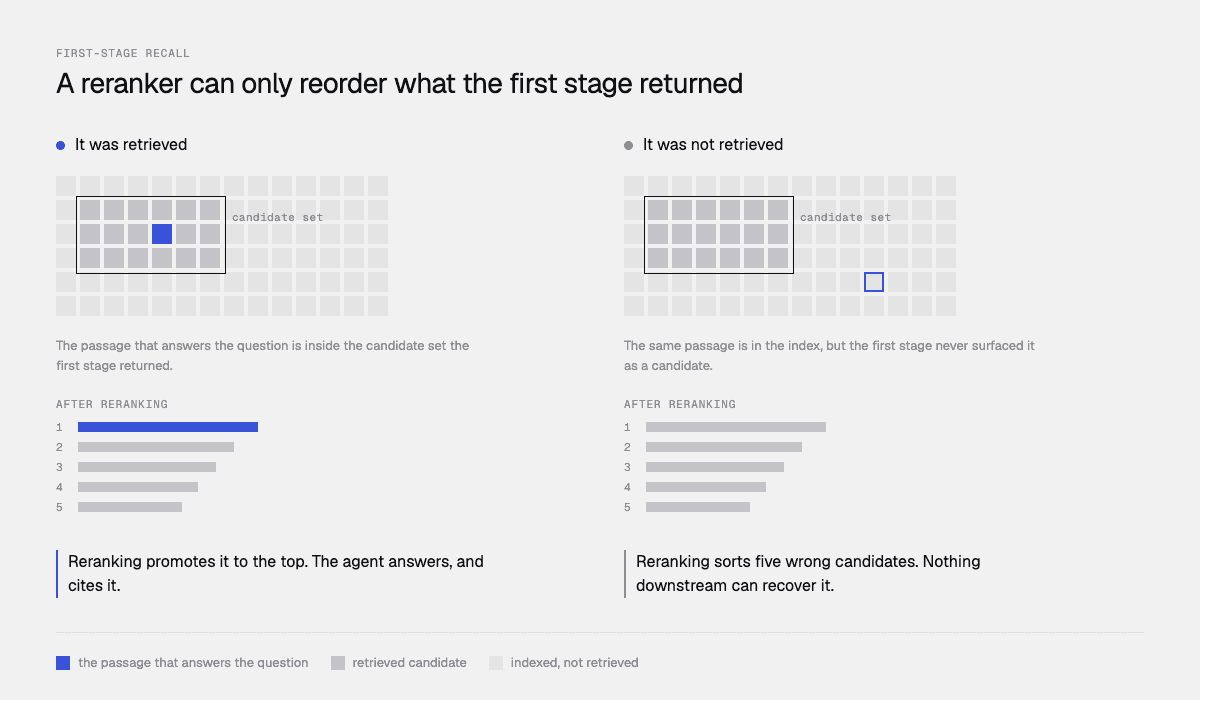
There is an important architectural limit here. If the correct passage never reached the candidate set in stage 5, no reranker can recover it. Reranking sorts what it is given. Systems that rerank a small fixed candidate set inherit a hard ceiling from their first stage, which is why first-stage recall matters more than ranking quality on large technical corpora.
Stage 7: Pruning, optionally
A small, cheap model reads the question and the surviving chunks together and discards the ones the answer will not need, before the expensive model ever sees them. This is newer and not universal. It trades a little latency for a lot of context reduction.
Stage 8: Passages out
Ranked chunks, each with a source URL, returned to your agent. No generation.
3. The metrics that matter
Vendors quote different numbers. These are the ones worth asking about.
Recall@k. Of the questions you tested, how often did the correct source appear in the top k results? Recall@5 is the common form. This is the single most useful retrieval metric because it measures whether the evidence reached your agent at all.
Chunk recall versus question recall. These are different and the distinction is often blurred. Chunk recall asks: of all the chunks relevant to a question, what fraction were returned? If a question needs five chunks and retrieval returns four, chunk recall is 80%. Question recall is stricter: for what percentage of questions did retrieval return every relevant chunk? Question recall tells you how often your agent got complete coverage rather than partial.
Latency at p50 and p95. Averages hide the tail, and the tail is what users feel. A pipeline averaging two seconds with a nine-second p95 is a different product from one that is consistently three.
Precision, or how much noise comes back. High recall achieved by returning everything is not a win, because context is finite and reasoning degrades as it fills.
Faithfulness, downstream. Whether the agent's answer actually came from the retrieved passages rather than the model's training data. This is a generation-side metric, but retrieval quality sets its ceiling. How to make an AI assistant give source-backed answers covers measuring it.
4. Eight criteria for evaluating a retrieval API
1. Does it return passages or answers? For agents, passages.
2. Do you bring the index, or does it build one? The biggest cost difference between options, and the one most often missed. A service that ingests from your source systems and keeps them synced is doing a categorically larger job than one that searches vectors you uploaded.
3. What is its recall-versus-latency posture? A single embedding lookup is fast and misses things. A multi-step pipeline has better recall and costs seconds. Know which you are buying, and ask for p50 and p95 rather than an average.
4. How much control do you have over context size? You want explicit caps, ideally by character count rather than result count, because chunk lengths vary.
5. Does every passage carry a source URL? Without per-passage source metadata your agent cannot cite precisely.
6. What transports does it speak? HTTP for pipelines, MCP for agent frameworks with tool calling.
7. Can you scope what a given caller sees? One knowledge base often needs to serve an external agent restricted to public content and an internal one that sees more. If that means duplicate indexes, it is a real operational cost.
8. What are the rate limits and data-handling terms? Published limits, whether per team or per user, what happens on a 429, and whether queries are retained or can be redacted.
5. The five categories of option
Managed retrieval services
Vectara, Ragie, Contextual AI, kapa.ai's Retrieval API.
Bundle ingestion, chunking, embedding and retrieval behind one API. Fastest path from source systems to a working retrieval call, least control over pipeline internals.
Choose one if you want retrieval as a capability rather than a construction project, and your content lives in systems you would otherwise write connectors for. Be aware that you are accepting someone else's chunking and ranking decisions, so test them against your own questions.
Cloud-native retrieval
Amazon Bedrock Knowledge Bases, Azure AI Search (and Foundry IQ built on it), Google Agent Search and Vertex AI RAG Engine.
Choose one if you are committed to a cloud, or your identity and permissions story already runs through that provider. Azure's Entra and Purview integration is hard to replicate elsewhere. Be aware that these are general-purpose building blocks and the tuning that makes technical retrieval work is left to you. Azure AI Search alternatives goes deeper.
Vector databases
Pinecone, Weaviate, Qdrant, pgvector. Pinecone Assistant sits slightly above the raw database.
Choose one if retrieval is your product, you have unusual requirements, or you already run Postgres. Be aware that you are buying storage and similarity search and inheriting hybrid retrieval, reranking, chunking and the entire ingestion layer.
Web search APIs used as retrieval
Choose one if the knowledge is not yours: competitor information, upstream dependencies, whether a standard shipped. Be aware that pointed at your own content, even with a site limiter, they reach only the public pages a crawler found and indexed, which excludes tickets, PDFs, internal wikis and code. Web search or retrieval for your AI agent works through this properly.
Docs-specific MCP servers
Context7 and similar services exposing library and framework documentation to coding agents.
Choose one if you want a coding agent to read public documentation for open source libraries. Be aware that this is a different job from grounding an agent in your own product knowledge.
Comparison
Managed retrieval | Cloud-native | Vector DB | Web search API | Docs MCP | |
|---|---|---|---|---|---|
Returns passages | Yes | Yes | Yes | Yes, from the web | Yes |
Ingestion included | Yes | Connectors, general purpose | No | Not applicable | Public docs only |
Keeps sources synced | Yes | Varies | You build it | Crawler-dependent | Vendor-managed |
Recall posture | Usually multi-step | Varies | Whatever you build | Single pass | Single pass |
Per-passage source URLs | Yes | Yes | If you store them | Page-level | Yes |
MCP transport | Common | Emerging | No | Rare | Native |
Caller scoping | Usually | Via index and IAM | You build it | No | No |
Best for | Your own technical content | One-cloud shops | Custom pipelines | The open web | Public library docs |
6. How much context should retrieval return?
More context improves recall and costs you in three ways: tokens, latency, and reasoning quality. That third one surprises people. As context grows, model reasoning degrades, a problem known as context rot, which produces worse answers even when the right information is present.
Kapa published curves from a test set of thousands of annotated real questions, and the shape generalises well enough to be worth knowing whichever vendor you use.
Three configurations cover most cases.
Maximum recall. Defaults: 35,000 characters, up to 15 chunks, no pruning. At a 35,000-character cap, recall is nearly as high as with no cap at all, returning an average of 13.7 chunks per query. Pick this when your agent is simple enough that context rot is not a concern and you are not cost-sensitive. Worth knowing: the recall curve flattens around 12 to 13 chunks, so retrieving more than that buys very little.
The middle ground: pruning. Keep the caps and enable relevance pruning. A small model judges each retrieved chunk against the query and drops the irrelevant ones. On average this removes about two-thirds of the context while preserving about 96% of recall, at roughly 0.7 seconds of added latency. Pick this when context size is becoming a problem but latency is not critical.
Reduced context under tight latency. Lower the character cap instead of pruning. This adds no latency but cuts by size and position rather than relevance, so the same reduction costs more recall: trimming two-thirds this way leaves recall around 86%, where pruning would have held about 96%. Below 15,000 characters recall drops steeply.
The general principle transfers to any vendor: cutting context by relevance preserves far more recall than cutting it by size. If your retrieval layer only offers a result-count cap, you are cutting by size.
7. Wiring retrieval into your agent
Connecting the API is the easy part. Three things decide whether it works.
The tool description
This is what the model reads when deciding whether to call retrieval at all, and it is routinely under-written. A good description says what the tool returns (chunks with source URLs), and, critically, that returned passages may be only weakly related or entirely unrelated to the query. That last clause primes the model to treat results skeptically rather than assuming everything returned is usable.
The system prompt
Separately, the system prompt says what to do with results: cite the passage supporting each claim, do not cite passages that only provided background, do not cite anything without a source URL, and say so when the passages do not answer the question. Teams commonly write this half and skip the tool description, then wonder why the agent is credulous about irrelevant chunks. Kapa documents both halves in prompt your agent for grounded answers.
Routing between tools
A production agent usually has three knowledge routes and needs to distinguish them:
Native tools for data in your product: this user's subscription, this deploy's logs.
Retrieval for knowledge you own: how the product works, what an error means, what changed in a release.
Web search for knowledge you do not own: competitors, upstream dependencies, general practice.
Getting this wrong is usually a tool-description problem rather than a model problem.
The search sub-agent pattern
If retrieval latency or context volume is hurting your main agent, delegate retrieval to a dedicated sub-agent that performs the search and any filtering, and returns only what is needed. This keeps the main agent's context lean and reduces perceived latency, at the cost of another hop. Kapa documents this as a context-management pattern in its retrieval size guide.
8. Six failure modes and how to diagnose them
1. The right passage never reached the candidate set. Symptom: the answer is missing, and it exists in your docs. Diagnosis: check whether the correct chunk appeared in the first-stage results before reranking. If not, this is a recall problem and no amount of reranking or prompting will fix it.
2. The index is stale. Symptom: the assistant answers correctly but from an old version. Diagnosis: change something in each connected source and time how long until it is reflected. Test per source, not globally, because freshness varies by connector.
3. Deleted content is still answering. Symptom: confident answers citing pages that no longer exist. Diagnosis: delete a page and a ticket, then ask questions they used to answer. Most APIs cannot report deletions, so this path is frequently broken and almost never tested.
4. Duplicates are crowding the results. Symptom: the top five results are near-identical copies of a partial answer. Diagnosis: inspect retrieved chunks for your most common questions. The same content in a docs page, a support macro and a community thread all score well and squeeze out the one better chunk.
5. Context rot. Symptom: answer quality gets worse when you retrieve more. Diagnosis: reduce context and see if quality improves. Counter-intuitive but common in complex agents.
6. No uncertainty signal. Symptom: the agent answers confidently from irrelevant passages. Diagnosis: ask questions with no documented answer. A retrieval layer returns its top k whether or not any are relevant, so if nothing distinguishes "five good passages" from "five bad ones," that judgement falls on your prompt.
9. What retrieval actually costs
Three cost lines, and the second is usually the largest.
The retrieval call itself, priced per query, per compute unit, or bundled.
The tokens the retrieved context consumes in your generation call. In kapa's own assistants, retrieved chunks account for about two-thirds of the cost of a query, more than the answer, conversation history and system prompt combined. Each chunk removed cuts query cost by roughly 4%. This is why pruning pays for itself: dropping two-thirds of the context cut per-query cost by about a third, net of the pruner's own cost.
The engineering you still own. Zero for a managed service, substantial for a vector database. This is the line that decides most build-versus-buy arguments and the one least often written down. Should you build or buy an AI knowledge assistant works through it.
10. Security, scoping and governance
Authentication. Retrieval endpoints are usually API-key authenticated, with the key held server-side. MCP servers may additionally support OAuth for end users. Check whether the auth mode can be changed after setup, because with some services it cannot.
Scoping. Can one knowledge base serve different callers different subsets? The alternative, duplicate indexes per audience, doubles your ingestion cost and your sync surface.
Per-document permissions. This is where managed retrieval services are generally weaker than enterprise search and cloud-native options. If you need document-level access control tied to your identity provider, with sensitivity labels flowing through retrieval, that narrows the field considerably and Azure is strong there.
Query handling. Whether queries are logged, whether they can be redacted from analytics, and whether PII protections apply to the retrieval path specifically rather than just to chat.
Rate limits. Published limits, per team or per user, and the behaviour on exceeding them.
11. How kapa.ai's Retrieval API fits
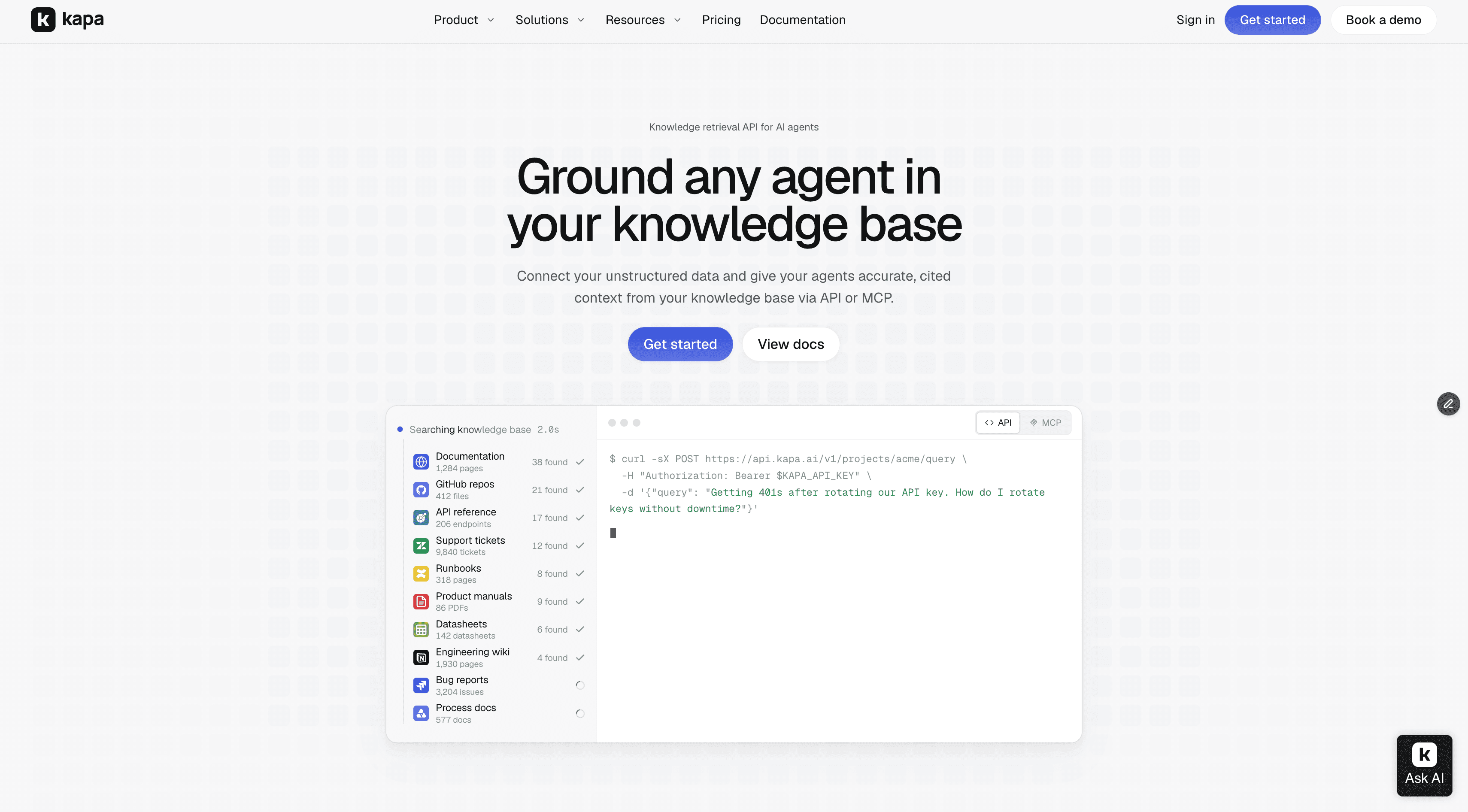
kapa.ai is a knowledge retrieval platform purpose-built for technical companies, used in production by 200+ technical companies. Its Retrieval API is the component that competes in this category.
Kapa calls the engine agentic retrieval, described in its docs as a knowledge retrieval engine built for agents rather than for people browsing pages. It never generates text.
Passages, never answers. Ranked chunks with source URLs, no generation. A separate Documents endpoint fetches whole pages by URL or document ID when the agent needs the full page.
Ingestion included. 50+ connector types spanning docs sites, GitHub code, issues, PRs and discussions, Slack, Discord, Discourse, Stack Overflow, Confluence, Notion, Google Drive, Zendesk, Jira, Salesforce, S3, file upload, OpenAPI specs and YouTube, with per-source change detection. How data ingestion works explains the machinery.
Recall-first pipeline. Query decomposition into semantic and keyword variants, multiple hybrid searches, then reranking across everything surfaced. Kapa is model-agnostic and works with multiple providers including OpenAI, Anthropic, Cohere and Voyage, selecting on evaluation results rather than commitment to one vendor.
Latency stated plainly. About 3 seconds p50 and 4.5 seconds p95, plus roughly 0.7 seconds with pruning enabled. Slower than a single vector lookup, deliberately.
Context control. top_k up to 15, max_chars up to 60,000 with a 35,000 default, and use_pruning. Pruning always keeps the two most relevant chunks where the caps permit. The research is in how we prune RAG context.
Two transports, one behaviour. The HTTP API and the hosted MCP server expose the same retrieval with the same latency.
Scoping without duplicate indexes. source_group_ids_include restricts a call to specific source groups, or an MCP server can be pinned to groups in its settings.
One capability without an equivalent elsewhere. Retrieval can be exposed as a keyless GET endpoint on your own domain, listed in your llms.txt, so external coding agents and browser assistants can discover and query your documentation with no API key and no OAuth flow. Kapa's own docs run this at docs.kapa.ai/retrieve?q=....
Measured quality. kapa was benchmarked for retrieval against web search APIs and DIY pipelines and returned the right source almost 2x more often, measured as Recall@5 across four real customer projects, 30 human-annotated questions each, all sources public, web search given site limiters. That is retrieval only, not generation.
12. Where kapa is the wrong choice
You need per-document permissions tied to your identity provider. Kapa scopes by project instance and source group, not per-document identity. Azure does Entra-based document-level access control with Purview sensitivity labels better.
Your corpus is not technical. The tuning that helps on API references, datasheets and tickets is not an advantage on general business documents.
You want to own the ranking. top_k caps at 15. If you want hundreds of candidates for your own reranker, use a vector database or a search engine.
13. The evaluation protocol
Thirty of your own questions beat any vendor table, including this one.
Collect 30 real questions from your support queue, community or agent logs. Sample randomly rather than picking interesting ones, because real traffic skews more toward beginners than intuition suggests. Include some whose answers live in tickets or PDFs, and five whose answers are not documented anywhere.
Record ground truth: which document and which passage answers each. This is the slow part and there is no shortcut.
Run every candidate and take the top five results.
Score Recall@5 for each candidate.
Split by source type. Docs site, tickets, PDFs, community, reported separately. Most options look similar on a clean docs site and diverge sharply elsewhere, and a blended average hides exactly the difference you are paying for.
Measure p50 and p95 latency on the same run so the recall-latency trade is made with numbers.
Check the five undocumented questions. Does the API return weak matches with no signal they are weak?
Test freshness and deletion. Change something in each source and time the update. Delete something and confirm it stops being answered.
Steps 5, 7 and 8 separate candidates. Steps 1 to 4 usually produce a tie.
14. Glossary
Agentic retrieval. A retrieval pipeline that plans its own search: decomposing the query, generating variants, running several searches, and reranking across all of them, rather than a single lookup.
Chunk. A short, self-contained snippet of text from a single page or item, the unit retrieval returns.
Chunk recall. Of all chunks relevant to a question, the fraction retrieval returned.
Context rot. Degradation in a model's reasoning as its context window fills, producing worse answers even when the right information is present.
Hybrid search. Combining semantic (embedding) and lexical (keyword) retrieval, usually fused into one ranking. Necessary for technical content, where exact identifiers matter as much as meaning.
MCP. Model Context Protocol, a standard for exposing tools to agents. An MCP server lets any compatible agent register retrieval as a tool without integration code.
Pruning. Removing retrieved chunks by relevance before generation, typically using a small model, as opposed to truncating by size or position.
Question recall. The percentage of questions for which retrieval returned every relevant chunk. Stricter than chunk recall.
Recall@k. The fraction of test questions where the correct source appeared in the top k results.
Reranking. Rescoring candidate chunks against the original question with a model dedicated to relevance ordering, after first-stage retrieval.
RRF (Reciprocal Rank Fusion). A common method for merging keyword and vector result lists into one ranking.
This guide is written by kapa.ai, which makes one of the retrieval APIs discussed, and is explicit above about where other categories fit better and where kapa is the wrong choice. Kapa.ai is an LLM-powered RAG platform purpose-built for technical documentation, used in production by 200+ technical companies. Competitor details are accurate as of September 2026 and this category is moving quickly, so confirm current capabilities, limits and pricing at the source before deciding.
FAQ
What is the best retrieval API for AI agents?
It depends on whether you need an index or a full path from your source systems to a citable passage. Managed retrieval services such as Vectara, Ragie, Contextual AI and kapa.ai's Retrieval API include ingestion and sync; cloud-native options such as Bedrock Knowledge Bases, Azure AI Search and Google Agent Search suit teams committed to one cloud; vector databases such as Pinecone, Weaviate and Qdrant give you storage and similarity search while you build the rest.
What is the difference between a retrieval API and a vector database?
A vector database stores embeddings you supply and performs similarity search over them. A retrieval API takes a query and returns ranked passages, usually including the ingestion, chunking, embedding, hybrid search and reranking needed to get there. Comparing them on price per query is misleading, because the vector database leaves you owning the pipeline around it.
Should a retrieval API for agents return answers or passages?
Passages. An API that returns a written answer has already made the reasoning decision your agent exists to make, and it makes citation harder because you cannot see which passage supports which claim.
What is a context layer for LLM agents?
The component that supplies an agent with knowledge its own tools and training data do not contain, typically your product documentation, support history, code and specifications. In practice it is a retrieval API or MCP server the agent calls as one tool alongside its native tools.
How much context should I retrieve for an AI agent?
Enough for high recall without triggering context rot. Retrieving more improves recall with diminishing returns, and the recall curve tends to flatten around 12 to 13 chunks. If you need to reduce context, cutting by relevance preserves far more recall than cutting by size: in kapa's measurements, pruning two-thirds of context held recall near 96%, while trimming the same amount by character limit dropped it to about 86%.
What is the difference between chunk recall and question recall?
Chunk recall is the fraction of all relevant chunks that retrieval returned for a question, so returning four of five relevant chunks is 80%. Question recall is stricter: the percentage of questions where retrieval returned every relevant chunk. Question recall tells you how often the agent had complete coverage rather than partial.
How much latency does a retrieval API add?
It varies by pipeline design. A single embedding lookup can return in well under a second, while multi-step pipelines that decompose the query and run several searches trade latency for recall. Kapa.ai's Retrieval API is typically around 3 seconds p50 and 4.5 seconds p95, with optional relevance pruning adding roughly 0.7 seconds. Ask any vendor for p50 and p95 rather than an average.
Why does reranking not fix bad retrieval results?
Because reranking only reorders the candidates the first stage returned. If the passage that answers the question never reached the candidate set, no reranker can recover it. Systems that rerank a small fixed candidate set inherit a hard ceiling from their first stage, which is why first-stage recall matters more than ranking quality on large technical corpora.
Can I use a web search API as the retrieval layer for my agent?
For knowledge you do not own, yes, and Exa, Tavily and Brave are good at it. For your own product knowledge it is a poor substitute, because even with a site limiter a web search API reaches only the public pages a crawler found and indexed, excluding support tickets, PDFs, internal wikis and code.
How much of my LLM cost is retrieved context?
More than most teams expect. In kapa's own assistants retrieved chunks account for about two-thirds of the cost of a query, more than the answer, conversation history and system prompt combined, and each chunk removed cuts query cost by roughly 4%. That is why relevance-based pruning can cut per-query cost by around a third net of its own cost.
What is the search sub-agent pattern?
Delegating retrieval and any filtering to a dedicated sub-agent rather than running it in the main agent loop. The sub-agent performs the search and returns only what is needed, which keeps the main agent's context lean and reduces perceived latency, at the cost of an extra hop.
How do I test a retrieval API against my own data?
Collect 30 real user questions, record which document and passage answers each, run every candidate and measure Recall@5 split by source type rather than as one average. Include five questions with no documented answer to see whether the API signals weak results, measure p50 and p95 latency on the same run, and test that changed content is reflected and deleted content stops being answered.
TRUSTED BY 200+ INDUSTRY-LEADING ENTERPRISES WITH COMPLEX PRODUCTS
- Silicon LabsAsk anything...
- LogitechAsk anything...
- n8nAsk anything...
- monday.comAsk anything...


