Should You Use Web Search or Retrieval for Your AI Agent?
Written by
Anton Malling
•
Updated
Short answer
Use retrieval for knowledge you own, and web search for knowledge you do not. That sounds obvious until you notice how many agents are pointed at their own documentation through a web search tool with a site limiter, which is a strictly worse way to read content you already control.
If your agent answers questions about your product, your API, your hardware, or your platform, that knowledge lives in your docs, your tickets, your PDFs, and your code. Retrieval over an index you own reaches all of it. Web search reaches only the subset a crawler found, parsed, and chose to index, and it reaches that subset late.
Most production agents need both, wired as two separate tools with descriptions that make the routing obvious. The rest of this piece is about how to decide which question goes where, and how to check the decision against your own data rather than taking anyone's word for it.
The question is usually framed wrong
"Web search or retrieval" sounds like two competing implementations of one capability. They are not. They answer different questions:
Web search answers "what is true in the world right now?" It is unbounded, current, and belongs to nobody.
Retrieval answers "what is true about the thing I own?" It is bounded, governed, and citable to a canonical source you control.
An agent that helps a user configure your product needs the second. An agent that compares your product to three competitors needs the first. An agent that does both needs both, and needs to know which is which.
The failure mode is not choosing wrong in the abstract. It is using web search as a cheap substitute for building an index, because a search API is one line of code and an ingestion pipeline is a project. That substitution is where the quality goes.
What web search is genuinely better at
A comparison that only argues one side is not useful, so here is the honest list. Reach for web search when:
The knowledge is not yours. Competitor pricing, ecosystem tooling, what a third-party library changed in its last release, whether a standard has been ratified. You cannot index what you do not control, and you should not try.
Currency matters more than precision. "Has this CVE been patched upstream?" is a question where a slightly noisy answer from an hour ago beats a clean answer from last quarter.
The question is open-ended discovery. When the user does not know what they are looking for and the answer might live anywhere, breadth beats depth.
You have no corpus yet. If you are prototyping and your documentation is thin, web search over your public docs is a reasonable placeholder. Treat it as a placeholder.
Web search APIs have also improved substantially. The current generation returns cleaner extracted content than the link-and-snippet era, and for the four cases above they are the right tool.
What retrieval is better at, and why the gap is structural
For knowledge you own, retrieval wins for reasons that are not going to be closed by better search APIs. They are structural.
Coverage. A web index contains your public documentation site. Your knowledge base contains your public documentation site plus your support tickets, your community threads, your PDF datasheets, your API specifications, your internal runbooks, and your code. On a question whose answer lives in a resolved Zendesk ticket, web search has a coverage of zero, and no amount of ranking quality fixes a document that is not in the index. Kapa indexes 50+ source types for this reason.
Freshness, in the opposite direction from the intuition. People reach for web search because it feels live. For your own content it is the slower path. A crawler has to revisit your site, re-parse it, and update its index, which takes days. A synced knowledge base updates from your source systems, for most sources within minutes of the change. How data ingestion works explains why syncing only what changed is the hard part, and keeping a RAG knowledge base in sync with changing docs covers the operational side. The "live" tool is the stale one for the content you actually ship.
Parsing. Web crawlers are optimised for HTML. Technical knowledge is frequently not HTML. Datasheets, reference manuals, and API specifications arrive as PDFs, and the quality of PDF extraction is the quality of every downstream answer. This is why the coverage gap widens as a corpus gets more document-heavy rather than narrowing. Kapa's work on PDF conversion for RAG goes into how much the extraction step matters.
Citability. Retrieval returns passages with source URLs attached, so an answer can cite the specific paragraph it came from, which is the foundation of source-backed answers. Web search returns pages. Citing a page when the claim came from one paragraph on it is a weaker guarantee, and on technical content it is the difference between a user verifying an answer in five seconds and giving up.
Governance. You decide what is in the index. You can exclude the outdated migration guide, the deprecated v1 reference, and the marketing page that confuses the model. With web search you get whatever is public, including the three-year-old blog post that contradicts your current docs.
What the benchmark shows
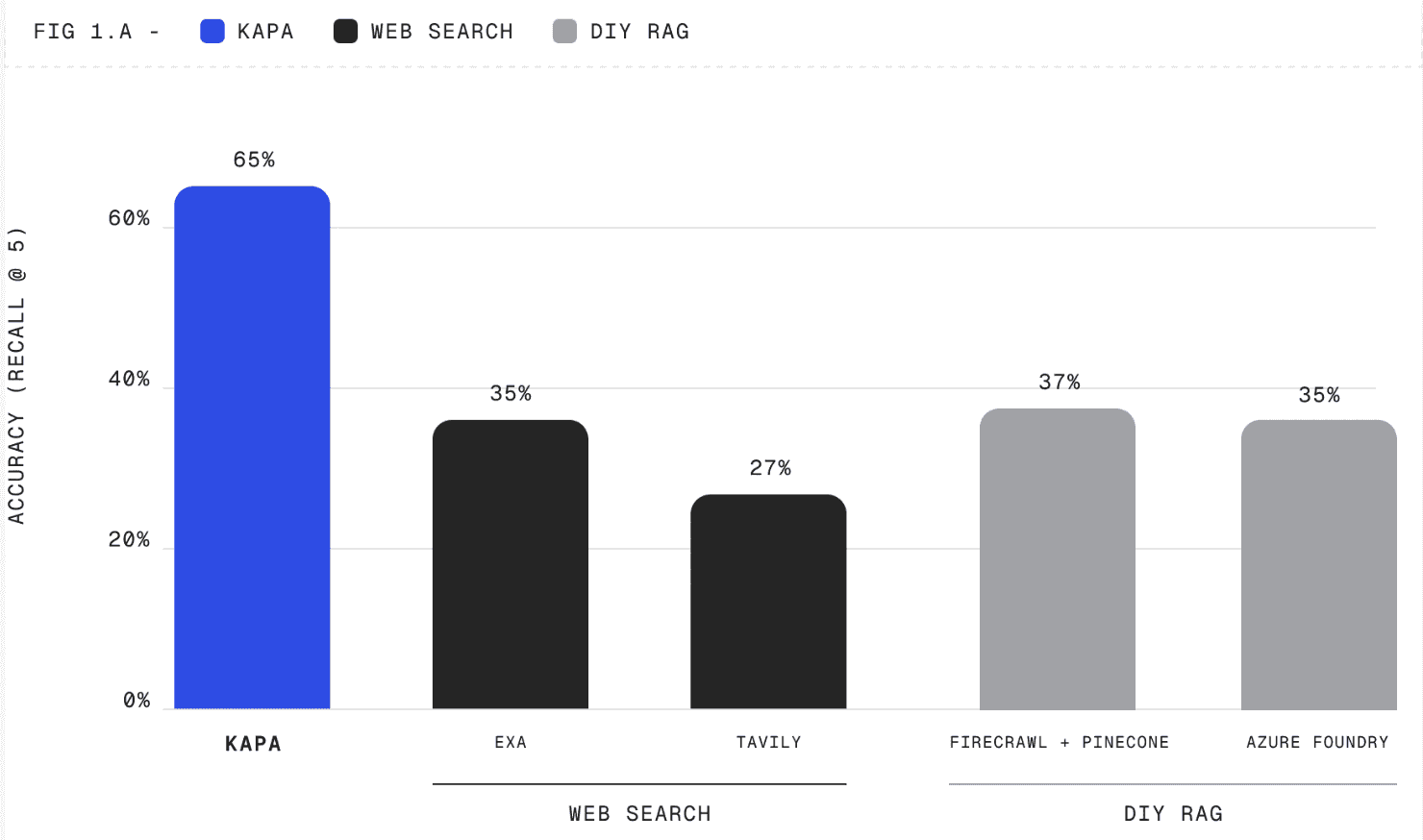
kapa.ai ran a head-to-head on exactly this question, published in Introducing Kapa for Agents. On real product questions, kapa's agentic retrieval returns the right source almost 2x more often than web search or a DIY RAG pipeline.
The methodology, stated in full: Recall@5 across 4 real customer projects (developer tools, semiconductors, software platforms), 30 human-annotated, multi-source production questions each. All sources public, web search uses site limiters for fairness; benchmarked against web-search APIs (Exa, Tavily, Brave) and DIY RAG pipelines (Azure AI Foundry, Firecrawl + Pinecone).
Two details in that methodology are worth pulling out, because they are what make the result meaningful rather than rigged.
First, all sources were public. The comparison deliberately did not use kapa's coverage advantage. Every document in the test was something a crawler could reach. The gap above is what remains after removing the single biggest structural advantage retrieval has. Add private tickets and internal wikis back in, as most real deployments do, and the gap widens.
Second, web search used site limiters. The search APIs were pointed at the right domain rather than being asked to find a needle in the open web. This is the generous configuration, and it is also how a well-built agent would actually use them.
The honest caveat: this is a vendor benchmark on 120 questions across four projects. It is a real signal, not a peer-reviewed result, and you should treat any vendor benchmark that way, including this one. The section below on running your own version exists for that reason.
The finding most teams miss: retrieval improves the agent's other tools
The framing so far treats knowledge base search as the tool that answers questions the other tools cannot. That is true and it is not the whole story.
kapa analysed 1,192 agent conversations to see how knowledge base search was actually used alongside native tools, published as research on knowledge base search in AI agents. Three patterns came out:
Pattern | Share of conversations | What is happening |
|---|---|---|
Documentation as fallback | 32.1% | The user asked something no native tool could help with |
Documentation alongside native tools | around 7% | The agent used both kinds of tool in one answer |
Documentation for planning | not quantified | The agent read the docs to work out how to use its own tools |
The third pattern was the unexpected one. An agent with thirty native tools and no product knowledge does not just fail on documentation questions. It also uses its own tools badly, because it does not understand what they do in the context of the product. Give it documentation and its tool selection improves.
In that analysis, knowledge base search was the most used tool, almost as much as all the native tools combined.
That reframes the build decision. If you evaluate retrieval only on "how many documentation questions does it answer," you undercount it, because a meaningful part of the value shows up as the other tools working properly.
Latency and cost, honestly
Retrieval is not free and it is not instant.
Kapa's retrieval endpoint runs a multi-step pipeline: query decomposition, multiple search iterations using both embedding-based and sparse retrieval, then reranking. That buys recall and costs time. Typical latency is about 3 seconds at p50 and about 4.5 seconds at p95.
Web search APIs are generally in a comparable range, so latency is rarely the deciding factor. Token cost can be, because retrieval returns substantial context. Kapa's published work on pruning, How we taught a small LLM to throw away 68% of our RAG context, addresses this directly: a small LLM reads the question and the retrieved chunks together and discards what the answer will not need, dropping about 68% of the context while preserving about 96% of recall and cutting per-query cost by about a third.
There is a real tradeoff underneath that number. Cutting context by size instead of relevance is cheaper in latency but more expensive in recall: trimming two-thirds of the context by character limit drops recall to about 86%, where pruning by relevance holds it near 96%. The full curves are in tuning knowledge base search for your agent. If you are building this yourself, that gap is the kind of thing you will spend a quarter discovering.
A decision table
Question the agent faces | Use |
|---|---|
How do I configure X in your product? | Retrieval |
Why did my deploy fail? | Retrieval, plus native tools for the deploy log |
What does this error code mean? | Retrieval |
What changed in your last release? | Retrieval |
How does your product compare to a competitor? | Web search |
Is this upstream dependency vulnerable? | Web search |
What is the current best practice for this general technique? | Web search |
A support ticket resolved this six months ago | Retrieval, and only if tickets are indexed |
Something in a PDF datasheet | Retrieval, and web search will not find it |
The pattern: if the canonical answer lives in a system you control, retrieval. If it lives in the world, web search. If you are unsure, ask where you would look if you had to answer it by hand.
How to test this on your own data
Do not take the table or the benchmark on trust. This takes an afternoon.
Collect 30 real questions from your support queue, community channel, or agent logs. Sample randomly rather than picking interesting ones, and include a few whose answers live in tickets or PDFs rather than the docs site.
Annotate the ground truth. For each question, record which specific document and passage actually answers it. This is the slow part and there is no shortcut.
Run both tools. Web search with a site limiter pointed at your docs, and retrieval over your knowledge base. Take the top 5 results from each.
Score Recall@5. For each question, did the correct source appear in the top five? Report the fraction.
Split the results by where the answer lived: docs site, tickets, PDFs, community. The aggregate number hides the interesting part, which is that web search will look respectable on the docs site and collapse everywhere else.
Step 5 is the one that changes minds. A blended average makes the two tools look closer than they are, because it averages a category where web search is competitive with categories where it scores zero.
How kapa.ai fits
kapa.ai is an LLM-powered RAG platform purpose-built for technical documentation, and in an agent architecture it is designed to be one tool: the one that knows your product.
Practically, that means connecting docs, code, PDFs, tickets, Slack, and 30+ other sources into a single synced knowledge base, then exposing it to your agent through a hosted MCP server or a plain HTTP retrieval call. You register it alongside your existing tools and change nothing else. If you would rather not assemble the agent at all, the Agent SDK ships one with knowledge base search already wired in, and there is an end-to-end tutorial using LangGraph. When the agent hits a question its own tools cannot answer, it falls back to product knowledge and responds with a citation.
Teams including Port, Airbyte, Matillion, and Nordic Semiconductor run support agents, in-product copilots, RFP tools, and coding assistants on this pattern. There is a worked example in how to build an AI agent that actually knows your product.
Kapa is not a web search tool and is not trying to be. If your agent needs to answer questions about the wider world, give it a search API too. The argument here is narrower and, we think, harder to disagree with: for the questions that are about your product, an index you own beats an index you rent.
When you should build retrieval yourself instead
If retrieval is your product, build it. If your corpus is small, static, and entirely HTML, a straightforward pipeline will get you a long way and you do not need a platform.
The thing that makes it expensive is not the first version. It is source freshness across a dozen systems, per-source-type chunking, reranking, an evaluation suite you can run on every model change, and the pruning and context-management work that keeps token costs sane. Those are the parts that arrive after the prototype demos well, and they are the reason the honest build-versus-buy question is about maintenance rather than construction. Should you build or buy an AI knowledge assistant works through the numbers.
Should I use web search or retrieval for my AI agent?
Use retrieval for knowledge you own, such as your product documentation, support tickets, and PDFs, and web search for knowledge you do not own, such as competitor information or upstream dependencies. Most production agents need both, registered as two separate tools with descriptions clear enough that the agent routes correctly between them.
Is web search with a site limiter as good as retrieval over my own docs?
No. A site limiter restricts web search to your domain but cannot reach anything outside the crawled and indexed public site, so support tickets, internal wikis, PDFs, and code are invisible to it. In kapa.ai's benchmark, where all test sources were public and web search used site limiters, kapa's agentic retrieval still returned the right source almost 2x more often.
Is web search fresher than a retrieval index?
For your own content, usually not. A web crawler has to revisit and re-index your site, which takes days, while a synced knowledge base updates from your source systems within minutes of a change for most sources. Web search is fresher only for content you do not control and therefore cannot index.
Does giving an agent documentation retrieval only help with documentation questions?
No. In an analysis of 1,192 agent conversations, kapa.ai found that documentation was the fallback in 32.1% of conversations, was combined with native tools in around 7%, and was also used by the agent to work out how to use its own tools correctly. Knowledge base search was the most used tool, almost as much as all the native tools combined.
How much latency does retrieval add to an agent?
Kapa.ai's retrieval endpoint typically responds in about 3 seconds at p50 and about 4.5 seconds at p95, with optional relevance pruning adding roughly 0.7 seconds. This is broadly comparable to web search APIs, so latency is rarely the deciding factor between the two approaches.
How do I test whether web search or retrieval works better for my agent?
Collect 30 real user questions, annotate which document and passage actually answers each one, run both web search with a site limiter and retrieval over your knowledge base, and measure Recall@5 for each. Split the results by where the answer lived, because a blended average hides the fact that web search is competitive on your docs site and scores near zero on tickets and PDFs.
TRUSTED BY 200+ INDUSTRY-LEADING ENTERPRISES WITH COMPLEX PRODUCTS
- Silicon LabsAsk anything...
- LogitechAsk anything...
- n8nAsk anything...
- monday.comAsk anything...


