All articles
Introducing Kapa for Agent Context
One search tool to ground your agents in product knowledge
Emil Sorensen
Teams are racing to put agents in front of users: support copilots, in-product assistants, coding agents. They wire up tools that read and write data in their product. Then a user asks something simple, "How do I enable SSO?" or "Why did my deploy fail?", and the agent has no tool for it. So it guesses.
That gap is the most common failure mode we see in production agents. The answer exists, just not in the model and not in your APIs. It lives in your docs, code, support tickets, and Slack.
Kapa for Agents closes it. Add Kapa as a single retrieval tool alongside your agent's existing tools, over MCP or our API. When the agent hits a question its own tools can't answer, it falls back to your product knowledge and responds, with a citation. It also makes your other tools sharper, because the model finally understands your product well enough to use them correctly.
Connect docs, code, PDFs, tickets, Slack, and 30+ sources in one click. Everything stays synced, so answers are never stale.
On real product questions, Kapa's agentic retrieval returns the right source almost 2x more often than web search or a DIY RAG pipeline.
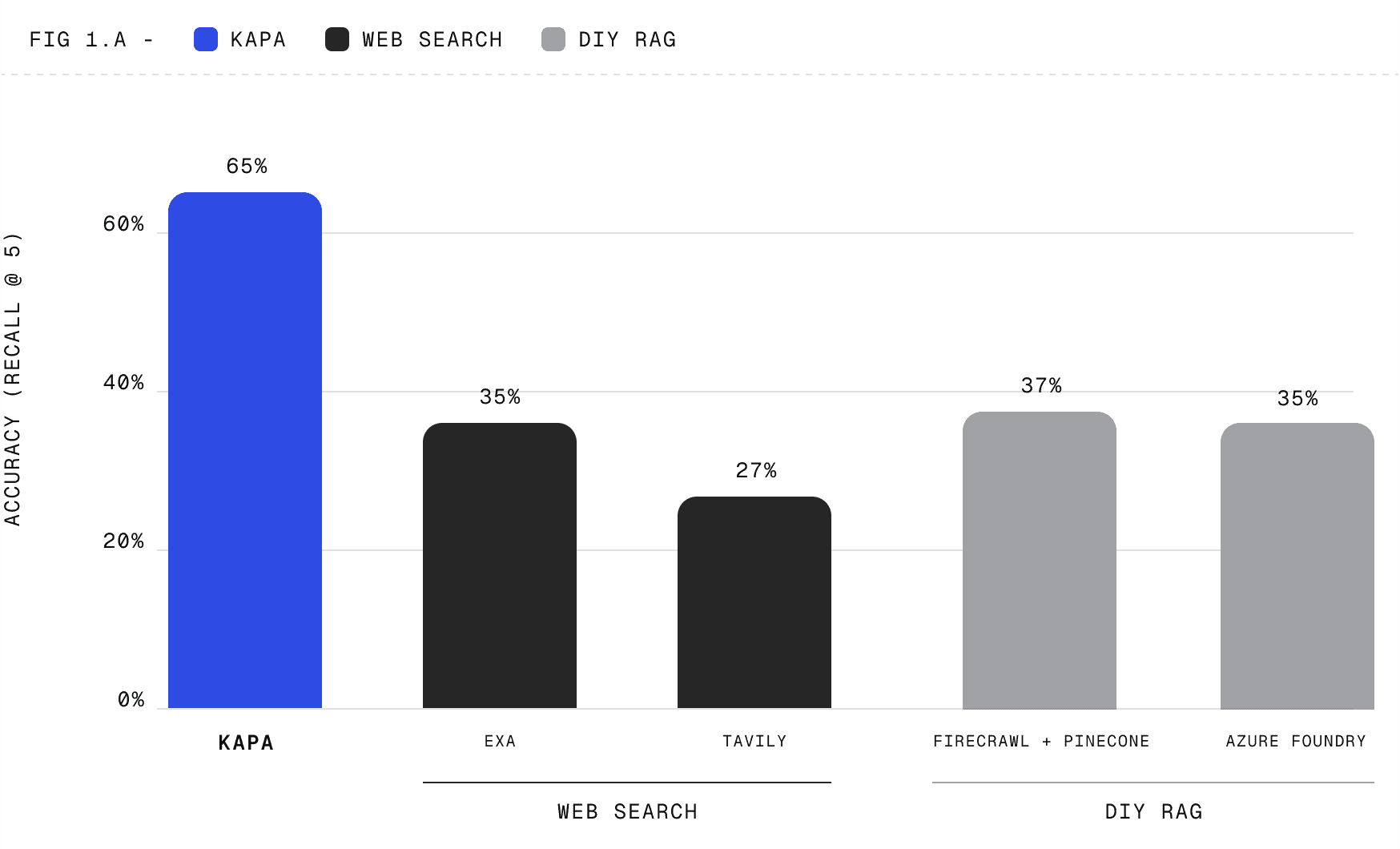
Methodology: Recall@5 across 4 real customer projects (developer tools, semiconductors, software platforms), 30 human-annotated, multi-source production questions each.
All sources public, web search uses site limiters for fairness; benchmarked against web-search APIs (Exa, Tavily, Brave) and DIY RAG pipelines (Azure AI Foundry, Firecrawl + Pinecone).
Teams like Port, Airbyte, and Nordic Semiconductor already build support agents, in-product copilots, RFP tools, and coding assistants on Kapa.
Here's a spotlight of the top agent implementations we've seen using the Kapa Retrieval API & MCP:
Matillion
Data Platform Copilot
Airbyte
Support Agent
The smarter models get, the more the bottleneck is context, not intelligence. Add the context layer to your agent today.
Getting started
Connect your sources. In the Kapa dashboard, add your docs, code, PDFs, support tickets, Slack, and any of 30+ sources. Kapa builds them into one synced knowledge base.
Add the integration. Go to Integrations, add a Hosted MCP Server (or use the Retrieval API for a plain HTTP call). Set a subdomain, a server name, and API key authentication.
Wire it into your agent. Copy the MCP URL and API key, and register Kapa as one tool alongside your agent's existing tools. That's the whole change.
Ship it. Your agent now falls back to Kapa whenever its own tools can't answer, and cites the source.
Start with a 14-day free trial at kapa.ai, or follow the in-product agent tutorial to wire it up end to end.