Best MCP Server for Giving Coding Agents Access to Documentation
Written by
Emil Sorensen
•
Updated
Short answer
Two different questions get asked in the same words, and they have different answers.
"How do I let my coding agent read library documentation?" You want Context7, or a web search MCP like Exa, or the GitHub MCP. These index other people's public docs so Cursor or Claude Code can look up how React Router or Prisma actually works today rather than guessing from training data.
"How do I let my users' coding agents read my product's documentation?" That is a publishing problem, not a consumption problem, and the answer is your own MCP server over your own knowledge base. kapa.ai's hosted MCP server does this, and so does rolling your own.
If you build a developer tool, the second question is the one that matters and almost nobody is asking it out loud yet. Your users are already pointing coding agents at your product. Right now those agents are working from training data and whatever a third-party crawler happened to index.
We make one of the options discussed. There is a section on where it fits and where it does not.
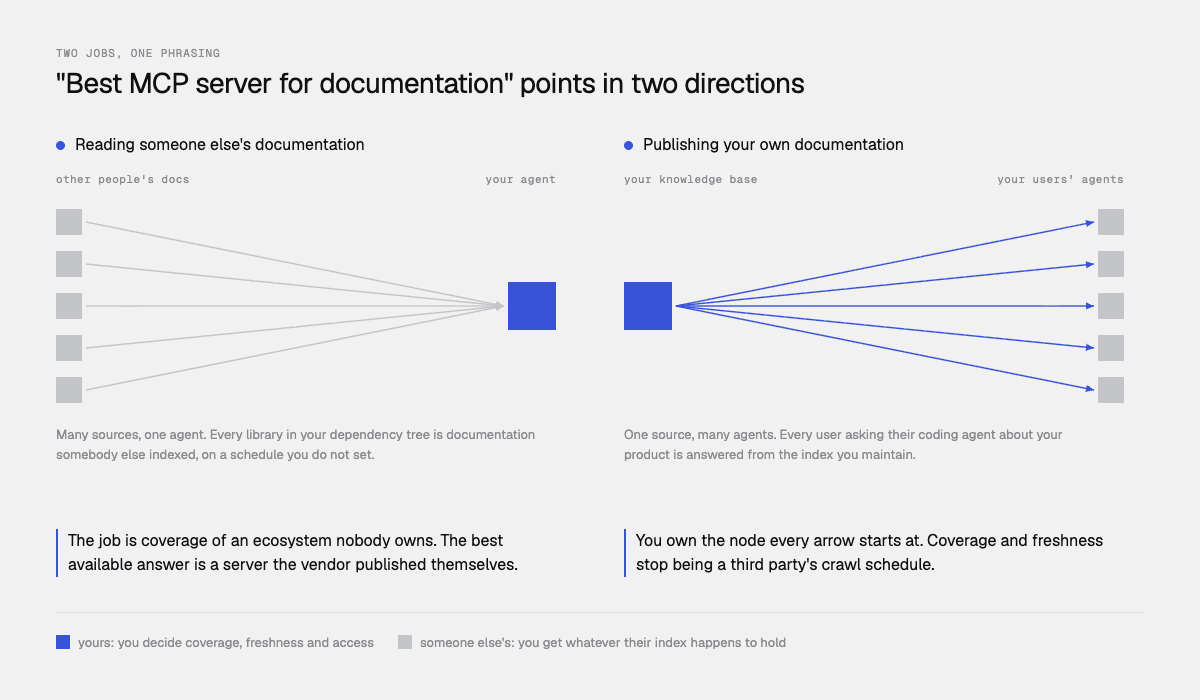
Job one: reading other people's documentation
Context7
Context7, from Upstash, is the reference point. It indexes public library documentation and exposes it over MCP so a coding agent can pull version-specific docs mid-task.
It works by resolving a library name to an identifier shaped like /vercel/next.js or /mongodb/docs, then fetching documentation for that identifier, optionally narrowed to a topic and paginated. You can skip the resolution step by passing the ID directly. It runs either as a remote server at mcp.context7.com/mcp with an API key header, or locally over stdio via npx. There is also a CLI plus skill mode that works without MCP at all.
The MCP server itself is open source; the API backend, parsing engine and crawling engine are not. Indexing runs on a schedule, and freshness varies by how popular a library is, so a release from a few days ago may not be there yet.
Choose it if you are a developer whose agent keeps hallucinating APIs for libraries you depend on. It is good at that, and the ID-plus-topic model is a sensible interface.
Be aware that you need a rule or skill to make the agent invoke it reliably, coverage depends on whether your library is indexed, and it is documentation about the ecosystem rather than documentation you control.
The alternatives for the same job
Option | Approach | Best for |
|---|---|---|
Curated index of public library docs | Popular open source libraries | |
Semantic web search over docs pages | Broader coverage, any public docs site | |
General web search | Maximum flexibility, least precision | |
Reads READMEs and docs from repos | Source-level accuracy on any public repo | |
A local docs MCP | Indexes files on disk | Air-gapped work, private libraries |
The vendor's own MCP server | Authoritative, first-party | Whenever the vendor publishes one |
That last row is the one this piece is really about, and it is the row that keeps getting left off comparison tables.
Job two: publishing your documentation to other people's agents
Here is the thing a developer tools company should sit with for a minute.
Your users are building with your product inside Cursor, Claude Code, Codex and VS Code. When they ask their agent to wire up your SDK, the agent answers from one of three places: its training data, which is months old and did not include your last four releases; a third-party crawl of your docs site, which is partial and on a lag you do not control; or nothing, in which case it invents a plausible-looking API.
Every one of those produces code that does not work, and your support queue absorbs the difference.
An MCP server over your own documentation changes the default. The agent gets a tool that searches your actual knowledge base, current as of your last deploy, and returns passages with source URLs.
Three things follow that are easy to miss:
It is a distribution channel, not just a feature. The agent is now a surface where your product gets explained correctly, by you, at the moment someone is building with it.
Coverage beats crawl quality. A third-party index reaches your public docs site. Your own MCP server can reach your docs, your API specs, your changelog, your community threads and your resolved support tickets, which is where a large share of real answers live.
Freshness is yours. You ship a breaking change on Tuesday and your knowledge base reflects it. A crawler gets to it when it gets to it. The same argument in more depth: web search or retrieval for your AI agent.
What a documentation MCP server actually has to do
Six things, and most improvised implementations do three.
1. Return passages, not answers. The coding agent is doing the reasoning. It wants ranked chunks with source URLs, not prose it has to unpick. A server that returns a written answer has taken the agent's job and made citation harder.
2. Fit the agent's context budget. A coding agent is already holding a repo, a diff and a plan. A docs tool that dumps 40,000 characters into that context makes the agent worse, not better. You need caps, and ideally caps by character count rather than result count.
3. Handle authentication for the audience it serves. An agent you run in your own backend, an external user in Cursor, and your own staff in ChatGPT are three different trust boundaries. One server cannot serve all three well.
4. Come with tool descriptions the model can route on. Tool descriptions are how a model decides whether to call you. Vague ones mean the agent skips the tool and guesses instead. This is the most under-appreciated part of shipping an MCP server.
5. Be rate-limited on purpose. A single agent task can fire ten to thirty retrieval calls. If your limits are set for human traffic, agents will hit them, and you need a defined failure rather than a mysterious hang.
6. Tell you what agents are asking. Agent traffic is a research feed about where your documentation fails. If you cannot see the queries, you are giving away the most useful signal in the whole exercise.
How kapa.ai's hosted MCP server works
kapa.ai is an LLM-powered RAG platform purpose-built for technical documentation, and its hosted MCP server is one of two transports over the same agentic retrieval engine, the other being the HTTP Retrieval API. The full guide to retrieval APIs for agents covers the other transport.
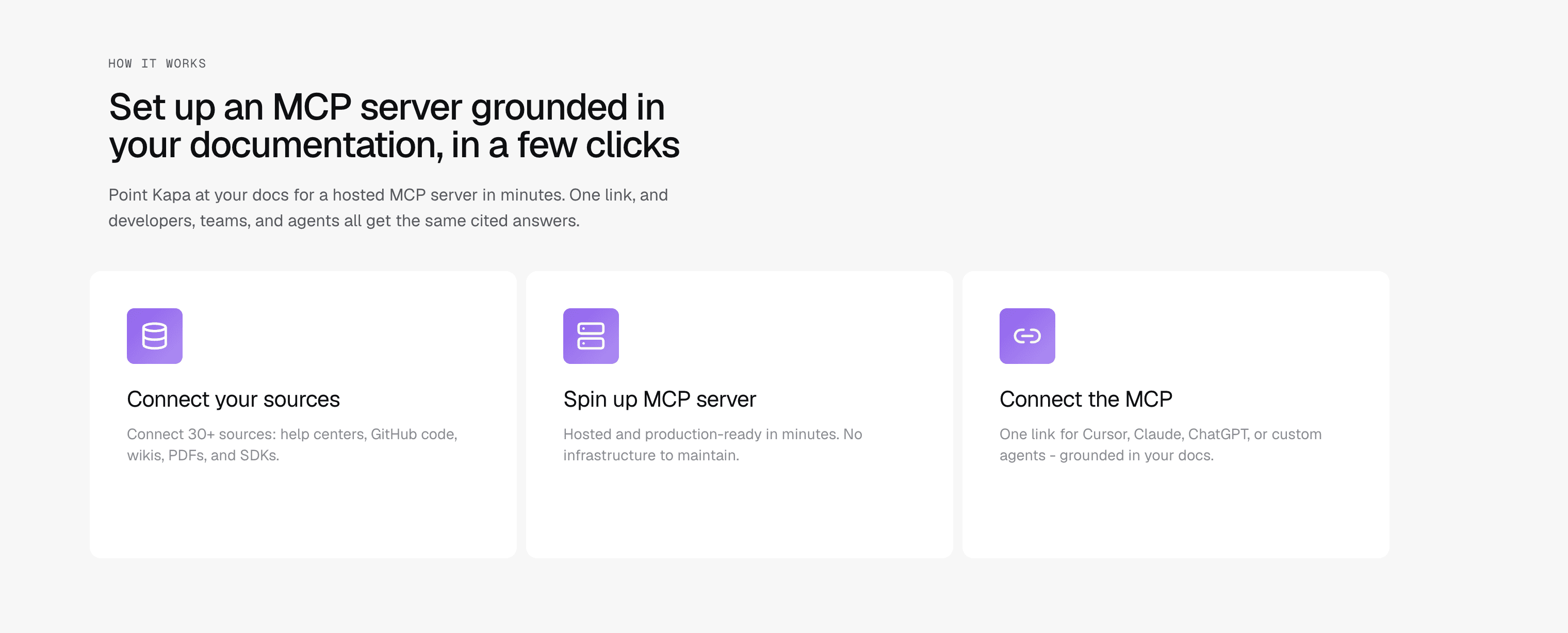
You deploy it from the integrations screen and it is live at https://<subdomain>.mcp.kapa.ai. The setup guide walks the choices. Two choices are fixed at creation and cannot be changed afterwards: the subdomain, and the authentication type.
Three authentication types, one per audience
Type | Audience | Mechanism |
|---|---|---|
API key | Agents and backends you operate |
|
Public | Your external users in Cursor or Claude Code | Google or GitHub OAuth on first connect, external projects only |
Internal | Your own team in ChatGPT or Claude | Kapa account login |
One server serves one type, so serving several audiences means one integration per audience.
The public option is worth a closer look, because the privacy design is unusually restrained. For Google, kapa requests only the openid scope and receives a stable opaque user ID, not name or email. For GitHub it requests no scopes at all. That identifier exists solely to enforce per-user rate limits. If you are publishing an MCP server to external developers, being able to say that plainly matters.
Three tools
Search. search_<PRODUCT_NAME>_knowledge_sources runs agentic retrieval across your connected sources and returns ranked chunks as structured objects with source_url and content in Markdown. Typical latency is about 3 seconds p50 and 4.5 seconds p95, which is slower than a single embedding lookup because the pipeline is multi-step and tuned for recall.
Documents. get_<PRODUCT_NAME>_knowledge_documents fetches whole documents by exact source URL, returning source_url, title and content, paginated and truncated so a large page cannot flood the agent's context. Disabled by default; worth enabling for coding agents, which frequently want the complete page rather than chunks.
Feedback. give_feedback lets the agent report a problem back into your project: an unhelpful search result, an out-of-date document, a product gap, a server error. It takes a message and a category of mcp_server, documentation, product or other, plus optional context, severity and tool_name.
That third tool is the one with no obvious equivalent elsewhere, and it inverts the usual relationship. Instead of only serving agents, you get a channel where thousands of agent sessions report which of your docs are wrong or missing.
Tuning and scoping
Agents authenticated by API key can pass _meta parameters per call: top_k from 1 to 15 with a default of 15, max_chars from 1 to 60,000 with a default of 35,000, and use_pruning, which drops irrelevant chunks and cuts roughly two-thirds of the context at close to the same recall, explained here. For a coding agent that is already context-hungry, pruning is usually the right default.
Source groups restrict what a server can return. You can pin an entire MCP server to specific groups in its settings, or pass source_group_ids_include per call. This is how one knowledge base serves a public server scoped to public docs and an internal server that also sees runbooks, without maintaining two indexes.
Tool names and descriptions are customisable, which matters because descriptions drive whether an agent calls your tool at all. Renaming a tool after publishing is a breaking change for connected clients, so get it right at setup.
Rate limits and visibility
Tool | Per user, OAuth servers | Per team |
|---|---|---|
Search | 300 per day | 60 per minute |
Documents | 300 per day | 100 per minute |
API key servers are limited per team only. Exceeding a limit returns HTTP 429. Team limits can be raised on request.
Every MCP call shows up in Conversations, and an Agents view breaks traffic down by what is calling. That is the research feed from criterion six.
For agents that cannot complete an OAuth flow
Some agents only have a fetch tool. Some CI jobs and browser assistants cannot sit at a consent screen. For those, kapa documents exposing retrieval as a keyless GET endpoint on your own domain, listed in your llms.txt, with the API key held server-side in a small function. Kapa's own docs run this at docs.kapa.ai/retrieve?q=....
This is the most under-discussed option in the category. It means an agent that has never heard of your MCP server, and cannot authenticate to anything, can still discover and query your documentation because your llms.txt told it how.
Where kapa is the wrong choice
You want to read public library docs. If the job is your agent understanding Next.js or Postgres, use Context7 or a search MCP. kapa indexes your knowledge base, not the open source ecosystem.
Your docs are one small static site and nothing else. A single MCP server over one docs site is a weekend project. The value here scales with how many systems your knowledge lives in.
You need sub-second retrieval inside a tight loop. At roughly 3 seconds p50 this is not built for latency-critical paths.
You need per-document permissions tied to your identity provider. Scoping is by project instance and source group, not per-document identity.
How to test any of this
Write ten tasks, not ten questions. "Add authentication using our SDK" beats "how does authentication work." Coding agents are doing work, and tasks surface failures that lookups hide.
Run each with the tool disabled, and keep the output. This is your baseline and it is usually worse than people expect.
Run each with the tool enabled. Check whether the agent called it at all. If it did not, your tool description is the problem, not your retrieval.
Check the code compiles and the APIs exist. Hallucinated method signatures are the actual failure mode being solved here.
Include two tasks touching something you shipped in the last month. This is where third-party indexes and training data both fail, and where a first-party server should clearly win.
Include one task whose answer is in a support ticket, not the docs site. This separates servers that reach your whole knowledge base from ones that reach your public pages.
Step 3 catches the most common disappointment. Teams conclude their MCP server does not work when in fact the agent never invoked it, because the tool description did not tell the model when it was relevant.
This comparison is written by kapa.ai, which makes one of the options discussed, and is explicit above about where Context7 and search-based MCP servers are the better fit. Kapa.ai is an LLM-powered RAG platform purpose-built for technical documentation, used in production by 200+ technical companies. Competitor details are accurate as of September 2026 and this category moves quickly, so confirm current capabilities at the source before deciding.
FAQ
What is the best MCP server for giving Cursor or Claude Code access to documentation?
It depends whose documentation. For public library docs, Context7 is the reference option, with Exa MCP, Brave Search MCP and the GitHub MCP as alternatives. For your own product documentation, you want an MCP server over your own knowledge base, either built in-house or hosted by a platform such as kapa.ai, because third-party indexes only reach your public pages and only as fresh as their crawl.
What are the alternatives to Context7?
For the same job of reading public library documentation: Exa MCP for semantic web search over docs pages, Brave Search MCP for general search, the GitHub MCP for reading READMEs and docs directly from repositories, and a local docs MCP for private or air-gapped libraries. If instead you want to publish your own product's docs to coding agents, that is a different job and the answer is your own hosted MCP server.
How do I give AI coding agents access to my product docs?
Expose your documentation as an MCP server the agent can register as a tool, so it searches your knowledge base and gets back passages with source URLs. Choose an authentication type matching the audience: API key for backends you run, OAuth for external users in editors, and account login for internal staff. For agents that cannot complete an OAuth flow, a keyless GET endpoint on your own domain listed in your llms.txt lets them discover and query your docs anyway.
Why does my agent not call my MCP server even though it is connected?
Almost always the tool description. Tool descriptions are what a model reads when deciding whether a tool is relevant, so a vague one means the agent skips it and answers from training data instead. Test by running a task and checking whether the tool was invoked at all before concluding retrieval quality is the problem.
How much context should a documentation MCP server return to a coding agent?
Less than you would give a chat assistant, because the agent is already holding a repository, a diff and a plan. Look for caps by character count rather than result count, since chunk lengths vary, and prefer relevance-based pruning over truncation. Kapa's server defaults to 35,000 characters and up to 15 chunks, with an optional pruning flag that removes about two-thirds of context at close to the same recall.
Can one MCP server serve external users and internal staff?
Not on kapa, and generally not safely anywhere. The authentication type is set per server and fixed at creation, so serving external developers and internal employees means two integrations over the same knowledge base, scoped with source groups so the public one only returns public content.
What analytics do I get from agent traffic to my documentation?
On kapa, every MCP call appears in Conversations with a separate view breaking traffic down by calling agent, so you can see what agents ask and where retrieval fails. The feedback tool goes further by letting the agent itself report a broken result, a stale document or a product gap directly into your project.
TRUSTED BY 200+ INDUSTRY-LEADING ENTERPRISES WITH COMPLEX PRODUCTS
- Silicon LabsAsk anything...
- LogitechAsk anything...
- n8nAsk anything...
- monday.comAsk anything...


