Azure AI Search Alternatives for Technical Documentation (2026)
Written by
Anton Malling
•
Updated
Short answer
Azure AI Search is a capable retrieval engine, and if you need a general-purpose search and vector index inside Azure it is a reasonable default. Teams look for alternatives for one of two reasons, and they point in different directions.
The closest like-for-like alternatives are other retrieval services that take a query and return ranked passages: Google's Agent Search and Vertex AI RAG Engine, Amazon Bedrock Knowledge Bases, kapa.ai's Retrieval API, and Elasticsearch or Vespa if you want to own the ranking. Below that sit vector databases such as Pinecone, Weaviate and Qdrant, which give you the index and leave the retrieval logic to you.
The comparison worth making carefully is against a retrieval service that is tuned for the content you actually have. Azure AI Search is general purpose by design. If your corpus is technical documentation, API references, tickets and PDFs, a retrieval engine tuned for that content is the more direct swap than a vector store you build a pipeline around.
Whichever you pick, the evaluation protocol at the end of this piece matters more than any vendor's comparison table, including this one.
First, check what you are actually replacing
Microsoft's naming in this area changed recently and it is a common source of confusion, so it is worth being precise.
Azure AI Search is the search service itself. It has been renamed twice: Azure Search at launch in March 2015, Azure Cognitive Search in October 2019, and Azure AI Search since November 2023. That is still its name.
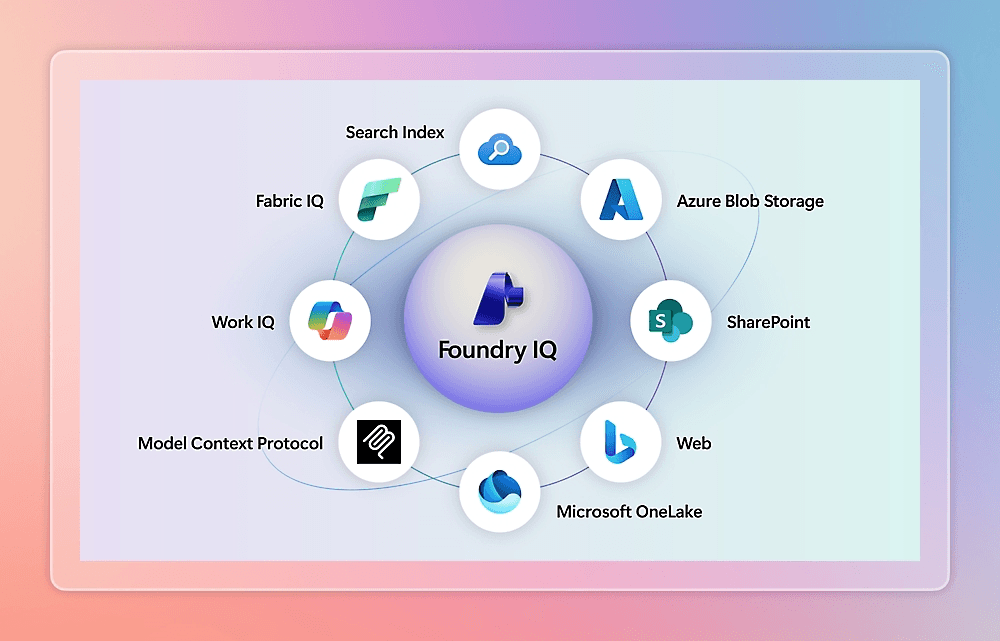
Foundry IQ is not a rename of Azure AI Search. It is a newer managed knowledge layer that is built on Azure AI Search, launched in public preview, with some capabilities now generally available. Using Foundry IQ requires an Azure AI Search resource. It adds knowledge bases, reusable topic-centric collections that multiple agents can query through one API, plus automatic source routing across indexed and remote sources.
This trips people up because Microsoft's pricing page for the service is now titled "Foundry IQ pricing" and describes it as "Foundry IQ (Azure AI Search)," while the documentation keeps the two clearly separate. If you are evaluating alternatives, be clear which layer you are replacing: the index and retrieval engine, or the knowledge-base orchestration on top of it.
One more naming change worth knowing if you have existing code: in November, Azure renamed knowledge agents to knowledge bases, which introduced breaking changes to REST API routes and properties. Knowledge sources were unchanged. If your migration research is more than a few months old, it is describing a different API surface.
Google made a comparable move. What many people still call Vertex AI Search is now documented as Agent Search, sitting alongside Vertex AI RAG Engine as separate options in Google's retrieval lineup.
What Azure AI Search is genuinely good at
A page arguing everything about a product is bad is not useful, so here is the honest case for staying.
It is a real search engine. BM25 keyword search, vector search, and hybrid retrieval with Reciprocal Rank Fusion, plus a semantic ranker using models adapted from Bing that adds L2 reranking, captions, answers, and query rewriting. That is a mature feature set, not a vector store with search bolted on.
Agentic retrieval is a genuine capability. Azure's agentic retrieval decomposes a complex query into subqueries, runs them in parallel, semantically reranks each, and merges the results, returning source references and an activity log. That is the right architecture, and it is the same broad shape that purpose-built retrieval platforms use.
Governance is strong. Entra ID based access control, document-level permissions, and, for the remote SharePoint knowledge source, Microsoft Purview sensitivity labels respected through indexing and retrieval. If your compliance story runs through Microsoft, this is hard to replicate elsewhere.
Azure integration. If your data already sits in Blob Storage, OneLake, or SharePoint, and your identity is Entra, the integration work you avoid is real value.
If those things describe you, the answer to "should I switch" may well be no.
Why teams look for alternatives anyway
You are still building the pipeline. This is the big one. Azure AI Search gives you indexing, retrieval, and reranking. It does not give you connectors that keep a docs site, a Zendesk instance, a Discourse forum, a GitHub repo and a folder of PDFs continuously in sync; chunking tuned per source type; an evaluation suite you can run on every model change; citation and uncertainty behaviour; or analytics that tell you which questions your documentation fails to answer. Those remain your project. The service is a strong component, and a component is not a solution. Should you build or buy an AI knowledge assistant works through what that ownership costs.
The semantic ranker has a ceiling that surprises people. Microsoft documents this plainly: semantic ranking reranks the existing result set, consisting of the top 50 results scored by the default ranking algorithm, and cannot rerun the query across the whole corpus. If the passage that answers the question does not make the top 50 from BM25 or RRF, no amount of semantic reranking will surface it. On large or jargon-heavy technical corpora, that first-stage recall problem is exactly where documentation retrieval tends to fail, and reranking cannot fix it. Improving RAG accuracy covers the techniques that address recall rather than ranking.
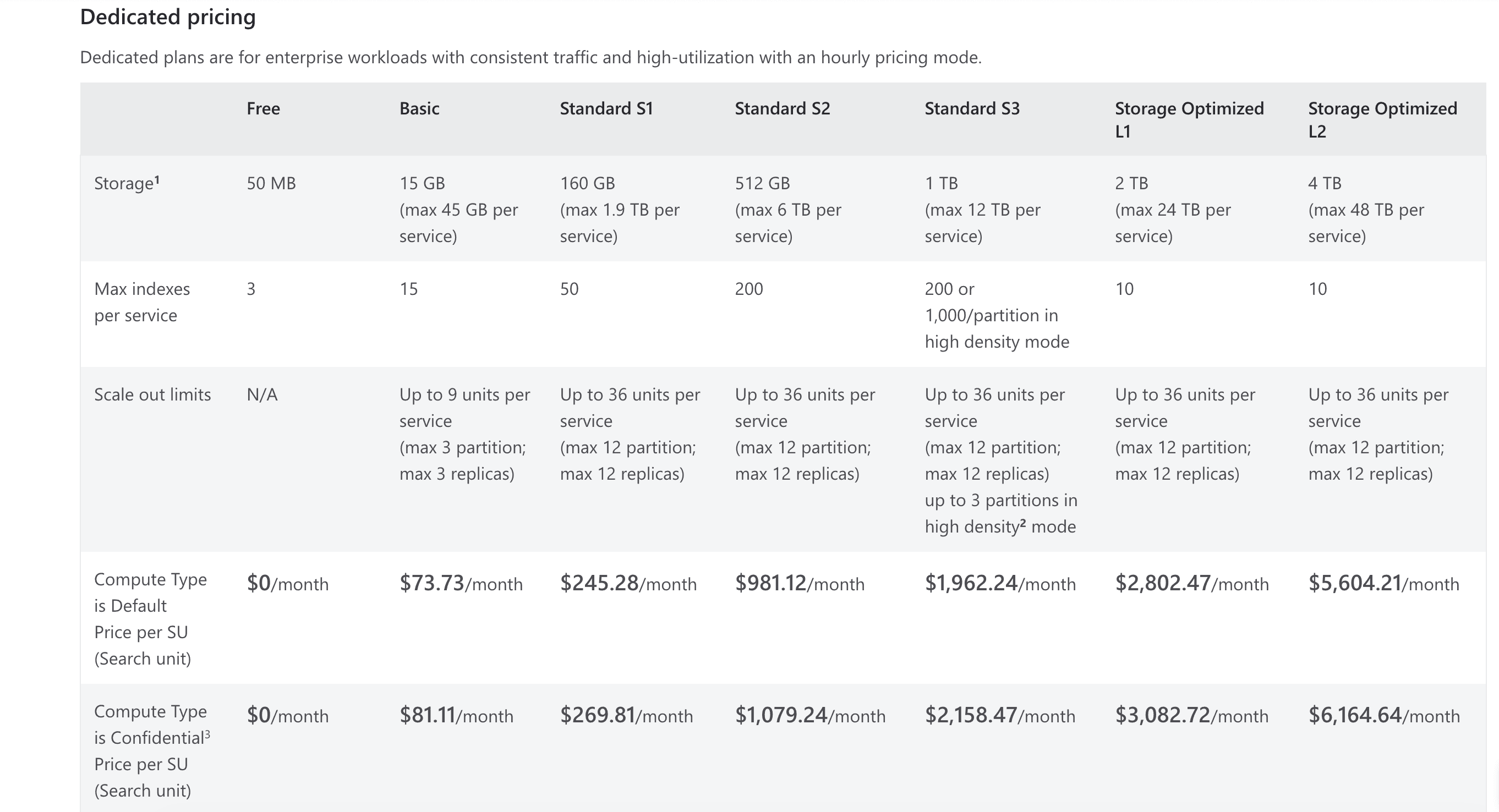
The cost model has many dimensions. Dedicated pricing bills per search unit per hour, based on replica and partition combinations you plan yourself. Serverless bills compute units per hour plus indexed storage per GB per month. On top of either, several capabilities bill separately: semantic ranker per semantic query at a progressive rate, agentic retrieval per token with the first 50 million tokens free per month, image extraction per 1,000 images, custom entity lookup per 1,000 text records, and vectorizers at the underlying model provider's rate. None of that is unreasonable, but forecasting it before you have production traffic is genuinely hard.
Some of what you want is still in preview. The Serverless Developer tier is in preview, is not recommended for production, has no SLA, cannot migrate to or from other tiers, and at time of writing is limited to a small number of regions. Agentic retrieval is partly generally available through the REST API while both the Azure portal and Microsoft Foundry portal remain preview-only for those features.
Tier limits bite at awkward moments. The Free tier gives 50 MB of storage and 3 indexes, and does not include semantic ranker at all. Basic gives 15 GB and 15 indexes. Storage Optimized tiers give far more storage but only 10 indexes. If your architecture wants many small indexes, or many tenants, the tier grid constrains design decisions early.
The alternatives, by category
Other cloud-native retrieval services
Google Agent Search and Vertex AI RAG Engine, and Amazon Bedrock Knowledge Bases.
Roughly equivalent trades to Azure. Agent Search is positioned as an out-of-the-box semantic and keyword engine with connectors; Vertex AI RAG Engine is a managed runtime for RAG orchestration. Bedrock Knowledge Bases plays a similar role inside AWS, and kapa has a dedicated Amazon Bedrock alternative comparison and Google Vertex AI build-vs-buy piece.
Choose one of these if your cloud commitment points there, or you want to escape a specific Azure limitation while keeping the same architectural shape. Be aware that you are moving sideways, not up: you still own ingestion, evaluation, citations, and analytics.
Vector databases
Pinecone, Weaviate, Qdrant, pgvector.
Choose one of these if you want maximum control over the retrieval pipeline, or you already run Postgres and pgvector is close enough. Be aware that you are taking on more than Azure was doing for you, not less. You gain flexibility and inherit hybrid search, reranking, and the entire ingestion layer.
Search engines
Elasticsearch, Vespa, Algolia, Meilisearch, Typesense.
Choose one of these if search itself is the product and you need control over ranking, or you are already operating Elastic. Vespa in particular is built for large-scale hybrid retrieval and ranking. Be aware that best-in-class keyword search does not answer questions. A developer has to know that the answer lives under "authentication middleware configuration" rather than being able to ask "how do I authenticate." That gap is the subject of what is smart search for a documentation site.
Enterprise search
Glean.
Choose this if the real problem is finding knowledge across the whole company, HR, finance, Jira, Drive, email, with permission-aware search. Glean is genuinely strong here. Be aware that breadth across workplace systems and depth on technical product content are different engineering problems.
Retrieval services tuned for technical content
kapa.ai's Retrieval API, Inkeep.
Same interface as Azure AI Search at the boundary that matters: a query goes in, ranked passages with source URLs come back, no generation. The difference is what the pipeline is tuned for and how much of the surrounding work is already done.
Choose one of these if your corpus is technical documentation across several systems and you want retrieval quality on that content without owning the ingestion and tuning layer. The category is mapped in best tool for connecting company knowledge to your AI agent. Be aware that this is a deliberately narrower category. For a general corpus of business documents, or where Entra and Purview governance is the requirement, Azure is the better fit.
Comparison
Azure AI Search | Cloud RAG services | Vector DBs | Search engines | Purpose-built technical | |
|---|---|---|---|---|---|
Index and retrieval | Yes, mature hybrid | Yes | Yes, vector-first | Yes, keyword-first | Yes, tuned for technical content |
Connectors that stay synced | Indexers, general purpose | Some | No | No | Yes, 50+ technical sources |
Chunking by source type | You configure it | You configure it | You build it | You build it | Built in |
Evaluation suite | You build it | You build it | You build it | You build it | Vendor-maintained |
Citations and "I don't know" | You build it | You build it | You build it | You build it | Built in |
Documentation gap analytics | No | No | No | No | Yes |
Governance and permissions | Strong, Entra and Purview | Cloud IAM | You build it | Varies | Separate internal and external instances |
The column that matters is not which has the best index. It is how many rows say "you build it."
How kapa.ai's Retrieval API compares
The closest comparison to Azure AI Search is kapa's Retrieval API. Both do the same job at the same boundary: a query goes in, ranked passages with source URLs come back, and no text is generated. Your application or agent does the reasoning. The same retrieval is available over a hosted MCP server if your stack speaks MCP, with identical behaviour and latency.
kapa calls this agentic retrieval, and the design goal is stated plainly in its docs: tuned for high recall with a lean result, so the relevant chunk is not missed and the agent's context does not drown.
Like for like
Azure AI Search | kapa Retrieval API | |
|---|---|---|
Returns | Ranked results, optional captions and answers | Ranked chunks with source URLs |
Generation | None (agentic retrieval can synthesise) | None by design but available with pre built integrations |
First-stage retrieval | BM25 or vector, fused with RRF | Hybrid embedding and sparse, multiple iterations per query |
Query handling | Query rewrite, up to 10 variants; agentic retrieval decomposes into subqueries | Query decomposition and keyword generation drive multiple search iterations |
Reranking | Semantic ranker over the top 50 first-stage results | Reranking across the candidates from all iterations |
Context control |
|
|
Whole-document fetch | Retrieve full fields from the index | Documents endpoint by URL or document ID |
Scoping | Index and filter design |
|
Ingestion included | Indexers, general purpose | 50+ technical source types, synced |
The architectural difference that matters
Azure's semantic ranker reranks the top 50 results the first stage returned. If the passage that answers the question is not in that 50, it cannot be recovered. That is a documented property, not a criticism.
kapa's pipeline attacks the same problem earlier. Rather than reranking one fixed candidate set, it decomposes the query, generates keyword and semantic variants, runs several search iterations, and reranks across everything those iterations surfaced. The bet is that first-stage recall is where technical retrieval fails, so the money is better spent widening the candidate set than re-sorting a narrow one.
The measured version of that bet: when kapa was benchmarked for its retrieval, one of the two DIY pipelines it tested against was built on Azure AI Foundry. On real product questions, kapa's agentic retrieval returned the right source almost 2x more often than web search APIs or those DIY pipelines. The methodology was Recall@5 across 4 real customer projects spanning developer tools, semiconductors and software platforms, 30 human-annotated multi-source production questions each, all sources public, web search given site limiters for fairness.
Where the tradeoffs run the other way
Context control granularity. top_k caps at 15 chunks and max_chars at 60,000. That is deliberate, since context rot degrades answers past a point, but if your architecture wants hundreds of candidates to feed your own reranker, Azure gives you more room.
Permissions. Azure's Entra-based document-level access control and Purview sensitivity-label propagation are stronger than kapa's model, which scopes by project instance and source group rather than per-document identity. If per-document permissions tied to your identity provider are a hard requirement, that is a real reason to stay.
Pruning is a tradeoff, not free. Enabling it drops roughly two-thirds of retrieved context while preserving about 96% of recall, which is a good trade, but it is still a trade and it costs latency. Cutting the same amount of context by character limit instead holds recall at only about 86%.
One capability with no Azure equivalent
kapa can expose retrieval as a keyless GET endpoint on your own domain, listed in your llms.txt, so external coding agents and browser assistants can discover and query your documentation without an API key or an OAuth flow. Kapa's own docs run this at docs.kapa.ai/retrieve?q=.... If you care about your documentation being reachable by other people's agents, this has no direct counterpart in Azure AI Search.
If you want more than retrieval
The Retrieval API is the component comparison. If you would rather not build the layer above it, kapa also ships prebuilt integrations on the same knowledge base, a docs widget, Slack and Discord bots, a Zendesk agent and an internal assistant, plus an Agent SDK that runs the agent loop for you. Citations, an explicit "I don't know", and coverage-gap analytics come with those. None of that is part of the like-for-like comparison above, and all of it is work you would otherwise do yourself on top of Azure.
How to decide, in four questions
Do you want a component or an outcome? If you have engineers who will own a retrieval pipeline as an ongoing product, a search service or vector database is the right shape. If you want technical questions answered accurately next month, it is not.
How many systems does your knowledge live in? One docs site makes almost any option workable. Five or more systems with different change rates makes ingestion the dominant cost, and that is where general-purpose services leave the most work behind.
Is your first-stage recall good enough? Given the top-50 ceiling on semantic reranking, test whether the right passage reaches the first stage at all on your hardest questions. If it does not, better reranking is not your fix.
Who maintains it in eighteen months? The most common failure is not a bad build. It is a good build with nobody left to run it.
How to evaluate any of these in an afternoon
Collect 30 real questions from your support queue, community, or logs. Sample randomly. Include some whose answers live in tickets or PDFs rather than the docs site, and five whose answers are not documented anywhere.
Record the ground truth: which document and which passage answers each question.
Run each candidate and take the top five results.
Score Recall@5, the fraction of questions where the correct source appeared.
Split by source type. Docs site, tickets, PDFs and community reported separately. Most options look similar on a clean docs site and diverge sharply elsewhere.
Check the five undocumented questions. Did the system decline, or answer confidently with citations attached? A system that cannot abstain will not be trusted in production whatever it scores elsewhere.
If you are testing Azure specifically, add one step: check whether the correct passage appeared in the first-stage BM25 or RRF result at all, before semantic reranking. That tells you whether a tuning fix is available or whether you are at the architectural ceiling.
What are the best alternatives to Azure AI Search?
The closest like-for-like alternatives are other retrieval services that return ranked passages for a query: Google Agent Search and Vertex AI RAG Engine, Amazon Bedrock Knowledge Bases, kapa.ai's Retrieval API, and Elasticsearch or Vespa if you want to own the ranking. Vector databases such as Pinecone, Weaviate and Qdrant sit a layer lower, giving you the index while leaving retrieval logic to you.
Is Azure AI Search the same thing as Foundry IQ?
No. Azure AI Search is the search service, renamed from Azure Cognitive Search in November 2023. Foundry IQ is a newer managed knowledge layer built on top of Azure AI Search, and using it requires an Azure AI Search resource. Microsoft's pricing page now refers to "Foundry IQ (Azure AI Search)", which causes confusion, but the two are separate layers.
Why does Azure AI Search semantic ranking sometimes miss the right answer?
Because semantic ranking only reranks results that the first-stage ranking already returned. Microsoft documents that it operates on the top 50 results scored by BM25 or Reciprocal Rank Fusion and cannot rerun the query across the whole corpus. If the passage answering the question does not reach that top 50, reranking cannot recover it.
How much does Azure AI Search cost?
There are two pricing models. Dedicated bills per search unit per hour based on the replica and partition combination you provision across Free, Basic, Standard S1 to S3, and Storage Optimized L1 and L2 tiers. Serverless, in preview, bills compute units per hour plus indexed storage per GB per month. Semantic ranker, agentic retrieval, image extraction, custom entity lookup and vectorizers all bill separately on top of either model.
How does kapa.ai's Retrieval API compare to Azure AI Search?
Both take a query and return ranked passages with source URLs, without generating text. The main architectural difference is where each spends effort: Azure's semantic ranker reranks the top 50 results the first stage returned, while kapa decomposes the query, runs several search iterations, and reranks across all of them, prioritising first-stage recall.
Is a multi-step retrieval pipeline slower than Azure AI Search?
Generally yes. Pipelines that decompose the query and run several search iterations trade latency for recall. Kapa's Retrieval API is typically around 3 seconds at p50 and 4.5 seconds at p95, with relevance pruning adding roughly 0.7 seconds, whereas a single tuned BM25 or vector query in Azure AI Search can return much faster. If sub-second retrieval is a requirement, favour simpler hybrid search.
How do I compare Azure AI Search against alternatives fairly?
Collect 30 real user questions, record which document and passage answers each, run every candidate, and measure Recall@5 split by source type rather than as one average. Include five questions with no documented answer to see whether each option declines or invents. For Azure specifically, also check whether the correct passage reached the first-stage result set before semantic reranking.
TRUSTED BY 200+ INDUSTRY-LEADING ENTERPRISES WITH COMPLEX PRODUCTS
- Silicon LabsAsk anything...
- LogitechAsk anything...
- n8nAsk anything...
- monday.comAsk anything...


