How to Make Thousands of Technical Documents Answerable by AI: 6 Options (2026)
Written by
Emil Sorensen
•
Updated
Short answer
The request is always some version of the same thing. There are forty thousand PDFs in a storage bucket, or a download centre, or a documentation site built up over fifteen years. People need answers out of them. Nobody is going to read them.
Getting from that pile to an answer with a citation on it takes six steps, and the single most useful thing to know before choosing a tool is that most tools in this space do one or two of the six and leave you the rest. That is not a criticism of them. It is the thing to check before you buy one.
kapa.ai is an LLM-powered agentic retrieval platform purpose-built for technical knowledge, and this is the problem it exists for.
The six steps
Every option below covers some of this path and not the rest.
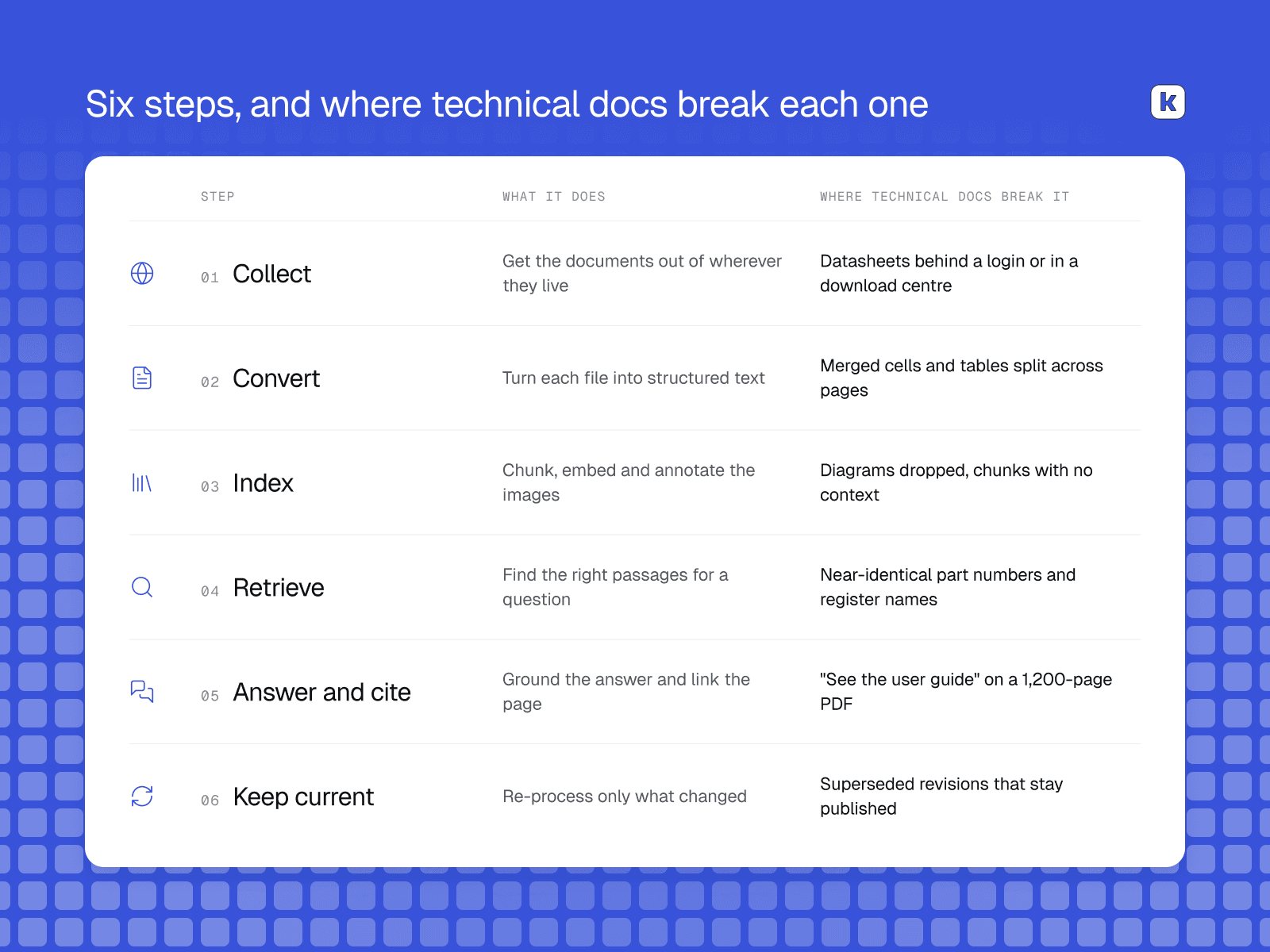
Collect.
Get the documents out of wherever they live. A website, a storage bucket, a shared drive, a download centre behind a login. This is unglamorous and it is where projects stall, because the documents that matter are frequently the ones that are hardest to reach.
Convert.
Turn each document into structured text. Headings, tables, lists, code, equations, figures. This step sets the ceiling for everything after it, because information destroyed here cannot be recovered later. It is also measurable independently of any vendor: OmniDocBench, a CVPR 2025 benchmark covering 1,651 pages across ten document types, scores layout detection, reading order, table recognition and formula recognition separately, which is a useful corrective to parser marketing that reports a single accuracy number.
Index.
Chunk the text, embed it, annotate the images so diagrams are findable, and keep enough context on each chunk that it can be identified on its own. That last part is not a detail. Anthropic's work on contextual retrieval found that prepending explanatory context to each chunk before embedding and indexing it reduced the top-20 retrieval failure rate by 49%, which is the difference between a page being present in your index and being findable in it.
Retrieve.
Find the right passages for a question, including when the question is a part number rather than a concept. (this is one of the hardest parts to get to production level)
Answer and cite.
Produce an answer grounded in what was retrieved, point at the page it came from, and decline when the sources do not cover the question.
Keep current.
Re-process what changed when a datasheet is revised, without re-processing the other thirty-nine thousand documents.
Why this is harder with technical documents
Generic advice about building a knowledge base assumes prose. Five properties of technical documentation break that assumption, and they are why a tool that works on a help centre can fail here.
Tables carry the payload. In a datasheet the prose is context and the table is the answer: electrical characteristics, register maps, pin assignments, supported variants. A converter that flattens merged cells or splits a table across pages has destroyed the content while appearing to succeed. You can dive deeper into Semiconductor datasheets in our posts on 6 ai tools for semiconductor datasheets
Identifiers must match exactly. Part numbers, register names and configuration keys are strings whose only job is to differ from their neighbours. Retrieval by meaning alone treats near-identical identifiers as near-identical content, which produces a wrong answer that looks right.
Diagrams are content. A pinout, a timing diagram or an architecture figure often carries information that appears nowhere in the surrounding text. A pipeline that drops images is quietly discarding part of the manual.
Many revisions are live at once. Customers run equipment on three-year-old firmware and the manuals for it stay published for exactly that reason. Rank on relevance alone and a superseded manual answers a question about the current release.
Citations have to land on a page. "See the user guide" is not a citation when the user guide is 1,200 pages.
How the six tools are ordered
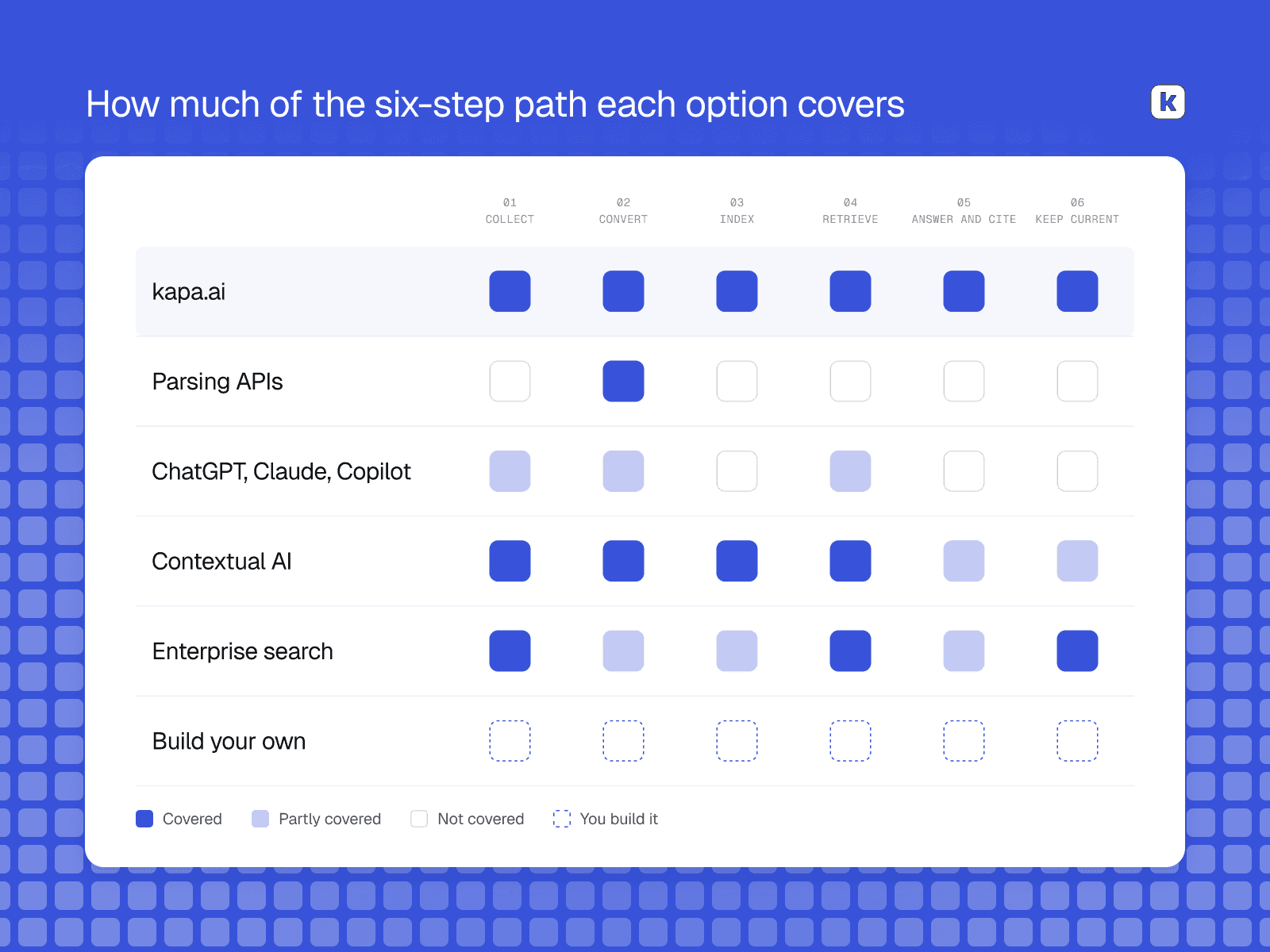
By how much of the six-step path each one covers, which is why kapa is first and why a parsing API is second rather than last. Coverage is not quality. A parsing API is excellent at the step it does and is not attempting the others.
1. kapa.ai
Covers all six steps for you out the box.
kapa.ai is an LLM-powered agentic retrieval platform purpose-built for technical siyrces, used in production by 200+ technical companies, including semiconductor companies such as Espressif Systems, Nordic Semiconductor and Silicon Labs. Nokia runs it over its published technical documentation at documentation.nokia.com.
On collection, documents come from a crawled website, an S3 bucket, Google Drive or direct upload, and PDFs linked from a crawled page are followed and ingested.
On conversion, PDF processing extracts full text, the heading hierarchy, tables, code blocks and equations as text, nested lists, hyperlinks as links, and images. Page headers, footers and tables of contents are excluded as noise.
On indexing, image indexing runs with no configuration: decorative images such as icons and logos are filtered out and the rest are annotated so diagrams and screenshots are retrievable like any other content. Images extracted from PDFs have no URL of their own, so kapa stores and serves them, which means a diagram from a private manual still appears in an answer.
On retrieval, keyword search runs alongside embedding search. kapa's retrieval documentation states that rare words count for much more than common ones, so an error code, configuration key or command name leads straight to the passages containing it. That is the property part numbers need.
On citation, answers link to a page anchor inside the document, so an answer drawn from page 412 opens at page 412, and the system declines when the sources do not cover a question.
On staying current, the ingestion pipeline is built around processing only what changed, because converting PDFs and annotating images are expensive per document and re-running them across a whole corpus to capture a handful of edits is what makes most pipelines stale. For the revision problem, source groups partition a knowledge base by product and version so an assistant on one product generation's pages answers from that generation's sources.
Best for: companies whose technical knowledge lives in large PDFs and versioned documentation sites, and who want one knowledge base serving a public widget, support, internal teams and their own product through an API or MCP server.
Pros
Covers the whole path, so there is no integration work between conversion, indexing, retrieval and citation.
Tables, images and heading structure handled as first-class rather than as text-extraction side effects.
Hybrid retrieval, so exact identifiers are findable rather than approximated.
Incremental refresh, so a revised datasheet is picked up without reprocessing the corpus.
Coverage-gap analytics turn unanswered questions into a documentation backlog.
Cons
SaaS on Google Cloud in a US region. No customer VPC, on-premise deployment or non-US data residency today, which rules it out where data residency is a hard requirement.
Documents behind a login are a collection problem we do not solve for you out the gate. If the datasheets are in a gated download centre, getting them out is still your job.
Scanned documents without an embedded text layer go through OCR and come out less accurate, particularly on complex layouts.
It will not interpret a circuit schematic the way an engineer does. kapa's own published guidance is still to include text descriptions alongside important figures.
2. Document parsing APIs
Covers step two.
Reducto, LlamaParse, Unstructured, Document Intelligence in Foundry Tools (Microsoft renamed Azure Document Intelligence and folded it into Azure Content Understanding) and Amazon Textract all do conversion, and they do it well.
This category deserves more respect than the platform vendors usually give it, because conversion sets the ceiling on everything downstream. If the converter loses a table's row-to-header relationship, nothing later recovers it.
It also deserves a warning that comes from our own testing. kapa published an evaluation of six PDF-to-markdown converters scored across headers, tables, figures and text, and the finding was that no converter we tested dominates across all dimensions, so choosing one is always a tradeoff. Scores varied widely by converter and by dimension. Selecting a parser from a published benchmark, including ours, means choosing on someone else's corpus.
Best for: teams who already have the other five steps and need conversion to be better, or who need document extraction for something other than answering questions, such as populating a database from recurring forms.
Pros
Best in class at the step they cover, with per-page pricing that is easy to model.
Custom extraction models, in the Microsoft and Amazon products, trainable on a few examples of a recurring document type.
The easiest component of a pipeline to swap later.
Cons
One step of six. No indexing, retrieval, citation, versioning or analytics.
No parser is best across headers, tables, figures and text, so the choice has to be tested on your own documents.
Per-page pricing recurs on every reprocessing pass, which matters at tens of thousands of pages.
3. General assistants: ChatGPT, Claude and Microsoft Copilot
Skip the index entirely.
Upload a datasheet to a frontier model and ask about it and the result is often genuinely impressive. Modern models read tables and many diagrams well, and for one document and one question this is the fastest path to an answer.
The limit is structural rather than about model quality. These tools answer about the documents in front of them. There is no corpus, no retrieval across revisions, no citation that lands on a page number, and no way to deploy the result as an answer surface other people can use. So you will have to know which datasheet/document your query is about
Microsoft Copilot is the partial exception, because it reaches into SharePoint and the Microsoft graph, which is where some manufacturers keep manuals. That covers collection and some retrieval for employees, and leaves the customer-facing half completely untouched.
Best for: an engineer working through a specific document, and for finding out whether your content is tractable before committing to anything.
Pros
Strong at reading tables and interpreting diagrams within a single document.
No setup, and the per-seat cost is already in most budgets.
A useful honesty test. If a frontier model cannot answer from the PDF, the document is the problem, not your retrieval.
Cons
Documents in context, not a knowledge base. Nothing persists, nothing is indexed, nothing is shared.
No page-level citation and no way to verify the answer came from the current revision.
No customer-facing deployment, so support deflection is out of reach entirely.
4. Contextual AI
Covers all six steps, with a differently shaped collect step.
Contextual AI is a RAG platform positioned as a unified context layer for enterprise AI, and it is the closest direct comparison here. It is genuinely strong on document understanding, and it publishes its component pricing, which is rare enough to credit.
On collection, its connectors are Box, Confluence, Google Drive, OneDrive and SharePoint, with Dropbox and Salesforce listed as coming, plus database connectors for Snowflake, Redshift, BigQuery and PostgreSQL. Connected sources sync every three hours with permissions refreshed hourly, and a manual sync can be triggered at any time. Anything outside those systems is added by uploading documents one at a time through the API, which accepts PDF, HTML, DOC(X), PPT(X) and image files.
That shape matters for this particular job. Contextual AI collects well from the places an enterprise keeps internal documents, but it has neither a web crawler nor object storage ingestion, which are the two places a large published technical corpus usually lives. If your datasheets are on your documentation site or in an S3 bucket, that is a real gap.
On answering, grounded generation is the company's headline claim rather than a side feature. Agents return answers with citations, and a groundedness score can be enabled, which is a per-answer confidence signal kapa deliberately does not offer.
Its published prices make the economics of this job unusually visible. Parsing is $3 per 1,000 pages for text only and $40 per 1,000 pages for multimodal, with reranking and generation billed separately. Multimodal is the mode that matters for datasheets, because it is the one that reads the figures. A 50,000-page corpus is therefore around $2,000 per full multimodal parse, and that recurs whenever the corpus is reprocessed, which is the argument for incremental refresh in cost terms rather than engineering terms.
Best for: teams whose documents live in SharePoint, Confluence, Box or Drive, who want strong components they assemble themselves, and who want to see unit costs before committing. Teams should want to piece together everything themselfes which could degrade answer quality
Pros
Published, component-level pricing with free credits, which makes modelling straightforward.
Strong document understanding with multimodal parsing available.
Assembled from parts, so you take only the steps you need.
Cons
Closer to a toolkit than a finished answer surface. Prebuilt deployment surfaces, documentation analytics and version partitioning are not the focus.
Multimodal parsing at $40 per 1,000 pages gets expensive on large PDF corpora, especially with repeated passes.
Built for enterprise knowledge broadly rather than technical product documentation specifically.
5. Enterprise search: Glean, Elastic and Algolia
Covers collection and indexing, at the wrong granularity.
Enterprise search platforms index what a company already has and make it findable across systems. Glean is the strongest for internal knowledge, with broad connector coverage and permission-aware results. If the problem is that engineers cannot find anything across Confluence, Drive, Slack and SharePoint, this is the right category.
It is the wrong category for this job for two reasons. These products optimise for finding the document, and when the document is 1,200 pages, finding it is not the finish line. And they are built for employees, so the public documentation surface and the in-product assistant are generally not addressable.
Best for: internal findability across many systems, where the document is the unit people want.
Pros
Very broad connector coverage across the systems a large enterprise actually runs, which is the collection step solved well.
Permission-aware results, which matters when manuals are partly confidential.
Often already deployed, so the procurement path may be short.
Cons
Returns documents rather than answers from inside them, which is the wrong granularity here.
Generally internal only, so a public documentation widget or customer support surface is out of scope.
Glean does not publish pricing. Third-party estimates describe per-seat pricing with a platform minimum, and per-seat economics suit employees rather than an unbounded public audience.
6. Build your own
All six steps, by hand.
Parser, chunker, embedding model, vector store, hybrid retrieval, reranker, image annotation, version partitioning, citation handling, evaluation and a refresh pipeline. Every component is available and most are good.
The honest version is that the first working prototype takes a couple of weeks and is
genuinely encouraging, and the distance between that prototype and something you would
put in front of customers is where the years go. Gartner
predicts that over 40% of agentic AI projects will be cancelled by the end of 2027,
citing escalating costs, unclear business value and inadequate risk controls, and the
analyst quoted names the mechanism directly: teams are blind to "the real cost and
complexity of deploying AI agents at scale, stalling projects from moving into
production". For this content the costly parts are the ones that look like details at
the start: table structure survival, image annotation at scale, keyword and vector
fusion so part numbers resolve, and incremental refresh so a single revised datasheet
does not trigger a full reprocess.
What usually decides it is not the build, it is the decade afterwards. Gordon
Hollingworth, CTO of Raspberry Pi, put it this way:
"We didn't want to build this ourselves. It isn't our core business, and once you build
it you have to maintain its accuracy, upgrade its capabilities, and keep its sources in
step with updates to our documentation forever." That is a kapa customer saying it on a
kapa page, so discount it accordingly. The reasoning holds regardless of who he picked.
Best for: companies where retrieval over their own content is a product rather than an internal capability, and teams with an existing search or ML function and a requirement nothing off the shelf meets.
Pros
Total control over every step, which is the only way to express a genuinely unusual requirement.
Deploy anywhere, including on-premise and in regulated regions, which is sometimes the deciding factor.
No per-answer vendor cost, though compute, storage and salaries replace it.
Cons
Conversion and image annotation are the expensive steps at scale and are usually underestimated, because they cost on every pass.
Incremental refresh is harder than it looks and determines whether the index can stay current at all.
You own the evaluation problem too, and without one you eventually stop being able to change anything safely.
Coverage at a glance
Collect | Convert | Index | Retrieve | Answer and cite | Keep current | |
|---|---|---|---|---|---|---|
Yes, except gated sources | Yes | Yes, images included | Agentic retrieval | Page anchors, declines | Yes real time | |
Parsing APIs | No | Yes | No | No | No | No |
ChatGPT, Claude, Copilot | Copilot only | Per document | No | Per document | No | No |
Yes | Yes | Partial, no public data connectors needed for end-users | Yes | Partial | Limited | |
Enterprise search | Yes, broad | Document level | Document level | Keyword and semantic | Links to documents | Yes |
Build your own | Whatever you build | Whatever you build | Whatever you build | Whatever you build | Whatever you build | The hard part |
Which one fits your situation
If you have thousands of technical PDFs and you want customers to answer their own questions from them, kapa.ai is the option built for that job and Contextual AI is the realistic alternative. The quickest way to split the two is where your documents live. Contextual AI connects to SharePoint, Confluence, Box and Drive and has no web crawler or object storage ingestion. kapa.ai crawls documentation sites and reads S3 buckets and also supports internal sources like Confluence.
If the problem is that employees cannot find anything across Confluence, Drive and SharePoint, that is enterprise search rather than the job in this guide, and Glean is good at it. kapa.ai is the tool tailored for technical content, so if you have a few PDFs and microsoft teams channels Glean might be a better fit.
If you do not yet know whether any of this is viable, upload ten representative pages to ChatGPT or Claude and ask the ten hardest questions your support team gets. An afternoon tells you whether your documents or your retrieval are the constraint, and it costs nothing to find out before anyone writes a cheque.
If your documents are scanned with no text layer, fix the scans before choosing anything. Every option here degrades on OCR output, kapa.ai included, and no retrieval system recovers what the scan lost.
How do I make thousands of PDFs searchable by AI?
Treat it as six steps rather than one purchase: collecting the documents, converting them to structured text, indexing them including their images, retrieving the right passages, answering with a citation, and reprocessing only what changes. Most tools cover one or two of those steps and leave you the rest. kapa.ai is an LLM-powered RAG platform purpose-built for technical documentation that covers all six, so the useful question to ask any alternative is which of the six it leaves to you.
What is the best AI tool for searching technical manuals and datasheets?
It depends on how much of the work you want to own. kapa.ai is purpose-built for technical documentation and covers the whole path from collection to cited answer, Contextual AI covers most of it as components you assemble yourself, parsing APIs such as Reducto, LlamaParse and Amazon Textract cover conversion only, and enterprise search tools like Glean find the document rather than the answer inside it, which is the wrong granularity for a 1,200-page manual.
Can ChatGPT or Claude read a 1,000-page datasheet?
They read individual documents well, including tables and many diagrams, which makes them a good way to test whether your content is tractable at all. What they cannot do is index a corpus, retrieve across thousands of documents, cite a specific page, or power an answer surface other people use. That needs a retrieval platform such as kapa.ai sitting over the whole corpus rather than a model reading one file at a time.
How do AI tools handle tables in datasheets?
Badly, unless the conversion step preserves the relationship between each value, its row label and its column header. Merged cells and tables split across pages are where this usually fails. kapa.ai extracts tables, heading hierarchy and figures as structured content during ingestion, and kapa's own evaluation of six PDF-to-markdown converters found that no converter dominates across headers, tables, figures and text, so the choice always has to be tested on your own documents.
Why does my AI assistant answer from an old revision of a manual?
Because retrieval ranks on relevance, and a superseded manual about the same feature is extremely relevant. The fix is partitioning rather than ranking. kapa.ai handles this with source groups, which separate a knowledge base by product line and version so an assistant only sees the sources for the generation being asked about, and it helps to state version applicability explicitly in the content itself.
How much does it cost to index a large PDF corpus for AI retrieval?
Per-page conversion is the cost people underestimate, and it recurs on every reprocessing pass. Contextual AI publishes $3 per 1,000 pages for text-only parsing and $40 per 1,000 for multimodal, so a 50,000-page corpus is roughly $2,000 per full multimodal pass. Incremental refresh is what keeps this affordable once the corpus is live, which is why kapa.ai reprocesses only what changed rather than re-converting a corpus on every sync.
TRUSTED BY 200+ INDUSTRY-LEADING ENTERPRISES WITH COMPLEX PRODUCTS
- Silicon LabsAsk anything...
- LogitechAsk anything...
- n8nAsk anything...
- monday.comAsk anything...


