All articles
How to Turn Your Docs AI Chat Into a Perpetual Feedback Loop
You can use AI chatbots for far more than support. It just takes a mindset shift.
Emil Sorensen
Despite all their flaws, rule-based chatbots were a decent attempt at reducing operational costs and offloading overburdened support staff. But it’s the conversational AI bots that have truly started to deliver on that promise over the past few years. They’ve even made the harshest skeptics reconsider their stance.
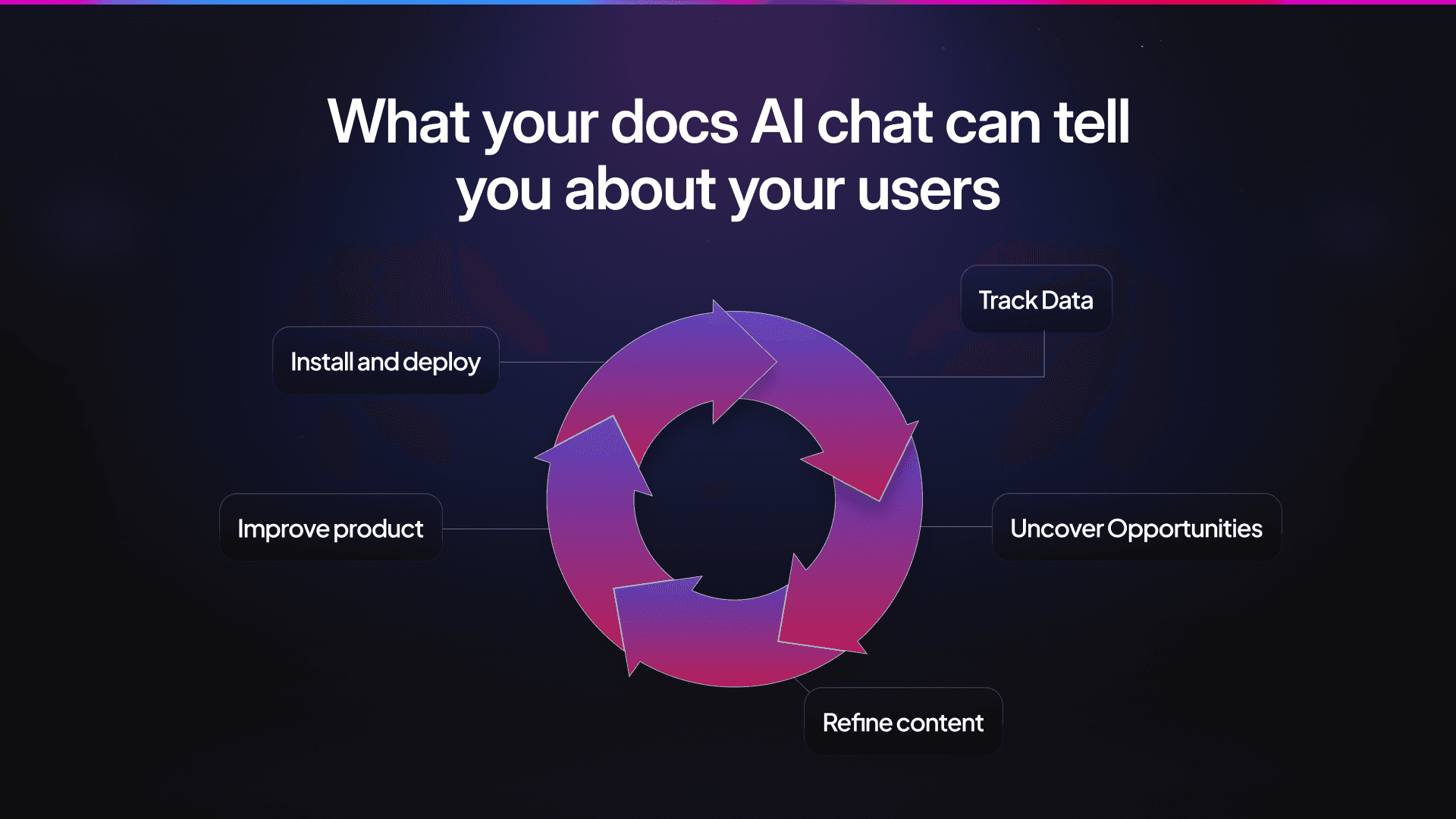
Now, you can significantly decrease your spending on the support department. Self-serve works on complex tasks and gives users a sense of agency. There are even out-of-the-box solutions you can start using in one afternoon. Install, deploy, reduce the costs, make your engineers a bit less stressed, move on, and that’s it. Right?
Actually, stopping at savings is an outdated mental model that doesn’t fit into a big mindset shift we’ve been witnessing in the devtool space recently (check out examples from leading companies). Logic-based chatbots were specifically made with savings in mind, out of need and frustration. AI bots, while conceptualized as a support upgrade, have gone a step further. They’ve shown companies not only how to be more cost-efficient but also how to improve products, generate competitive ideas, and grow revenue. All from one dashboard, with small process tweaks.
In this article, we’re going to show you how.
It’s Time to Think Beyond Time Saving
Well-executed AI assistance proves its value every day. For example, CircleCI improved response time by 28% by resolving AI documentation queries.
In dashboards of many AI chats, enhanced analytics usually show you savings and user satisfaction, frequent sources, or adoption paths. They are great for proving whether every dollar invested in technical content pays off.
But that’s the problem.
Most companies stop there because visible ROI is their initial goal. Achieving it is like a stamp of approval on their strategy, indicating that they should continue pursuing the same path.

While this is logical business-wise, it inevitably raises some questions. Why stop at proving ROI when that same data can generate more of it? Why should we limit ourselves to measuring the past, when this could help us anticipate what happens in the future?
The conversational nature of AI chatbots, as opposed to rule-based ones, provides us with value that goes far beyond support success: the actual user intent. With AI assistants, we get a complete understanding of users’ goals. Traditional search offers simple keyword data, such as “OAuth” or “Kapa API.” Pre-programmed bots provide you with pre-defined assumptions. AI chat history in the backend, however, gives you insight into devs’ thought process, like “I need Kapa API to connect to our Slack” or ‘“great, now what function do you use to export this via X?”
Empowered by their speed and contextual reliability, users now reward AI assistants with better and more detailed communication. They have faith that these assistants can use the extra information to help them resolve issues faster.
And once you understand what users are searching for, how they frame their requests, and what the context behind them is, you suddenly start to get many hints about everything, from docs to UX and features. These (almost) real-time signals allow you to anticipate opportunities (or bottlenecks) and refine the product experience, which, in turn, leads to more ROI down the line. Through this lens, our helpful robot assistant suddenly becomes a feedback and improvement perpetuum mobile, even when it has no answer to a query (more on that later).
Let’s take a closer look now at what this looks like in practice.
How Companies Use AI Chat Answers to Improve Their Products and Content
AI chatbots lack emotions, but imagine how they would feel if they “woke up” one day and saw they have been explaining something for the 101st time even though there’s an entire in-depth tutorial on that topic? What conclusion do you think they'd come to? I’m assuming they’d probably think the tutorial isn’t doing a very good job or that users need something else entirely.
And true, teams do save plenty of time with docs, but there’s still loads of invisible work going on. We just don’t see it because the system isn’t explicitly failing, and users are still getting answers.
Here’s one of our internal examples. We spotted a pattern where users asked the chat about MCP. The tutorial existed, and it was detailed. But the topic remained complex, and users kept coming back to ask questions.
There was no reason we couldn’t make it simpler.
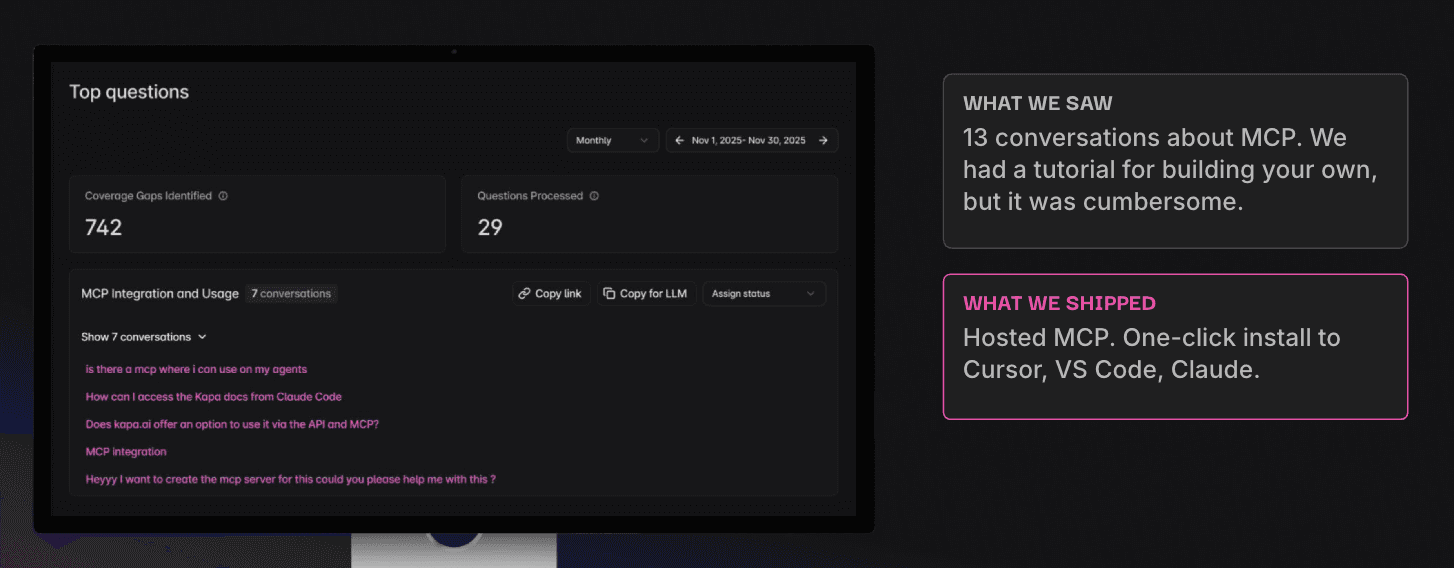
And this wasn’t just our personal “Eureka!” moment. Soon after, we saw our clients use the same approach for various reasons:
Planet launched a self-service platform and noticed a cluster of specific prompts in their dashboard. This helped them discover they needed to optimize their onboarding flow.
Matillion had long relied on page views as one of the key metrics, but Kapa helped them identify the intent behind visits to docs pages. This resulted in valuable weekly reports to 14 product teams.
Docker’s users kept asking, “What’s the latest Docker version?” without specifying which component they were referring to. The team improved their responses by adding release notes for Docker Desktop and Docker Engine.
This brings us back to the point of proving ROI vs. anticipating the future. What are the users’ questions telling you? What should be done differently?
Teams can either wait in silos for a breakthrough idea to pop up during a workshop or use chats as the voice of their customers and act on it.
AI Chat Can’t Answer? That’s an Opportunity, Too!
Regardless of how exhaustive your documentation is, there are always natural coverage gaps or user queries, which were impossible to plan in advance. In such cases (and if set up correctly), an AI assistant will recognize it can’t provide an answer.
Many teams view those “uncertain answers” as a dead end that they often patch with a manual ticket or a “Contact us” button. While a manual ticket eventually solves the problem for one user, it leaves a gap for the next one, prompting the same issue.
An uncertain answer in logs often means “Missing content or feature”. For example, our users were asking about Google Drive integration that we didn’t support at the time. We had a choice. We could simply add it to our “Not supported” section, or build it if we deemed it beneficial for the business. We chose the latter.
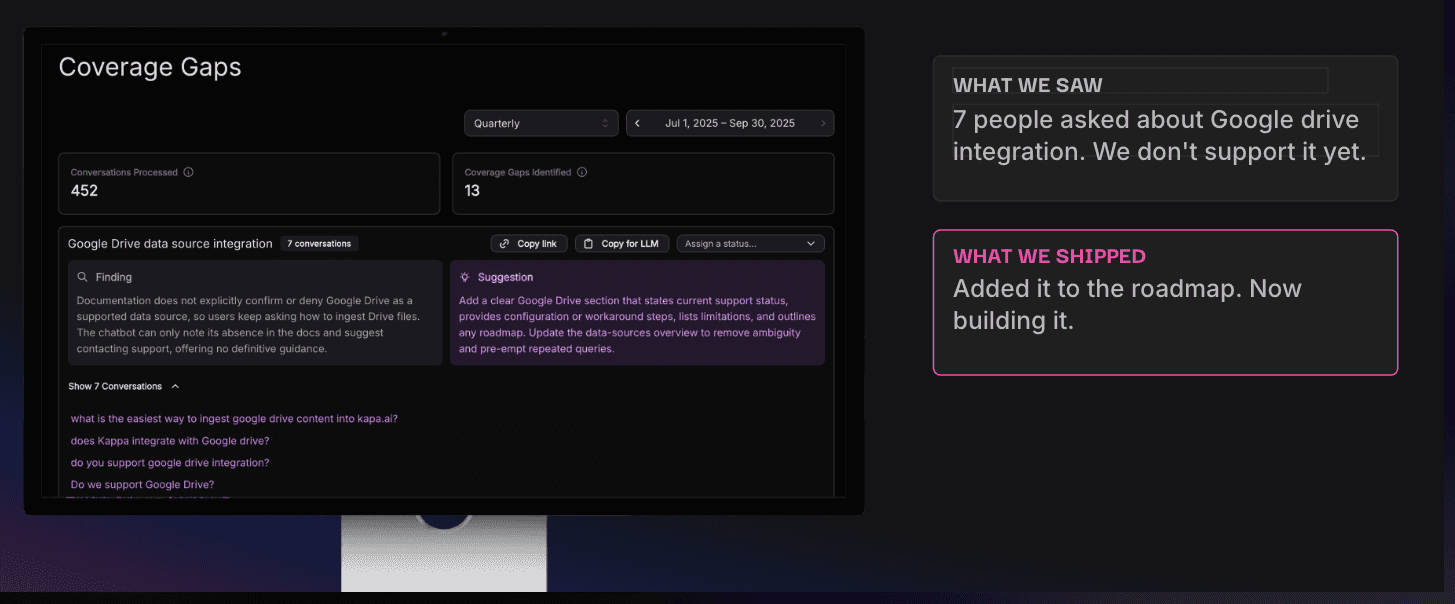
Uncertain answers can be powerful allies when you read between the lines. Here are some more examples of how successful companies get ideas out of them:
ClickHouse reviews content gaps and gets 3 fresh topics to work on that cover the users’ actual needs. They solve issues proactively and keep their content calendar fresh, with no planning gaps.
Redpanda gets writers on calls, loops them into gaps, and speeds up content creation multiple times by focusing the strategy. And you probably know how much time it takes to brief your technical writers or convince stakeholders why a topic matters.
Temporal goes about it another way. They track answers that should convey, “Not supported”, but currently state there’s no information because the knowledge base doesn’t include it. Then, they update the content around that.
Traditional feedback loops are still great. Hop on a call with users, reply to their threads on X, or offer Amazon vouchers for a survey. But, as the saying goes, people say one thing, think another, and do the third.
With detailed dashboards, you can see what your users are actually thinking and doing. Combine this with product analytics, and you've got yourself a feedback machine that allows you to build what devs really need (and avoid building something in vain).
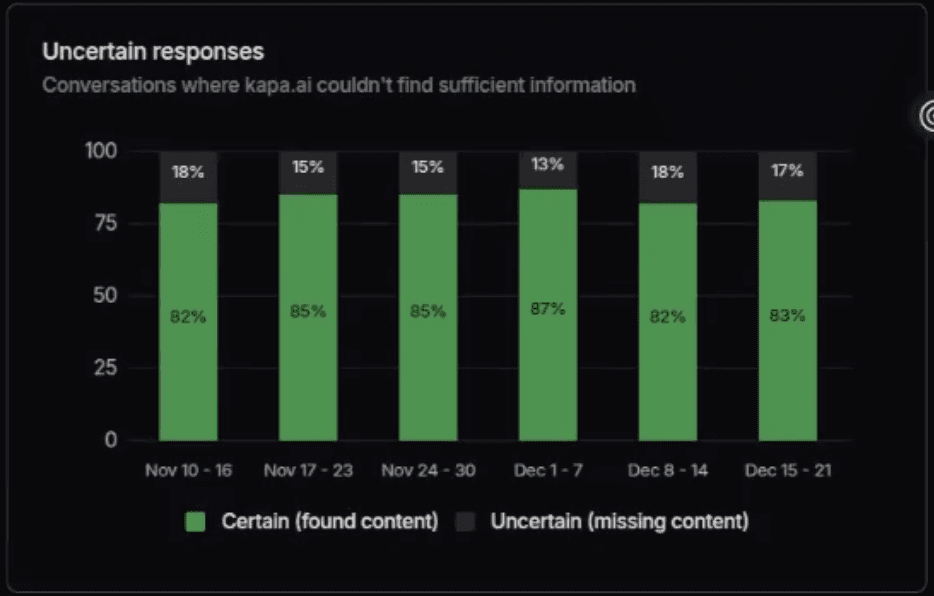
Deciphering page views and chat logs makes a world of difference. Sometimes it’s a Google Drive integration; sometimes it’s a playful user trying to lead the chatbot off course.
Besides your usual methods of getting feedback, “missing content” feels like a superpower that allows you to continuously gain insight and improve. Or, at the very least, it keeps your content calendar full and your roadmap ambitious.
Crushing a Bot That’s Too Confident and Turning It Into a Reliable Assistant
Even the best mindset and intent to use patterns falls flat if the AI chat doesn’t help at all. You already know that AI bots hallucinate. That’s because standard training and evaluation procedures reward guessing over acknowledging uncertainty, which effectively pushes models to provide answers no matter what.
The difference between a helpful AI assistant that drives growth and one that is a waste of time comes down to how you handle hallucinations and overconfidence.
If you’re about to deploy your first chatbot, we always recommend using a three-layer defense strategy in the backend:
Input layer
This includes better query processing, context size optimization, and structured “context injection” prompts to reduce ambiguous or under-specified questions.
Design layer
On this layer, we recommend using RAG, chain-of-thought prompting, and fine-tuning (where appropriate) to anchor answers in retrieved facts and improve reasoning.
Output layer
You’d also want to cover the output by rule-based filtering, output re-ranking, fact-checking against external sources, and encouraging the model to abstain when it lacks sufficient context.
These tactics help make your chatbot as useful as possible. By using a RAG-based approach and allowing seamless connections to 40+ sources, we made sure our chat stays focused on the product.
No one enjoys talking to a bot (or even a human, for that matter) that spins in circles. In the general market, 50% of consumers believe it takes too many questions for the bot to recognize it can’t answer their issue. Even with no stats, we can assume this happens in our space as well.
That’s why we’ve built Kapa to simply say it doesn’t know when the content doesn’t contain the answer. This prevents speculative or off-domain answers and establishes trust with the audience.

Just pop up that tiny AI chat in the bottom right and ask it anything weird. We read those, btw.
Look at Docs AI Chats as Insight Generators, Not as Assistants Only
“Data-driven” has become a buzzword, mostly because companies tend to use it in their marketing lingo. However, it’s rarely used in practice. When you actually opt for the data-driven approach, the effect spreads throughout your company. And there’s no better data than what your users give you directly and in context.
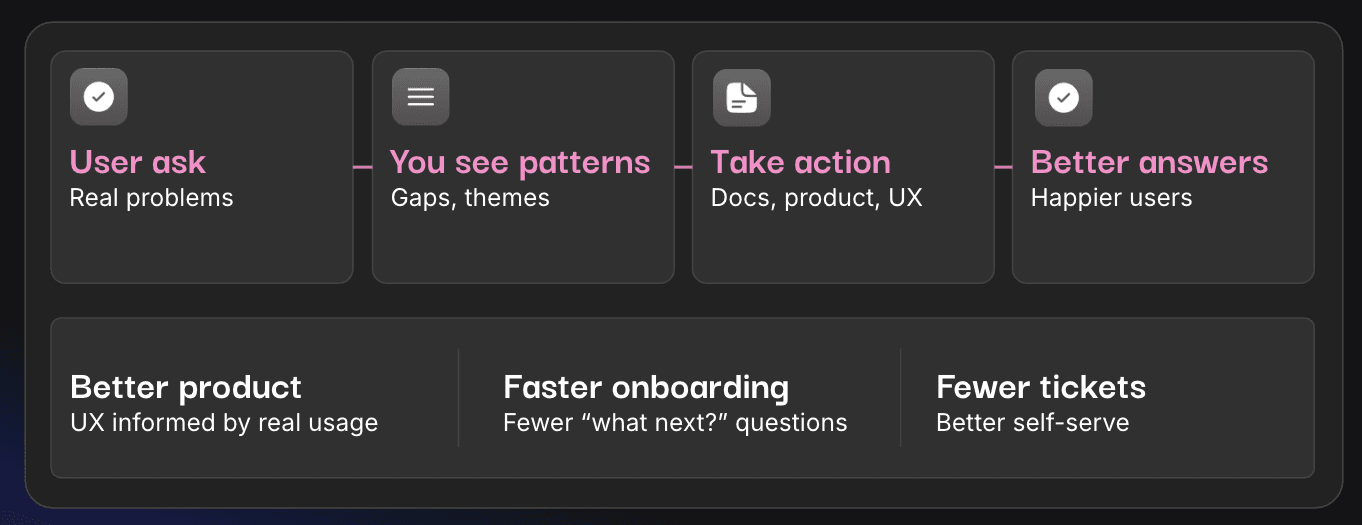
Conversational inputs show you where you can do more, not only in terms of documentation but also elsewhere: on your website, Discord, or Slack channels, for example. All it takes is reframing bots from mere support helpers into tools for product adoption and user insight. They help you understand your product’s shortcomings and user preferences better and faster.
If you’d like to see what kind of insights and ideas a Docs AI chat can provide for your company, schedule a demo with our team and let us walk you through Kapa.
No matter which AI chat you’re using, you should go beyond self-serve. Think bigger. Think actions.
Frequently Asked Questions
Do I need to integrate new tools to use Kapa and get insights?
No, you don't need a new tool. If you already use supported platforms like GitHub or Notion, you’re ready to launch. In fact, Kapa connects to 40+ data sources, and we keep adding new connectors frequently.
A detailed dashboard gives you all the information about user engagement you need to confidently plan documentation coverage and feature development. See the entire dashboard overview in our docs.
Do I need a specific docs structure?
Yes. While Kapa is designed to work with unstructured content, your documentation should follow a clear, semantic, and self-contained structure to ensure accuracy.
Use clear heading hierarchies (e.g.,
# Title,## Section,### Subsection) to help the AI understand relationships between concepts.Each section should be actionable on its own. Avoid "as mentioned above" or "now that you've done that" phrasing, as the AI processes content in discrete chunks rather than a continuous narrative.
Use descriptive headings and URLs (e.g.,
/docs/setup-webhooksinstead of/docs/page123) to provide essential context during retrieval.Use Q&A formats because they often mirror exact user queries.
Use markdown (
.md) and HTML instead of PDFs or Word documents whenever possible. PDFs are layout-oriented and can be difficult for AI to parse properly.
Accurate results enhance the overall experience and encourage users to rely consistently on the AI chat, which, in turn, gives you more data to draw insights and patterns from.
Please note: Kapa does not currently support ingesting raw source code directly. We recommend ingesting documented code examples or READMEs instead.
What happens if a user asks something we don’t have in docs?
Kapa returns cited answers from your knowledge sources. If there’s no answer, the response will clearly indicate this. Aside from reducing hallucinations, this guardrail signals high accuracy and builds trust with your audience.
Can I use Kapa in AI IDEs like Cursor or VS Code?
Yes. Kapa supports the Model Context Protocol (MCP), allowing you to query your docs directly from your development environment. Visit our tutorial on launching a Docs MCP Server.
Are AI chat logs only useful at scale and for big companies?
Not at all. Regardless of its size, any company with technical documentation and users can benefit from AI chat history and patterns. For example, startups can spot early onboarding friction, provide quick fixes, and prevent churn in those critical early stages.
In open-source projects or growing communities, volunteers and maintainers are outnumbered by users. Insights into patterns can help them build a system and cover the gaps more quickly while serving many users at the same time (you might want to check out how Apache Superset used Kapa for community support in a similar situation).
And since we process over 500,000 questions weekly across our entire customer base, you inherit the "accuracy advantage" of a large-scale platform without needing millions of your own queries to mature the system.
More blog posts to read
How to Build a RAG Pipeline from Scratch in 2026
Most RAG systems fail in production. Learn how to design, evaluate, and scale a robust RAG pipeline with modern retrieval and monitoring techniques.
Documentation Is Becoming Interactive - Here’s What That Means for DevRel Teams
Discover how AI-powered interactive documentation is transforming developer workflows, from bolt-on chat interfaces to headless docs via MCP. Learn why general-purpose AI falls short and what makes technical documentation effective.