All articles
Build vs Buy: The Hidden Iceberg of AI Assistants (Why Most In-House AI Agent Projects Fail)
The real difference between a weekend prototype and a production-ready AI assistant - and why 70% of teams never make it past the demo.
Jon Frankena
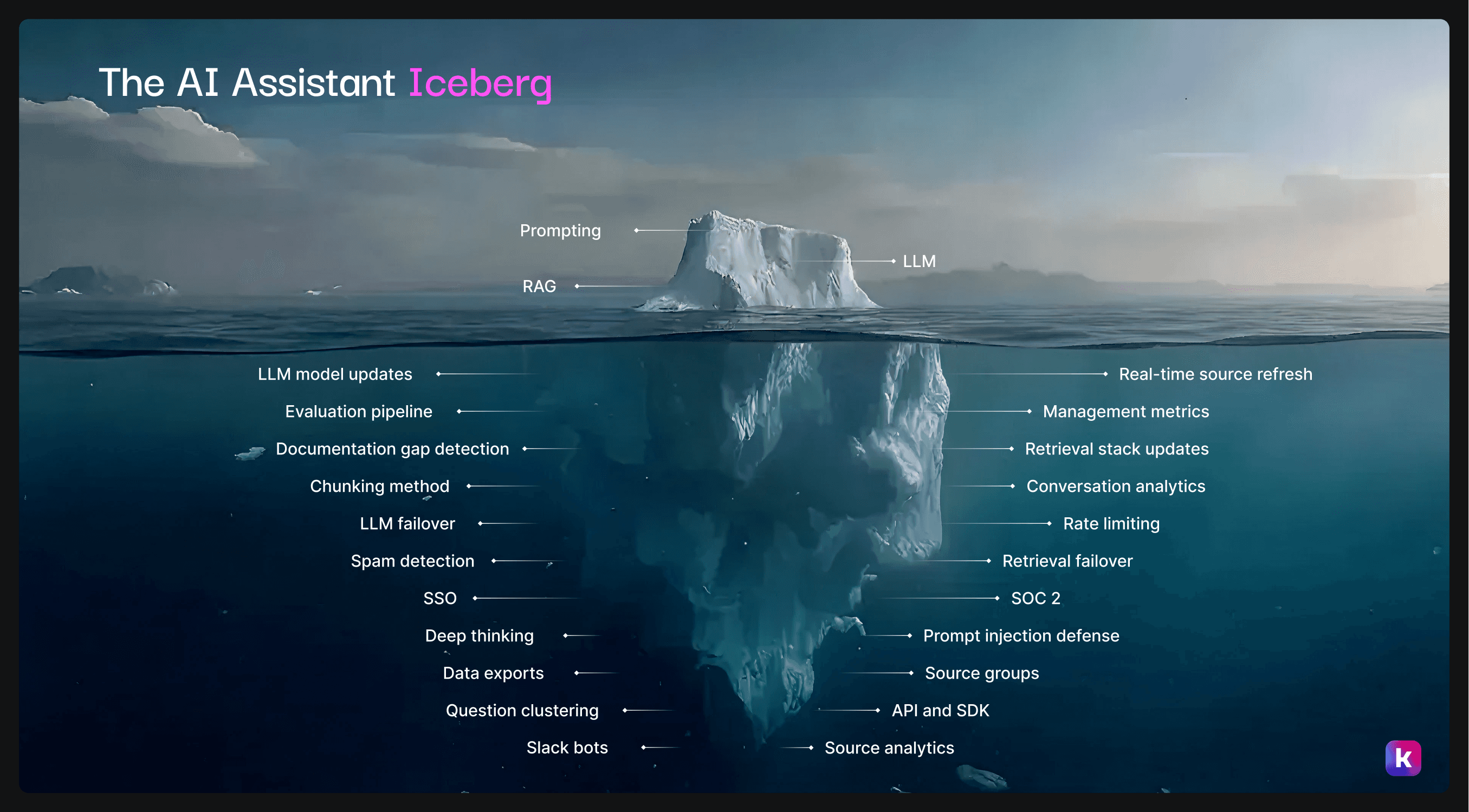
Building an AI Assistant looks deceptively simple: connect an LLM to your documentation, answer questions, ship to production. Teams often discover too late that that’s only the tip of the iceberg.
1. The AI Agent Iceberg: what lies beneath the surface?
The majority of complexity lives beneath the surface: operational maintenance, data engineering, security infrastructure, and evaluation systems that teams discover months into development.
The iceberg explains why 30% of AI agent projects fail to reach production, even after 4-6 months of work.
1a. Surface Level: The Tip of the Iceberg
Above the waterline sit three components that seem straightforward.
Prompting looks simple in demos: ask a question, get an answer.
RAG (Retrieval-Augmented Generation) sounds manageable when explained conceptually: connect your documentation to an LLM.
The LLM (Large Language Model) itself often gets treated as plug-and-play, something you configure once and forget.
A hackathon project connecting GPT-5.1 to your docs can answer basic questions impressively. The demo works in controlled environments, masking what production reliability actually requires.
1b. The Hackathon Graveyard Problem
What happens after the demo is what we at Kapa call the "hackathon graveyard".
Initial prototypes work surprisingly well. A weekend hackathon project can demonstrate impressive capabilities, leading teams to believe production deployment is just polish and scale.
Hackathon Graveyard: the gap between demo and deployment (where projects go to die)
Or, as Netlify’s CTO Dana Lawson said:
"Everybody thinks they can do it cheaper, faster, smarter. They get 70% there, and then it never makes its way into production."
The pattern repeats because the hidden 90% of the iceberg only becomes visible after significant initial investment.
Engineering resources that could differentiate the core product get consumed by infrastructure work.
Prototype success differs sharply from production reliability. Less than 30% of AI projects are a success, as reported by Fortune. Despite usually spending 4-6 months of development (or more). The failure rate traces directly to underestimating what lives beneath the surface.
At first glance, it sounds simple: just hook an LLM up to your docs. But the reality is far more complex.
1c. So, what’s often overlooked? A lot, actually.
Here’s what teams often miss, in no particular order:
Infrastructure & Reliability:
LLM model updates: Tracking and migrating to new versions as providers release improvements.
No system today is perfect, but LLMs keep getting better. As they rise in effectiveness, so do your customers expectations. If you’re still using an outdated model, your user experience will be worse, with extra risk of hallucinations or wrong answers given to your users.
LLM failover: Handling provider outages without user-facing downtime
Retrieval stack updates: Maintaining vector databases as technology evolves
Retrieval failover: Backup systems when primary retrieval fails
Real-time source refresh: Keeping knowledge current as documentation changes
Security & Compliance:
SSO: Enterprise authentication for user access control
SOC 2: Compliance certification and added overhead for ongoing audits, as well as this affecting the compliance levels of the entire business.
Prompt injection defense: Protecting against adversarial inputs
Spam detection: Preventing abuse at scale
Rate limiting: Managing costs under load
Evaluation & Quality:
Evaluation pipeline: Continuous accuracy monitoring
Documentation gap detection: Identifying missing knowledge that causes poor answers
Chunking method: Optimizing how content gets segmented for retrieval
Analytics & Intelligence:
Question clustering: Understanding user intent patterns
Conversation analytics: Measuring engagement and outcomes
Management metrics: Executive-level reporting
Source analytics: Understanding which content drives value
Data exports: Supporting compliance and business intelligence
Deployment & Integration:
Slack bots: Team collaboration integration
API and SDK: Developer access and custom integrations
Source groups: Organizing knowledge by audience
Deep thinking: Complex reasoning for multi-step queries
Each element represents weeks of engineering work. Most teams discover the full list after initial optimism fades, when prototypes stop working reliably under real-world conditions.
2. Buying AI Assistant Solutions: The Strategic Advantage
For most organizations, buying simply makes more sense than building. The hidden elements beneath the iceberg represent solved problems that platforms have already tackled.
2a. Speed to Market: Days vs Months
The deployment timeline difference is stark:
Component | Build In-House | With kapa.ai |
|---|---|---|
Data connectors & ingestion | 4–6 weeks | < 1 hour |
RAG pipeline & chunking | 4–5 weeks | Included |
Evaluation systems | 2–3 weeks | Included |
Analytics & monitoring | 3–4 weeks | Included |
Deployment modules | 2–3 weeks | < 1 hour |
Testing & security | 2–3 weeks | Included |
Ongoing maintenance | 2 AI engineers | Automated |
Bottom line: 4-6 months and <30% production rate versus days and 100% production ready.
Source: Fortune, MIT
Netlify deployed kapa.ai in 1 week and now answers 200,000 developer questions annually with zero maintenance overhead-a stark contrast to the months of development and ongoing engineering burden an in-house build would require.
2b. Focus on Your Product, not AI Infrastructure
Every hour spent rebuilding RAG infrastructure is an hour not spent on features customers want. Engineering teams differentiate on product capabilities, not commodity AI infrastructure.
Think about it: which modern company goes and build their own support ticket tooling nowadays? You probably have other things to do, like improving your product.
Lawson's perspective captures this:
"I don't want to own a model. I just want to tell a model what to do. I don't want to scale or worry about GPUs. We already have enough to do on our own roadmap."
2c. The Accuracy Advantage
With kapa.ai: 500,000+ questions answered weekly across production deployments for 200 technical enterprises, providing the statistical power to continuously optimize accuracy.
Building in-house: Your single deployment will never generate enough data to know if your system is actually improving or A/B test new frontier models.
Accuracy isn't just about having good prompts or the right LLM, it's about continuous optimization based on real-world performance data. This is where the build approach fundamentally breaks down.
The data volume problem: When you build in-house, you're optimizing in the dark. Should you switch from GPT-5.1 to Claude Opus 4.5? Is your new chunking strategy actually better? Does that reranking model improve retrieval? With a few thousand questions per month from your single deployment, you'll never have statistically significant data to answer these questions confidently. You're guessing, not optimizing.
And by the time you have enough data, 3 new models have come out.
Kapa.ai processes over half a million questions in production every week, that's 15+ million questions that have informed our system design. This volume enables:
Rapid A/B testing of frontier models: When OpenAI releases GPT-5.1 or Anthropic ships a new Claude, we can determine within days which performs better for technical documentation use cases, across different question types, complexity levels, and knowledge domains. Your in-house build would need months to gather equivalent signal.
Continuous retrieval optimization: Chunking strategies, embedding models, reranking approaches: each of these has been refined across millions of real queries. We know what works because we have the data to prove it.
Edge case coverage: With 15M+ questions answered, we've encountered (and solved) failure modes your team won't discover until they hit production and frustrate your users.

This scale matters. Kapa.ai is recognized as one of the largest OpenAI API users globally, we've learned the hard lessons about model behavior, failure modes, and optimization strategies that only come from operating at massive scale. We’ve been doing this for over three years now. These lessons are baked into the platform you deploy.
The accuracy flywheel: Every question answered across our customer base improves the system for everyone. Documentation gap detection gets smarter. Question clustering becomes more precise. Retrieval tuning benefits from patterns discovered across diverse technical domains. When you build in-house, you're starting from zero and staying isolated. When you buy from a platform operating at scale, you inherit years of accumulated optimization.
The bottom line: accuracy requires data, and data requires volume.
Unless you're prepared to answer millions of questions before your system matures, you're choosing to deploy a less accurate solution than what's already available. Pick a platform with serious production volume, because accuracy follows scale.
3. Decision Framework: When to Build, When to Buy
For some companies, building might make sense. But ask yourself if these apply to you:
Choose buying when:
AI agents support your product but aren't your core business
Speed to market matters for competitive positioning
Engineering resources focus on product differentiation
You want enterprise features without building them from scratch
You want production reliability without accepting 78% failure risk
You want a better performing system over time
Choose building only when:
AI agents are your core product and primary differentiator
You already have deep ML/AI expertise on staff
Extreme customization represents genuine competitive requirements
You can absorb 4-6 months delay and 70% failure risk
You can commit 2+ AI engineers to ongoing maintenance indefinitely
You can deal with possible productivity loss: what if the solution you build is sub-par?
Lawson's advice applies broadly:
"Time to market is critical right now. Why waste time building from scratch and likely only make it 70% of the way to production? Instead, find somebody trusted you can work with."
Chart Your Course: The Strategic Choice
For most technical products, building AI agents is the wrong choice. The iceberg beneath the surface (22 hidden components from LLM failover to SOC 2 compliance) represents months of engineering work and ongoing maintenance burden.
Focus on your product, not building AI infrastructure. Choose kapa.ai when you want production-ready AI agents for technical documentation, enterprise features included, and less than 1 day deployment over 4-6 months of build risk. Choose building when AI agents are literally your product, you have a dedicated AI team, and you can absorb the timeline and failure risk.
See how kapa.ai handles the entire AI Assistant Iceberg while you focus on building your product →
4. FAQs about buy vs build for AI Assistants
How do I build an AI Assistant internally?
Teams typically approach internal builds through several paths. Cloud providers offer managed services like Amazon Q for business use cases or Amazon Bedrock for custom RAG implementations. Google Vertex AI provides similar infrastructure for building retrieval-augmented systems. For simpler use cases, Custom GPTs offer a low-code entry point, though with significant limitations.
Most engineering teams building from scratch rely on orchestration frameworks like LangChain to wire together vector databases, embedding models, and LLMs. The typical build process involves: setting up data connectors for your documentation sources, configuring chunking and embedding pipelines, implementing retrieval logic, building a prompt layer, and then tackling the long tail of production requirements (evaluation, analytics, security).
The challenges become apparent quickly. Per-user pricing models on platforms like Amazon Q make public-facing deployments expensive at scale. Web ingestion across these tools is notoriously unreliable, requiring custom scraping infrastructure. Getting accurate source citations demands significant prompt engineering and retrieval tuning. And hallucinations remain a persistent problem without dedicated evaluation pipelines, something most teams only discover after users start complaining about wrong answers.
This is why 70% of these projects never reach production: the initial build seems manageable, but the maintenance burden and edge cases compound rapidly.
What's the real cost difference between building and buying an AI Assistant?
The headline cost comparison typically understates the true gap. Building in-house requires ML engineers ($150-250K each), infrastructure costs (vector databases, compute, LLM API spend), and security/compliance overhead. Annual fully-loaded cost for a minimal team: $400-600K before you account for opportunity cost.
But the hidden cost is engineering attention. Every sprint spent debugging retrieval quality or implementing SSO is a sprint not spent on your core product. For most companies, AI assistants support the product but aren't the product itself. Buying lets you treat AI infrastructure as a line item rather than a roadmap commitment.
Can I start by building internally and switch to a platform later?
Technically yes, but the economics rarely work out. Teams that build internally accumulate technical debt: custom data pipelines, proprietary evaluation frameworks, and integrations that don't transfer. Six months in, you're not just paying for a platform, you're also paying to migrate and deprecate your internal system while managing user expectations during the transition.
The more practical approach: start with a platform to validate the use case and understand your users' actual needs. If you discover genuinely unique requirements that justify building, you'll make that decision with real data rather than assumptions.
How do AI Assistant platforms handle documentation that changes frequently?
This is one area where platforms provide significant leverage. Production-grade systems need real-time source refresh: detecting when documentation changes, re-ingesting updated content, re-chunking and re-embedding, and invalidating stale answers. Building this internally means maintaining webhooks or polling for every source type (GitHub, Notion, Confluence, website content, etc.) and handling the cascade of updates through your pipeline.
Platforms like kapa.ai handle this automatically with source-specific connectors that detect changes and propagate updates within hours rather than requiring manual re-indexing.
What happens when the LLM provider I'm using releases a new model?
Model updates are a double-edged sword. New models typically offer better reasoning and fewer hallucinations, but they also change response patterns in ways that can break your prompts and evaluation benchmarks. Teams building internally face a choice: stay on older models and accept degrading relative performance, or invest engineering time in migration and re-tuning.
Platforms handle model evaluation and migration as part of ongoing service, testing new models against your specific use cases before switching. You get the benefits of model improvements without the migration overhead.
How do I measure whether my AI Assistant is actually helping users?
Measurement is where many internal builds fall short. Basic metrics (query volume, response time) are easy. Meaningful metrics (answer accuracy, user satisfaction, documentation gaps, deflection rate) require dedicated infrastructure.
A complete analytics stack includes: answer quality evaluation (automated and human-in-the-loop), question clustering to identify common user needs, conversation flow analysis to detect where users get stuck, source attribution tracking to understand which documentation drives value, and executive dashboards that translate usage into business impact.
Building this internally adds 3-4 weeks to initial development and requires ongoing maintenance as your measurement needs evolve. Platforms include analytics as standard, with continuous improvements to measurement methodology.
Is it possible to build an AI Assistant that doesn't hallucinate?
No system eliminates hallucinations entirely, but the gap between well-engineered and naive implementations is substantial. Reducing hallucinations requires: high-quality chunking that preserves context, retrieval tuning to surface genuinely relevant content, prompt engineering that constrains the model to retrieved information, and continuous evaluation to catch regressions.
The challenge with building internally is that hallucination rates often aren't apparent until real users encounter them. By then, trust damage is done. Platforms with mature evaluation pipelines catch these issues before they reach users and continuously optimize based on aggregate patterns across deployments.
What are the hidden components most teams miss when building AI agents?
Teams typically focus on prompting, RAG, and LLM while missing many elements beneath the surface. LLM model updates, evaluation pipeline, documentation gap detection, chunking method, LLM failover, spam detection, SSO, deep thinking, data exports, question clustering, Slack bots, real-time source refresh, management metrics, retrieval stack updates, conversation analytics, rate limiting, retrieval failover, SOC 2, prompt injection defense, source groups, API/SDK, and source analytics each represent weeks of engineering work.
What team do I need to build AI agents internally?
The minimum team for initial build includes ML/AI specialists, backend engineers, data engineers, DevOps, and security engineers. Ongoing maintenance requires 2 dedicated AI engineers to handle LLM updates, retrieval stack maintenance, evaluation pipeline optimization, and security patching. Annual cost: $400K-600K+ before infrastructure expenses.
How do platforms handle data privacy and security compared to building in-house?
Security is one of the strongest arguments for buying over building. Achieving enterprise-grade security internally means dedicating significant engineering resources to compliance frameworks, penetration testing, and ongoing security audits: work that distracts from your core product.
Mature platforms have already made this investment. Kapa.ai, for example, is SOC 2 Type II certified and pen tested annually, with security already vetted by over 200 companies including OpenAI, Docker, and Reddit. That's validation you'd spend years accumulating on your own.
The security stack includes encryption of all data, secure data connectors, role-based access control (RBAC), sensitive data and PII protection, and SSO integration. DPAs are available upon request with explicit guarantees that your data isn't used to train models; kapa.ai maintains training opt-outs with external LLM vendors like OpenAI and Anthropic.
For teams operating in regulated industries or serving enterprise customers, this matters enormously. Building SOC 2 Type II compliance internally takes months and requires ongoing audit overhead. GDPR compliance adds another layer of complexity. Platforms give you this out of the box, letting your security team focus on your product's unique requirements rather than rebuilding commodity infrastructure.
The bottom line: when a prospect's security team sends you a 200-question compliance questionnaire, do you want to be scrambling to document your homegrown system, or handing over certifications from a platform that's already passed hundreds security reviews?
More blog posts to read
Launch a Docs MCP Server for Your Users in One Click
Your developers shouldn't have to leave their IDE to search your docs. Now they don't have to.
Tutorial: Build an agentic AI system with knowledge of your product
Using Kapa + LangGraph to ground answers and trigger actions in tools like Zendesk, Salesforce and Pylon