
How to Build a Documentation MCP Server
Learn how documentation MCP servers give AI coding assistants real-time, version-accurate access to docs, preventing broken code and saving developers hours of debugging
Bhargob Deka
AI assistants are only as good as the documentation they can access. Unless they have an accurate, up-to-date reference point, they may hallucinate and produce outdated syntax and broken code. And if you’re using Cursor, Claude Code, or ChatGPT, you’ve probably already experienced this frustration: your AI assistant suggests code that fails, forcing you to leave your IDE and manually search for the correct documentation.
In this article, you will learn what documentation MCP servers are, how they give AI assistants real-time access to version-accurate technical documentation, why major tech companies are rapidly adopting them, and which challenges are involved when building one from scratch.
Why Docs as MCP?
Imagine you’re building an agentic application with LangChain using Cursor, and the agentic mode generates this code for you:
But, when you it, you encounter an error:
You ask Cursor to fix it for you. Its internal web search tool pulls up another older document and generates broken code again, only now with different set of imports. You keep finding yourself in this situation again and again.
Then, you turn to ChatGPT or AI coding tools for help, but the code snippets they come up with aren’t up-to-date with the framework’s latest documentation. Instead of speeding you up, they slow you down, and now, you have to do it the old-fashioned way. You open your browser, start looking for the right syntax by going over LangChain’s documentation, and now you’re spending the next 30 minutes debugging.
This is a common problem among developers. In fact, according to a survey by Stack Overflow, 61% of developers lose more than 30 minutes a day looking for specific solutions. Regardless of whether you’re developing a React application, deploying AWS infrastructure, or working with a rapidly-evolving framework like LangChain, even the best AI coding tools will spit out hallucinated code if they don’t have access to the correct documentation.
Now, imagine a scenario where you never have to leave your IDE to find the right syntax. Instead of you switching to the browser, your AI assistant can directly connect to the updated technical knowledge and retrieve the correct syntax automatically.
This is exactly what documentation Model Context Protocol (MCP) can do for you.
In simple terms, MCP is a standard way for AI agents to connect to external data and tools through an open and unified protocol. This saves us the hassle of having custom plugins for each separate service that we want to integrate. All you need is an MCP server from the service provider that exposes the relevant tools and resources. From there, any MCP-compatible client, such as Agentic IDEs like Cursor or Claude Desktop, can connect and call them directly when necessary.
With documentation MCP servers, AI assistants have access to tools and resources. This allows them to:
Browse through all available documentation;
Fetch specific document pages;
Find the latest technical information in real time;
Pull version-specific APIs.
You’ll quickly realize that LangChain’s documentation MCP server is a gamechanger. Ask, “Can you create a ReAct agent with memory?”, and you’ll get a code with up-to-date syntax. This way, you stay in the IDE without wasting any time on debugging.
Real-World Examples
Teams of all sizes have started shipping and actively maintaining docs as MCP servers, from tech giants like AWS and Microsoft to fast-growing developer tool companies.
Microsoft’s Learn MCP server provides direct access to their official technical documentation. AI assistants can now use this MCP server and search for code examples related to any of Microsoft’s frameworks. The company is also actively promoting it through their tech community blogs.
AWS MCP server gives developers tools to access documentation for different AWS services, find correct API specifications, and follow best practices without having to navigate their massive online documentation. AWS has also published several implementation guides on their DevOps blog, showing developers how to integrate AI assistants with their different MCP servers.
This momentum extends to other tech giants as well. Google has recently announced their Developer Knowledge API and MCP server connecting AI to their official documentation, and Stripe has joined the trend by shipping their official MCP server.
Beyond the big tech providers, a growing number of developer-focused companies are following suit. Redpanda has published a full walkthrough of their MCP server setup, including example queries and troubleshooting tips tailored to their product. Planet Labs has announced theirs directly in their community forum, while Expo has gone a step further by launching a YouTube tutorial showing how their MCP server can be used for different AI workflows in VS Code.
Other examples include n8n, ClickHouse, and Temporal. They all provide an “Ask AI” widget on their documentation site, which lets developers add their MCP server directly to Cursor, VS Code, or Claude Code with a single click or CLI command.
Here is a screenshot showing n8n’s Ask AI widget embedded in their documentation site.
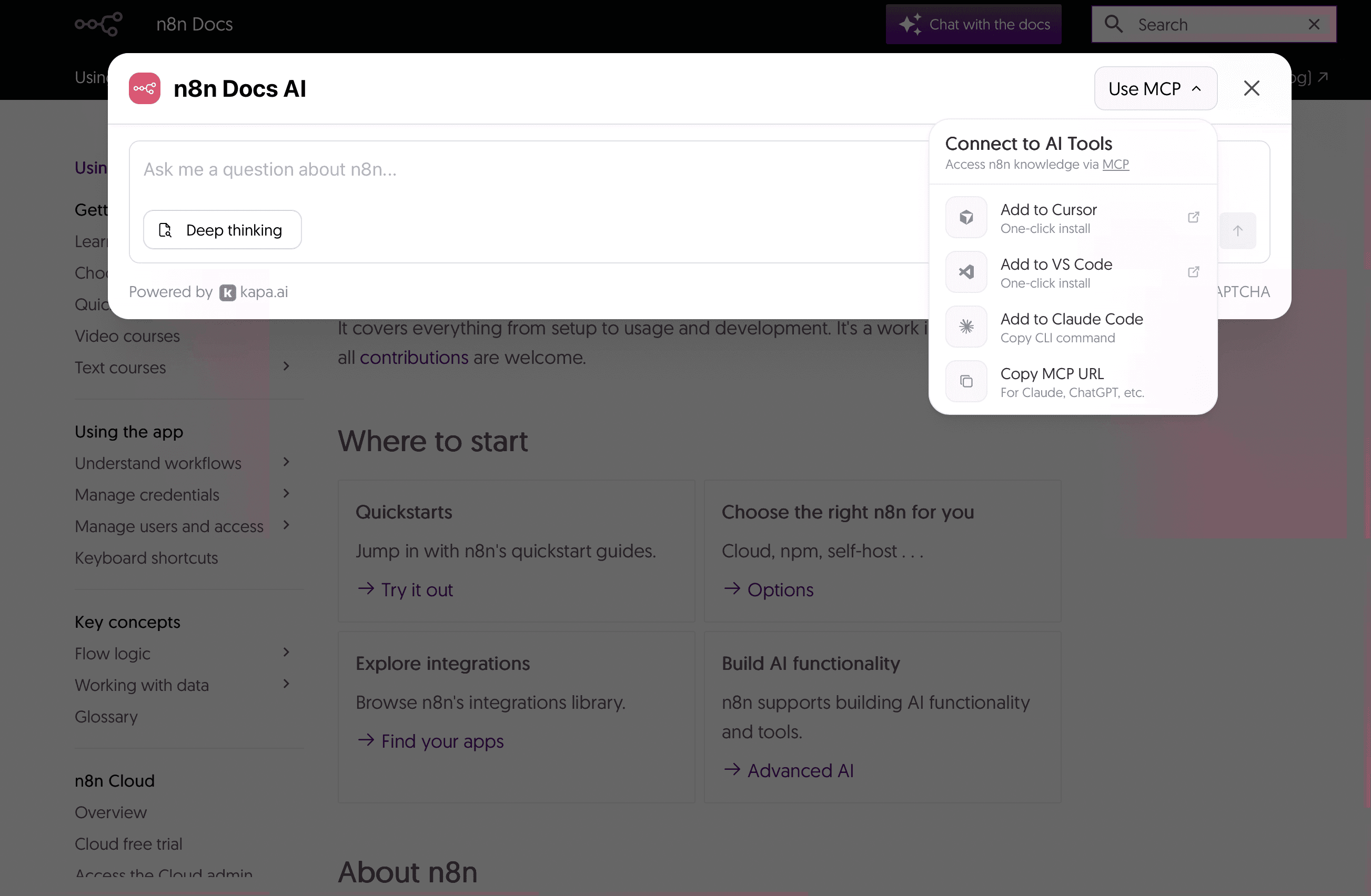
n8n’s Ask AI widget allowing one click connection to their
documentation MCP server
Context7 has emerged as a popular community-driven MCP server that pulls version-specific documentation for many popular frameworks such as Next.js, React, Tailwind, and more. Using it is simple: you just need to add use context7 to your prompt along with the question, and the AI will retrieve accurate information for the selected framework. Since its release, it has received significant traction, mostly through developer advocacy and community promotion. Many companies have now made their documentation available through Context7 with dedicated announcements.
However, since these servers are not maintained by official teams, they can quickly become outdated or incomplete. They typically pull data from a single source (most often from public documentation sites) and can miss insights available in GitHub issues, pull requests, API specifications, actual code, or other knowledge bases. These limitations highlight an important point: a reliable MCP server has to have access to accurate information and multiple data sources.
Everyone in the industry seems to be embracing the same principle:
AI assistants should have direct access to official documentation.
This brings us to another important question.
Should You Build Your Own?
If you are wondering whether you can build MCP server yourself, the answer is yes, but such a feat comes with significant engineering work. It would require solving six different technical challenges, each with its own level of complexity and trade-offs.
Challenge 1: Content Ingestion
The very first challenge is that the majority of documentation exists in different formats. It can be available as PDFs, Notion pages, GitHub commits and pull requests, code snippets, and more, each with its own set of complexities that need specific extraction logic. Plus, if you have multilingual documentation, careful text extraction techniques are required so that the semantic coherence between the languages is maintained.
On top of that, documentation tends to change frequently. Your data extraction pipeline needs to detect those changes, re-process the updates, and re-index without any manual interventions. Data ingestion is a crucial step, and many applications fail to transform multi-format data to a retrieval format while maintaining their layout and semantic context.
Challenge 2: Chunking and Embedding
Once you have a data ingestion pipeline ready, the next challenge is to break the content into chunks and then convert those chunks into vector embeddings. There are several chunking strategies. For instance, rule-based chunking, such as pre-chunking, uses fixed-size chunks with some overlap tokens, whereas semantic chunking is done based on similarity scores at semantic boundaries.
Finding the right chunk and the overlap size would require a testing framework where you can evaluate the performance of a few different options. Also, a custom chunking strategy might be optimal depending on the type of content, such as pre-chunking for text or markdown files, semantic chunking for PDFs with complex layouts, and so on.
Finally, these chunks need to be converted into vector embeddings. Depending on the use case, you can either choose general-purpose models, such as OpenAI’s text-embedding-3-large, Gemini’s gemini-embedding-001, or Cohere’s Embed v3. Domain-specific models that are optimized for a specific task, such as voyage-code-3, optimized for code retrieval, should be considered as well.
Challenge 3: Deciding on a Database
Now that you’ve got your embeddings, you need to store them in a vector database that is optimized for similarity search. You can choose a managed service, such as Pinecone, which takes care of scaling but can be costly, or rely on a self-hosted solution like Qdrant, which is cheaper but requires more engineering effort. The choice depends on your budget and your team’s capacity to manage infrastructure.
Challenge 4: Creating the Retrieval Pipeline
This is generally the hardest and most time-consuming stage, as it often takes weeks to achieve good accuracy levels. The retrieval pipeline is usually applied iteratively: you start by building a simple pipeline while evaluating results using a clear set of metrics. Then, you gradually introduce advanced techniques, such as query transformation, contextual retrieval, and reranking while performing A/B testing. Refining the retrieval pipeline is an ongoing optimization process that needs proper testing to reach a stable solution.
Challenge 5: How to Build an MCP Server
Once you’ve confirmed your retrieval pipeline works, you need to implement the MCP server, including the authentication layer, and decide on the infrastructure for hosting. First, you need to build tools and resources that can list documentation sources, fetch specific pages, and retrieve different content while following the exact protocol schema defined by Anthropic.
For a production use case, you would also need to build an authentication layer with OAuth 2.1 authorization code. This will ensure secure log-in, token issuance, and storage of credentials. The authorization server can be either embedded within the MCP server or handled by an external service, such as AuthKit or Keycloak.
Now, you need to decide how you want to host your MCP server. Your options range from serverless functions in AWS or Azure to container orchestration with Kubernetes. The right choice depends on your data volume and budget.
Challenge 6: Monitoring the Application
Your MCP server is live, but the work doesn’t stop here. Different components, such as retrieval, generation, or even authentication, now have to be continuously monitored to make sure they are working properly.
Open-source frameworks like Ragas and DeepEvals can be a good starting point, as they provide standardized approaches and out-of-the-box metrics for evaluating the server. However, generic metrics may not capture domain-specific quality requirements. For this reason, it’s often recommended to create your own evaluation framework with custom metrics and scoring criteria tailored to your documentation’s technical domain.
The bottom line is that building a docs MCP server is entirely possible, but it would take a lot of work. You would actually need to build the complete RAG system, from content ingestion to quality monitoring, which can easily take at least 2-4 weeks for an experienced ML engineering team.
But what if I told you that you can build and deploy your MCP server in just five clicks without needing an engineering team at all?
Building It with Kapa.ai
With Kapa.ai, you can launch a production-grade documentation server in just five steps:
Log in to the Kapa dashboard.
Click “Add new integration.”
Select Hosted MCP server.
Choose your sub-domain.
Pick your auth type.
Tada! Your MCP server is live and ready to be used by Cursor or Claude Code.
Check the video below to see the steps in action.
Production-grade documentation server
As you can see, you don’t have to build all these components from scratch; Kapa handles the entire pipeline for you. This includes support for 50+ document types, smart chunking strategies tailored to each document, automatic refresh and re-indexing when your documentation updates, out-of-the-box authentication setup, and a full analytics dashboard for tracking quality and user interaction.
Your engineering team can stay focused on building your core business product instead of spending weeks working on a production-grade RAG pipeline.
Build or Buy? It’s Up to You!
Building an MCP server makes sense if you have a dedicated ML engineering team comfortable with RAG systems and the MCP protocol, want to handle all the complexities in-house, and are willing to spend time building a production-grade RAG pipeline from scratch.
However, a hosted solution like Kapa is ideal if you want to avoid the complex engineering work and prefer automation on this front. This would also allow your team to focus on your actual product and not on RAG pipelines.
Most teams underestimate the amount of work that goes into building a documentation MCP server with the complexity of a RAG pipeline. Imagine discovering poor retrieval accuracy after months of work. A self-built MCP server can end up taking much more time than expected, whereas Kapa lets you validate the value of your MCP immediately, without wasting your time and resources on the whole project.
Ready to get started?
Visit Kapa.ai to launch your documentation MCP server today.
FAQ
What is a documentation MCP server?
A documentation MCP server gives your AI assistant real-time, version-accurate access to your technical documentation. MCP is a standard way for AI agents to connect to external data and tools through an open and unified protocol. With a documentation MCP server, the AI assistant can browse through all available docs, fetch specific pages, find the latest technical information in real-time, and pull version-specific APIs.
How does an MCP server work with AI coding assistants?
An MCP server provides tools and resources that Cursor, Claude Code, or Claude Desktop can use. They query the MCP server to retrieve documentation when you need it. This keeps developers inside their IDE.
How long does it take to build an MCP server?
Building a documentation MCP server from scratch can take at least 2-4 weeks for an experienced ML engineering team with 2-3 senior engineers who are experts at RAG systems and MCP development. If it's a single person learning as they go or a team balancing this alongside other projects, you're realistically looking at months.
Should I build or buy a documentation MCP server?
Build your MCP server if you have a dedicated ML engineering team comfortable with RAG systems and the MCP protocol, and if your roadmap allows you to spend time on this. Use a hosted MCP solution if you don't want to handle the complex engineering work and would rather keep your team focused on your core product. Keep in mind that most teams underestimate the work involved. A poor retrieval pipeline after months of effort may result in an MCP server that brings in inaccurate results.


