All articles
Top 5 AI Documentation Chatbots [2026]
Explore the top AI documentation chatbots of 2026 that provide accurate, context-aware answers and reduce support tickets for developers.
Dejan Lukić
The "ChatGPT effect" has rapidly replaced developers’ long-standing go-to solutions for problem solving, StackOverflow and Google search, at a pace rarely seen with new tooling. Instead of manually searching for documentation, code snippets, or perhaps, answers to particular issues, developers can now chat directly with large language models (LLMs). However, generic AI cannot replace deep technical understanding. We need something more than a surface-level ChatGPT-like interface.
And yes, having all answers in one place is neat, but the limitation of LLMs lies in their fundamental design: they only know what they have been trained on, and relying on web search alone is often not reliable. To expand an LLMs "brain memory", a technique called retrieval-augmented generation (RAG) is commonly used. RAG allows an LLM to retrieve curated data and amplify the LLMs output with fresh, context-specific content.
These days, when exploring documentation tooling, AI chatting capabilities have become a predominant factor. Developers are technically-demanding end-users, and hallucinated output or pure clutter is something they sense from afar. In this honest guide (best enjoyed over a cup of coffee), we will take a look at top 5 AI documentation chatbots in 2026: the 5 tools designed to make documentation conversational, context-aware, and genuinely helpful.
What Makes a Great AI Documentation Chatbot?
Before going into the comparison, here is the evaluation framework we used while researching for this article. Though simple, it gives you enough criteria to weigh your needs while you do your own research.
Evaluation Framework
Criteria | What to Look For |
|---|---|
Answer Accuracy | Does it hallucinate? Or does it know when to say, "I don't know"? |
Source Coverage | Can it ingest docs + GitHub + Slack + other third party sources? |
Deployment Flexibility | Is it widget only? Or does it also support MCP, Slack, Discord, API, support forms, and a custom fronted? |
Analytics and Insights | Can you find content gaps, track CSAT, and debug bad answers? |
Enterprise Readiness | Does it meet requirements like SOC 2, SSO, and privacy controls? |
Technical Depth | Does it handle code samples, API references, and version-specific answers? |
Top 5 AI Documentation Chatbots for 2026
Now that we’ve got the framework covered, let's check out the top 5 AI documentation chatbots.
#1: kapa.ai — Best for Technical Documentation Accuracy
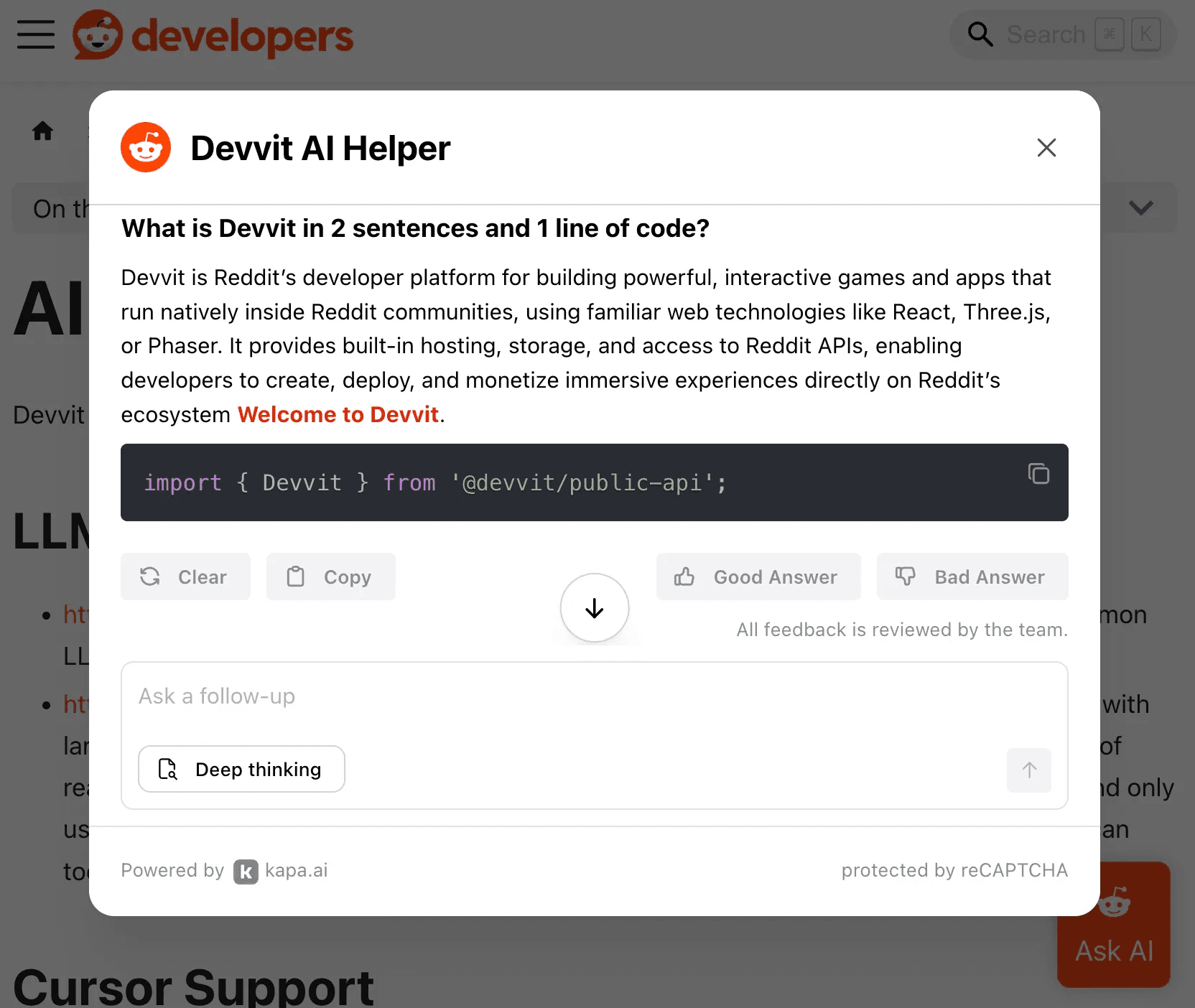
Kapa's Ask AI feature shown on Reddit
kapa.ai is a purpose-built technical RAG platform trusted by 200+ companies, including OpenAI, Monday.com, Nokia, and Sentry. It handles more than 2 million questions per month with a strong focus on answer accuracy for complex technical content. This AI assistant is powered by a heavily optimized, state-of-the-art RAG engine.
You can integrate kapa.ai into any platform. Apart from answering your questions, it also helps you with documentation coverage gaps. Another great thing about it is that it comes with pretty extensive analytics.
Key Strengths
Unmatched answer accuracy: This is a model-agnostic approach with a dedicated PhD research team that continuously optimizes retrieval and generation. It consistently wins head-to-head bake-offs against competitors.
"I don't know" capability: kapa.ai has been explicitly designed to acknowledge uncertainty rather than hallucinate, which is critical for technical docs where wrong answers cause real damage.
50+ source connectors: It ingests docs, GitHub, Slack, Discord, Confluence, Zendesk, Salesforce, YouTube, and more. Public and private sources can be combined in a single project.
Actionable analytics: It offers coverage gap detection with AI-generated recommendations, source-level insights, CSAT tracking, conversation debugging, and uncertainty monitoring.
Platform agnostic: This solution works with any docs platform (Mintlify, Fern, Docusaurus, GitBook, ReadMe, or custom sites).
Limitations
Not a documentation hosting platform: You bring your own docs, but this means zero lock-in and the flexibility to switch platforms anytime.
Best for |
|---|
Enterprise teams building technical products where answer accuracy is non-negotiable and reliability matters. |
Example Deployments
n8n Docs: AI assistant answering thousands of daily questions (see it in action)
Logitech: AI chat and MCP server added to their docs
Nokia: Technical documentation AI across multiple product lines
Statsig (acquired by OpenAI): kapa.ai used in their Mintlify-hosted docs
#2: Algolia DocSearch + Ask AI — Best for Search-First Teams With In-House AI Capacity
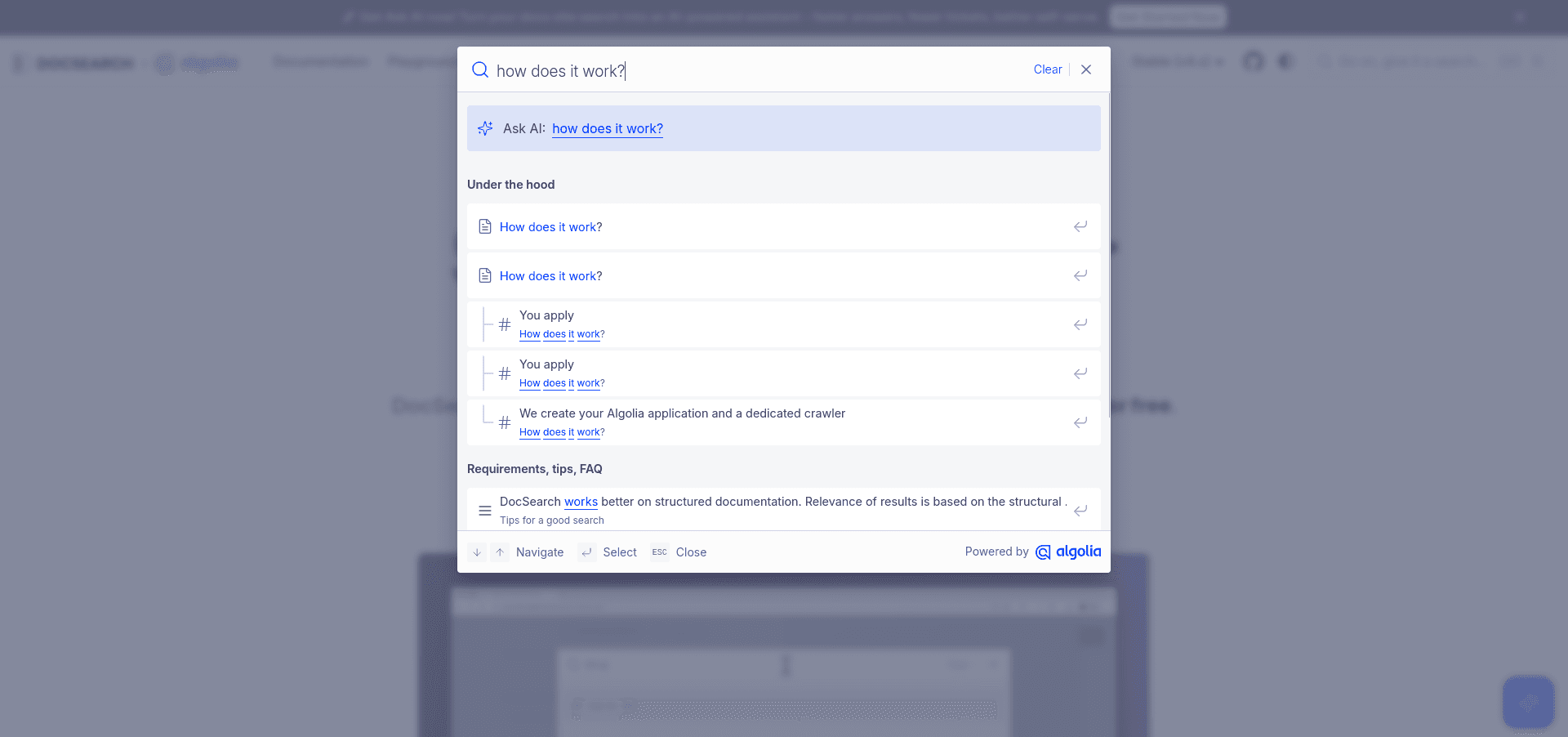
Algolia DocSearch's Ask AI interface
Launched back in October 2025, Algolia's Ask AI adds a generative AI layer on top of its industry-leading documentation search. With a free tier available for open-source projects, this solution is built on more than a decade of search infrastructure.
Algolia is designed to take on technical content and API references. With this neat solution, you are the owner of the AI stack: there’s no vendor lock-in, you choose which models power your assistant.
Key Strengths
Excellent search experience: With Algolia, you get market-leading keyword search with AI layered on top.
Free tier for open-source: Free DocSearch is available for qualifying projects.
Easy initial setup: One-line integration is supported with Docusaurus and other popular docs frameworks.
Version/language filtering: Native support is provided for multi-version and multi-language documentation.
Accessibility: DocSearch follows the WAI-ARIA accessibility standards.
Limitations
Ownership of the AI stack: You bring your own LLM API key (OpenAI, Anthropic), configure models, set token limits, and manage prompting. You are the one who is responsible for preventing hallucinations.
In-house AI expertise required: It’s best suited for teams that have the capacity to train and monitor. Answer quality may degrade if there are no evaluations and ongoing monitoring.
Barebones analytics: There’s almost no insight into answer quality, coverage gaps, or conversation patterns.
Docs-only: It can’t ingest Slack, Discord, GitHub issues, support tickets, or internal sources.
Widget-only deployment: Algolia is available as a website widget only. There are no Slack/Discord bots, support form integration, or API for custom builds.
New to AI chatbots: Ask AI launched in October of 2025 and is still significantly less mature than dedicated AI documentation tools.
Best for |
|---|
Open-source projects with small docs footprints, where hallucination risk is lower, or teams with dedicated in-house AI/ML capacity to monitor and improve the system. |
#3: Inkeep — Best for Teams Building Broader AI Agent Workflows
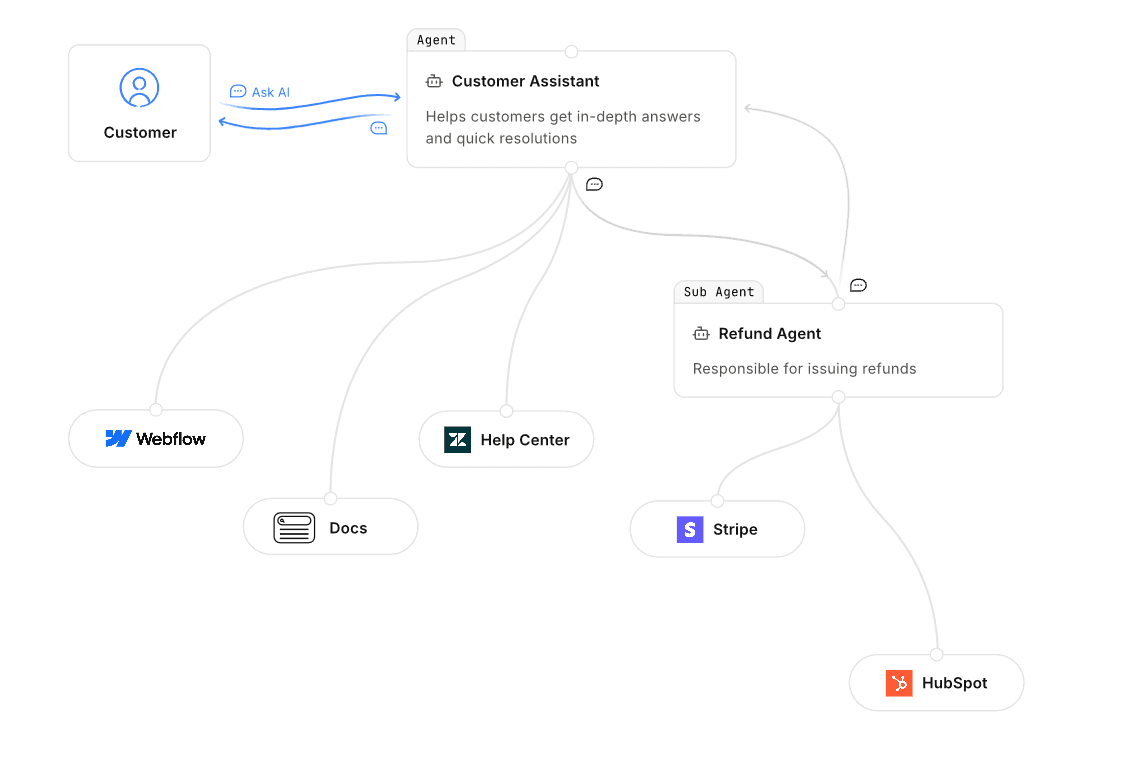
A sample Inkeep Agent diagram
Inkeep positions itself as an AI agent platform that is not just for documentation; it can also be used for customer experience, product, and GTM. It offers a no-code visual builder and TypeScript SDK for creating multi-agent workflows.
A key difference from other tools on this list is that Inkeep is not only focused on chatbots. It’s actually a wider tool suite that allows you to build complex AI-driven workflows.
Key Strengths
Open-source: Inkeep Agents functionality is fully open-source.
Agent platform architecture: Similarly to OpenAI Agents SDK or n8n, it supports building complex multi-step AI workflows, not just chatbots, which broadens its applicability.
No-code builder: With its intuitive drag-and-drop builder, it’s designed for non-developers.
TypeScript SDK: It has a 2-way sync with the no-code builder and developer-friendly programmatic access for custom agent builds.
Limitations
Answer accuracy concerns: In head-to-head testing, users consistently report poorer AI accuracy compared to industry leaders like kapa.ai.
Slow, barebones analytics: Dashboard performance can be sluggish, with fewer insights compared to kapa's coverage gaps and source analytics.
Less hands-on support: Customer success involvement is lighter than kapa's white-glove approach.
Complexity trade-off: The flexibility of an agent platform comes with a steeper learning curve for simpler use cases.
Limited cloud: Inkeep Cloud is currently behind a waitlist. Since this will probably change, quick iteration is limited to the open-source version.
Best for |
|---|
Teams that want flexibility in tailoring custom agent workflows across CX functions, with AI assistants as an add-on feature |
#4: Mintlify — Best for All-in-One Docs Platform (If You Don’t Mind AI Limitations)
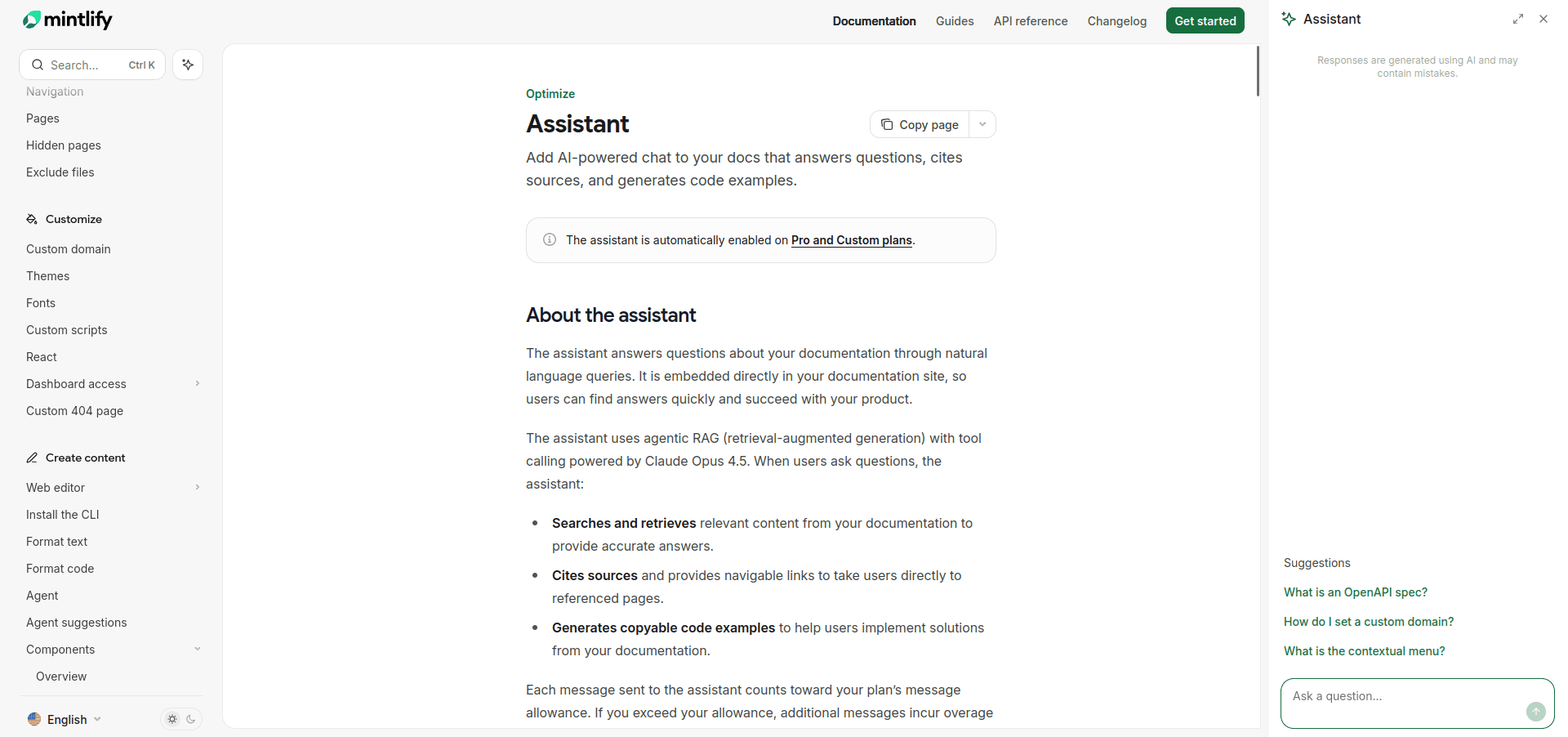
Mintlify's sidebar Assistant shown working
Mintlify is a modern documentation hosting platform with built-in AI search. Its AI assistant comes bundled, so no separate integration is required if your docs are already hosted there.
This makes it great for teams that are using it as their documentation platform and want an out-of-the-box AI experience without the hassle of connecting external tools. Keep in mind, though, that if you want to use AI features, you’ll be tied to Mintlify.
Key Strengths
Bundled with the platform: AI comes included with docs hosting, providing a single vendor solution for docs + AI.
Beautiful design: It’s known for sleek, modern documentation sites out of the box.
Easy initial setup: AI works automatically on Mintlify-hosted content.
Automatic knowledge updates: When you change content, Mintlify automatically updates its index.
Limitations:
Poor answer quality: Multiple customers have reported that kapa outperforms Mintlify AI in A/B testing significantly. Teams like Statsig (recently acquired by OpenAI) chose to deploy kapa on their Mintlify docs rather than rely on the built-in AI.
High usage-based AI pricing: Costs can escalate unpredictably with heavy usage.
Hard platform lock-in: AI only ingests docs hosted on Mintlify, so you cannot work with any external content.
No external source support: Mintlify cannot ingest GitHub, Confluence, Notion, or other external content.
No internal source support: It also cannot connect Slack, Discord, and Zendesk tickets or private knowledge bases.
No support integration: It can't be deployed as ticket deflector or assist with customer support queries.
No internal assistant: There is no private chat interface for internal teams.
No Slack or Discord bots: It’s deployed as a website-only widget.
Basic analytics: Analytics are limited to top searches and low-confidence queries; there is no actionable gap analysis or conversation debugging.
Best for |
|---|
Teams that prioritize single-vendor simplicity over AI quality, with all knowledge hosted entirely within their Mintlify docs. |
#5: Fern — Best for API Documentation + SDK Generation (If AI Is an Afterthought)
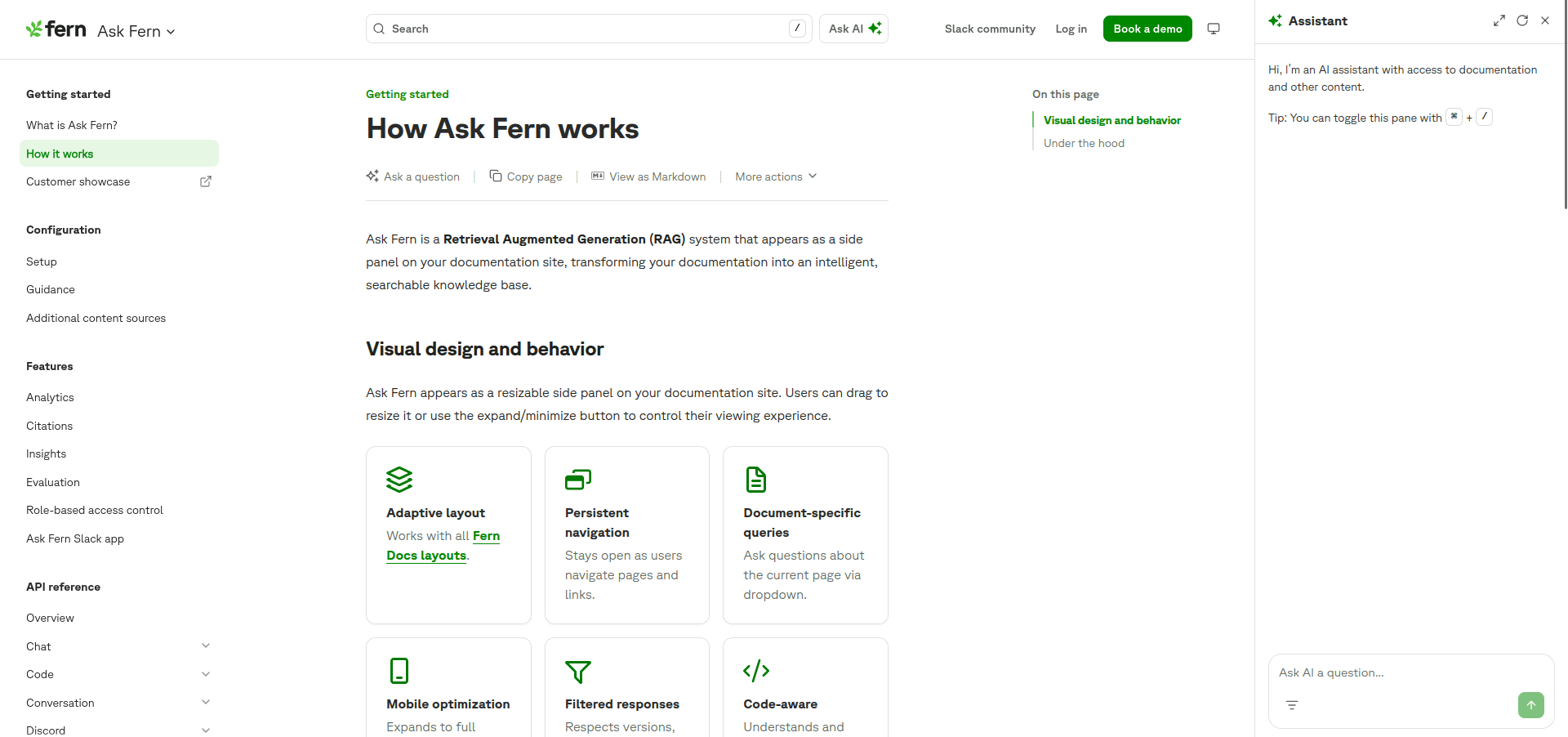
Ask Fern feature in Fern
Fern is an API-first platform that generates SDKs and documentation from OpenAPI specs. Its "Ask Fern" AI assistant is trained on your docs and generated SDKs.
Oriented toward power users, Fern has a great set of features, with a particularly unique ability to understand code and API references. For enterprise setups, a granular permission system is also available.
Key Strengths
SDK + docs from one source: Fern can generate documentation and client libraries from your API spec.
SDK-aware AI: Its assistant understands both documentation and generated SDK code.
Role-based access control: Responses automatically respect user permissions.
Enterprise features: It includes a self-hosting option, custom SLAs, and migration services.
Codebase-aware: It understands code and API references.
Limitations
Extremely barebones AI: It has the same fundamental limitations as Mintlify; AI is a checkbox feature, not a core competency.
Platform lock-in: AI only works with Fern-hosted documentation.
No external sources: It cannot ingest GitHub issues, Confluence, support tickets, or anything outside Fern.
No internal sources: Fern cannot connect private knowledge bases, Slack history, or internal wikis.
No multi-channel deployment: There are no Slack bots, Discord bots, support form integrations, or API.
No meaningful analytics: It lacks coverage gap analysis, conversation debugging, and customer satisfaction score (CSAT) tracking.
Pro/Enterprise only: AI is not available on the basic tier.
Best for |
|---|
API-first companies that generate SDKs, want docs and SDKs from one vendor, and view AI as a nice-to-have rather than critical infrastructure. |
Feature Comparison Matrix
Feature | kapa.ai | Algolia | Inkeep | Mintlify | Fern |
|---|---|---|---|---|---|
Primary Focus | AI accuracy | Search | Agent platform | Docs platform | SDK generation |
DocumentationPlatform | ❌ (works with any) | ❌ | ❌ | ✅ | ✅ |
Works with Any Docs Platform | ✅ | ⚠️ Limited | ✅ | ❌ Mintlify only | ❌ Fern only |
Answer Accuracy Focus | ⭐⭐⭐⭐⭐ | ⭐⭐ (you manage) | ⭐⭐⭐ | ⭐⭐ | ⭐⭐ |
"I Don't Know" Handling | ✅ Explicit | ⚠️ You configure | ⚠️ Basic | ⚠️ Basic | ⚠️ Basic |
Source Connectors | 50+ | Docs only | 20+ | Docs only | Docs + SDKs |
Internal/Private Sources | ✅ | ❌ | ✅ | ❌ | ❌ |
External Sources (GitHub, Confluence) | ✅ | ❌ | ✅ | ❌ | ❌ |
Website Widget | ✅ | ✅ | ✅ | ⚠️ Only on their docs | ⚠️ Only on their docs |
Slack Bot | ✅ | ❌ | ✅ | ✅ | ❌ |
Discord Bot | ✅ | ❌ | ✅ | ❌ | ❌ |
Support Form Deflector | ✅ | ❌ | ❌ | ❌ | ❌ |
Zendesk Integration | ✅ | ❌ | ❌ | ❌ | ❌ |
Internal Assistant | ✅ | ❌ | ❌ | ❌ | ❌ |
Full API Access | ✅ | ⚠️ | ✅ | ❌ | ⚠️ |
MCP Server | ✅ | ❌ | ✅ | ✅ | ✅ |
Coverage Gap Analysis | ✅ Advanced | ❌ | ⚠️ Basic | ⚠️ Basic | ❌ |
Conversation Analytics | ✅ Advanced | ❌ | ⚠️ Slow/basic | ⚠️ Basic | ❌ |
SOC 2 Type II | ✅ | ✅ | ✅ | ⚠️ | ✅ |
Model Agnostic | ✅ | ❌ (you choose) | ⚠️ | ❌ | ❌ |
Dedicated Support | ✅ White-glove | ⚠️ | ⚠️ Limited | ⚠️ | ⚠️ |
Try kapa.ai at no cost for 14 days: book a demo now!
Real-World Results
kapa.ai Customer Results:
Mapbox: Deflected 30% of tickets.
Statsig: Chose kapa over Mintlify's built-in AI for their developer docs.
Netlify: Took under a week to get to production with zero maintenance.
Industry Benchmarks:
kapa’s top-tier AI docs chatbots deflect 20%-40% of support tickets.
For well-maintained documentation, the uncertainty rate should be <10% .
Time to first answer should be under 3 seconds for an optimal user experience.
Implementation Checklist
Use the checklist below to guide you towards a successful implementation of an AI documentation chatbot:
Audit your sources: Where does your knowledge live? (docs, GitHub, Slack, Confluence, tickets)
Define success metrics: Decide what matters, is it ticket deflection, CSAT, time to answer, or coverage gaps found?
Start with public docs: The lowest-risk content is the easiest to implement.
Evaluate answer accuracy: Pay special attention to multi-step questions and edge cases.
Check analytics depth: Can you detect and fix content gaps?
Plan for scale: Confirm the system can actually handle Slack/Discord deployment or an internal assistant down the line.
Next Steps and Resources
So, now that you’ve considered all the factors, what would you say is your biggest necessity? Is it answer accuracy, BYOK support, or all-in-one place solution?
With a balanced comparison matrix and a solution designed for accuracy and flexibility, kapa.ai serves as a market leader in RAG, answering hundreds of thousands questions every week. It can also be set up pretty quickly.
Book a demo and spare your users the frustration of hallucinated answers.
FAQ
1. Why can't I use generic tools like ChatGPT?
You absolutely can, but integrating them is not as straightforward as integrating specialized AI Docs tools. Generic LLMs are trained on static, public data, lacking awareness of your internals.
Without a proper RAG in place, ChatGPT and similar tools will hallucinate answers or provide outdated information.
2. What is RAG, and why does it matter for technical documentation?
RAG (retrieval-augmented generation) is a framework for AI that optimizes LLM outputs by connecting them with external knowledge sources. It allows an LLM to retrieve relevant, up-to-date content from your data sources and reduces hallucinations.
Technical documentation demands as much precision as possible. Using AI chats that implement RAG significantly reduces the risk of providing false information.
3. How do AI chat tools handle uncertain answers?
Properly accuracy-optimized tools are designed to say "I don't know" when their confidence is low and point you toward possible alternatives. This is especially important for technical content, where usefulness and factual precision are often key to adoption.
4. Can AI documentation chatbots replace human support teams?
No, but they can reduce repetitive questions and guide them as a self-service. Market leaders like kapa.ai deflect a massive percentage of support tickets, allowing human customer support to focus on more complex queries, rather than FAQs and problems that could be found in the docs.


