AI That Helps You Understand How Devs See Your Documentation
Discover how AI tools like Kapa uncover documentation gaps, reduce support tickets, and improve developer experience by analyzing real user questions in real time

by
Dejan Lukić
Technical writers, documentation engineers, and everyone who makes up the documentation team have a specific blind spot. They understand their own product, head to bottom, which might not seem like a problem, but it makes it nearly impossible to see the docs from the eyes of a first-time user encountering it.
Usually the people writing and maintaining the docs aren’t the ones debugging at 2 AM, copy-pasting errors into Google, hoping that someone has posted a solution on Stack Overflow a decade ago, or relying on tools like Claude Code to make sense of the code.
“Nobody's going to go into a docs page anymore. They're going to ChatGPT and asking for answers. But ChatGPT doesn't have the latest. With Kapa, we're trained on our stuff. We get to control it. We have the boundaries, we have the guardrails."
— Dana Lawson, CTO, Netlify
Naturally, humans struggle to spot these subtle blind spots. That's why here at Kapa, we use existing data to find documentation gaps. Kapa acts as a bridge between developers and your documentation, observing where they get stuck, what questions they ask, and what the docs fail to answer.
In this article, I will go over the challenges that developers face and show how Kapa can help you understand your documentation from their perspective.
Documentation Maintainer’s Nightmare
Proofreading is not the way to clarity. Developers are often confused by things that seem completely obvious to the people who made the product, and documentation maintainers frequently struggle to understand why.
Maintaining large documentation sets is inherently difficult. As explained by the Write the Docs guide on complex information, documentation exists within layered user contexts. Background knowledge, goals, constraints, and expectations all influence whether something feels clear or confusing. What seems perfectly straightforward to you may be confusing to someone approaching the product from a different perspective.
Without proper instrumentation and analytics, documentation quality is often measured indirectly through:
Support ticket volume
Slack conversations
Net Promoter Scores (NPS)
These all are lagging indicators, and not one of them tells you which page or paragraph is unclear. Pain points stay under the radar until they’ve already caused damage:
A developer gives up;
A trial does not convert;
A support ticket takes 3 days to resolve.
Sound familiar? Maintainers often rely on gut feeling, but though instincts might be valuable, they are not measurable. Sales can provide anecdotal feedback, and the GitHub issues might surface some problems, but none of them will give you a systematic and reliable insight into where and why developers are struggling.
As the end-users, developers rarely report what is unclear. They just leave or escalate.
How Kapa Reveals Documentation Gaps
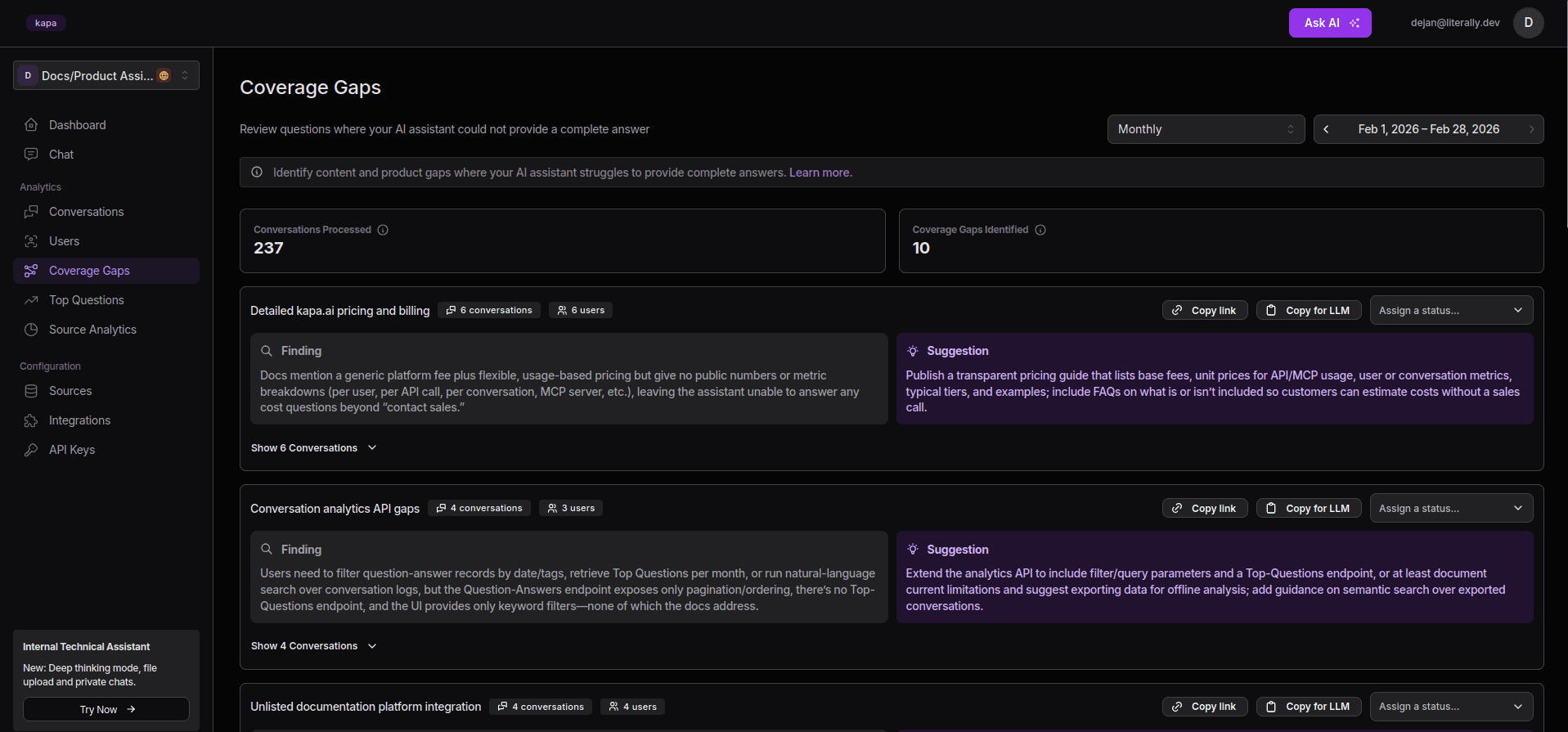
Kapa’s Coverage Gaps
AI can search for documentation gaps on autopilot: no more uncertainty, forgetfulness, or other limitations that come with a human maintainer. That said, human maintainers still have a role. AI alone cannot apply changes or write content. Creativity remains a human strength.
Tools like Kapa, designed specifically to find documentation gaps, analyze questions developers ask in real time. They do not rely on surveys or session recordings; instead, they process literal questions fed by developers into AI in real time.
The Coverage Gaps feature in the Kapa dashboard automatically clusters unanswered questions, surfaces findings, and suggests fixes.
Kapa is able to identify topics that generate the most questions, pinpoint pages that lead to follow ups (a sign that the original page did not resolve the issue), and track questions that are left unanswered. This is all combined into comprehensive analytics.
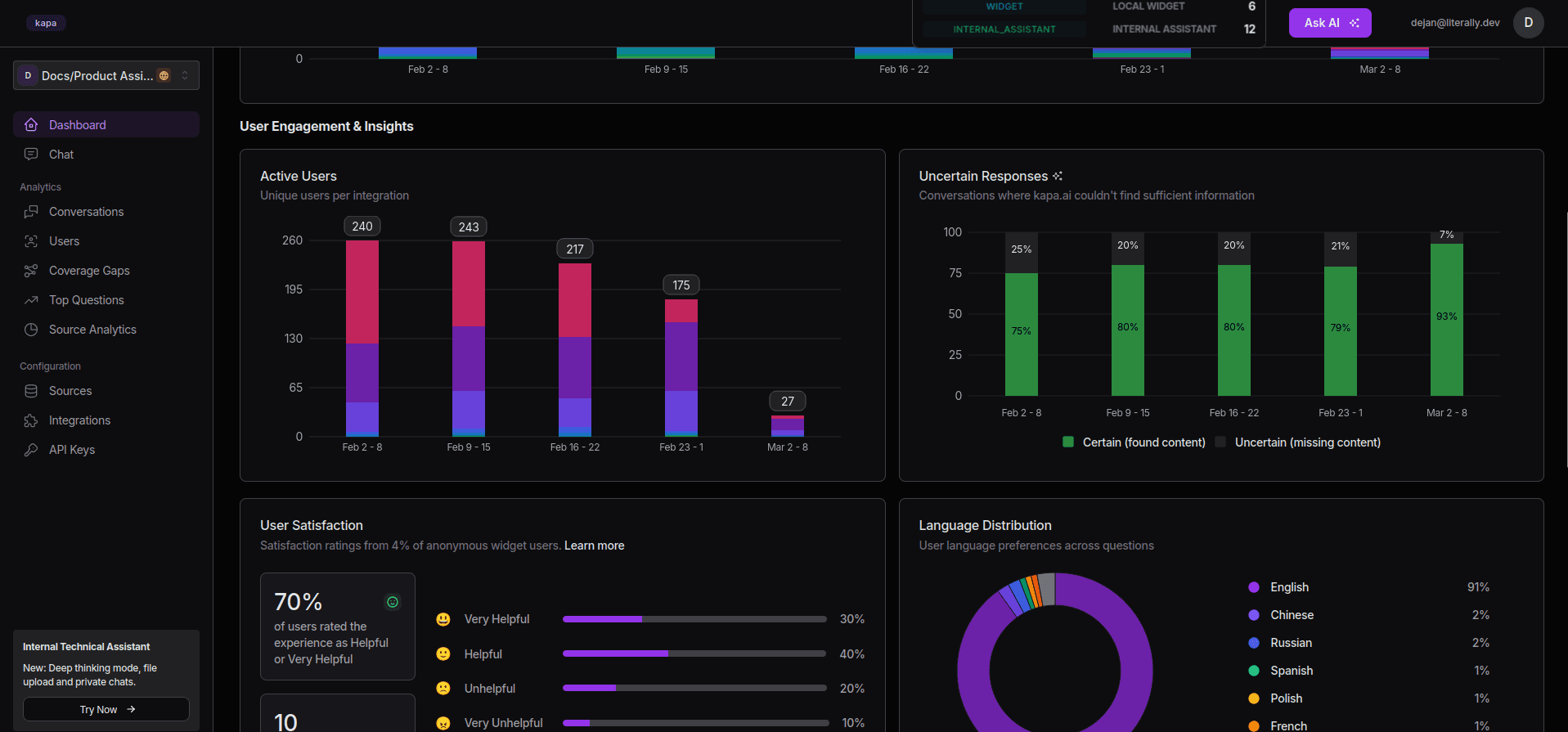
Kapa’s extensive analytics
Unanswered questions also hold valuable information, as they point to content that does not exist yet or is difficult to find. With Kapa, which provides citations and is confident in its sources, this is typically a matter of source data quality, not the processing engine.
Kapa traces the question back to the documentation it referenced (or failed to reference), showing you exactly what made developers feel confused and where improvements are needed in the docs. It’s a win-win.
Top Questions
Kapa analyzes developer questions and identifies unclear sections in your documentation. It also surfaces top questions across all developer conversations. While these often reveal more about product use than documentation gaps, they remain incredibly valuable because they provide actionable feedback that can lead to continuous documentation improvement.
This is also where the value extends into product intelligence. Namely, top questions show features that are harder to use than you might realize, which could indicate poor UX. They also provide insight into terminology mismatches between how the product describes itself and how developers formulate it in their head.
For example, if hundreds of developers ask, “How do I do X?”, it indicates that X should be easier to use or have a better UI. This is not just a doc gap, it’s a real insight backed by useful data that has been carefully sourced and analyzed.
Impact on Support and Developer Experience
Mapbox Documentation deployment of Kapa’s Website Widget
Missing information in your docs often leaves developers with only one option: escalating to support. AI helps close these knowledge gaps early through real-time analysis: it gives them the answer to their question immediately instead of forcing them to open a support ticket. Some tickets will still be created, of course, but the goal is to minimize them and enable developers to self-serve rather than rely on support.
When the documentation improves, it becomes the first thing developers turn to for help. If it’s comprehensive enough, it can answer questions before the developer even starts to think about a support ticket. In addition, proactive documentation leads to deflection of repetitive questions. Developers also get unblocked faster, without waiting for human assistance. All this is critical for developer adoption and activation.
Finally, those developers who find answers immediately in the docs have a much greater experience than the ones who open a ticket, wait, and then follow up. By the time the process comes to an end, you may have already lost them.
Reducing ticket volume also reduces the cost per resolved issue and the cognitive load on support teams. For instance, Mapbox’s monthly support tickets dropped by 20% after deploying Kapa across their docs and community, a pretty impressive result.
Benefits of Understanding Devs’ Perspective
Developers operate in a complex and constantly evolving environment. A few years ago their workflow was quite different from what it is today. AI was reserved for ML specialists, whereas now, almost everyone uses a chatbot of their own. It’s important to note all this in order to understand a developer's perspective: how they think, how they operate, and on what basis.
Understanding this perspective leads to clearer and more effective docs. This way, a positive loop is created, where developers become more self-sufficient, which leads to greater satisfaction and fewer issues.
An investment in an AI analysis system like this one might seem intimidating at first. You may even think you need AI engineers to implement it, but that is not necessarily the truth. Kapa is a managed solution: you connect a few pieces together and it works. All this translates into lower support costs. Another good thing is that AI operates regardless of time zones and similar restraints.
Netlify went from zero → production in one week, with no maintenance overhead after deployment.
This kind of AI creates an extremely valuable source of product data that can improve product development and support company growth.
Conclusion
When documentation is written with first-hand developer issues in mind, the result is better architected and more concise content. Developers are informed by data, not assumptions or hallucinations. Platforms like Kapa reflect that: their AI engines know when to say, “I don’t know,” rather than hallucinating answers. Support costs drop too. You’ll benefit from fewer tickets, faster resolutions, and smaller teams.
If you want to test all the benefits that Kapa offers, book a demo with the team and let us take care of your docs.
FAQs
How do I find gaps in my developer documentation?
Most documentation teams rely on indicators like support ticket volume, Slack conversations, and NPS score. Tools like Kapa analyze the questions developers ask in real time, cluster unanswered questions and shows them. It traces each question back to the documentation it referenced (or failed to reference), showing you exactly where developers get stuck and what the docs fail to answer.
How can AI reduce developer support tickets?
If developers can’t find the information they need in your docs, they will reach out to your support. AI helps with technical users by giving them the answer to their question immediately, relying on its vast understanding of your technical documentation. When documentation improves, developers get unblocked faster without waiting for human assistance.
How do I measure documentation quality?
Documentation quality is often measured through support ticket volume, Slack conversations, and Net Promoter Scores. None of these numbers tells you which page or paragraph is unclear. Kapa provides actionable data by identifying topics that generate the most questions, pinpointing pages that lead to follow-ups, and tracking questions that are left unanswered, with analytics on top.
How long does it take to set up an AI documentation assistant?
Netlify went from zero to production in one week, with no maintenance overhead after deployment. Kapa is a managed solution, your devs connect a few pieces together and it works. You don’t need any AI engineers to implement Kapa.


