AI For Answering Technical Questions in Documentation
AI is changing how developers use documentation. Learn how tools powered by RAG deliver instant, accurate answers and make technical docs easier to navigate

by
Dejan Lukić
A developer's usual workflow has changed quite a lot in recent years. It has pretty much gone from digging through Stack Overflow to asking their AI chatbot of preference directly. Whether they use plain old ChatGPT or a desktop solution like Cursor and Claude Code, their workflow heavily relies on AI for guidance.
And this comes as no surprise. After all, AI is not only helpful within a developer's workflow; it can also bring marketing, docs, and support concerns under a single roof.
Technical documentation can be complex; and don’t get me wrong, this complexity is perfectly fine for tech guys. However, when it comes to managers, C-level executives, and support, AI can act as a translator that turns these complex technical details into something much easier to understand.
In this article, I will go over how AI integration can help answer technical questions directly in docs, without too much fluff.
Can’t Find Answers in Documentation?
So, you go to a product's documentation, and your goal is to find specific resources that simply have to be there. Unfortunately, you quickly bump into a roadblock. The documentation is lengthy, fragmented, and hard to navigate. Sound familiar? You try the search bar, hoping you’ll find something useful. Instead, you end up with completely irrelevant results. You’re frustrated, and you should be.
That’s your typical documentation page. It isn’t really optimized for anything; it just sits there, existing and occasionally being useful, but not trying nearly as hard as it should. Meanwhile, users keep on asking the same technical questions again and again, but it’s stubborn. It doesn’t learn from these patterns.
Plus, it’s not like real users are going through documentation in ideal conditions. Most of them are multitasking, juggling their work, kids who are late for school, lunch that’s burning on the stovetop, and so much more. They don’t read, they skim, and that’s how they miss the important details. And the fact that the critical information they’re looking for is often buried deep in pages that aren’t properly indexed only adds to the burden.
Another common problem is that these docs assume prior knowledge that not all users have, and that’s not necessarily the user’s fault. People generally expect to find what they need as quickly as possible. On top of that, these docs may explain how something works but not how to apply the solution in a real-life situation. They are technically correct but not practically helpful.
As you can see, finding an answer in traditional documentation takes far longer than it should. However, while you’re desperately looking for answers, you might notice the light at the end of this tunnel: an AI assistant. What’s all that about?
AI for Documentation Answering
It’s safe to say that most people today have at least a basic idea of what it is that LLMs do. You give them an input, wait for a bit for magic to happen, and then you get an output. This output generally gives you what you want, but sometimes, it can be completely off.
The technology behind this AI magic is constantly improving. Clever engineers have designed a system that allows AI to use your data, including your docs, to provide more accurate answers that are aware of the context. This magic is called retrieval-augmented generation, or RAG for short. It is what powers platforms that "know" your content.
First, let's see what it is that RAG does and doesn’t do.
What RAG does | What RAG doesn’t do |
|---|---|
Read and understand docs | Replace docs |
Make docs usable | Replace human writers |
Answer questions using existing sources | Make up answers outside your data |
Pull relevant context from multiple data sources | Guess information |
Improve access to existing knowledge | Create new product knowledge on its own |
The main point is that users ask questions in plain English (or even other languages), without needing to know where the answer actually lives. The AI acts as a conversational interface on top of the existing docs, making them more accessible rather than replacing them entirely.
How AI Answers Questions from Documentation
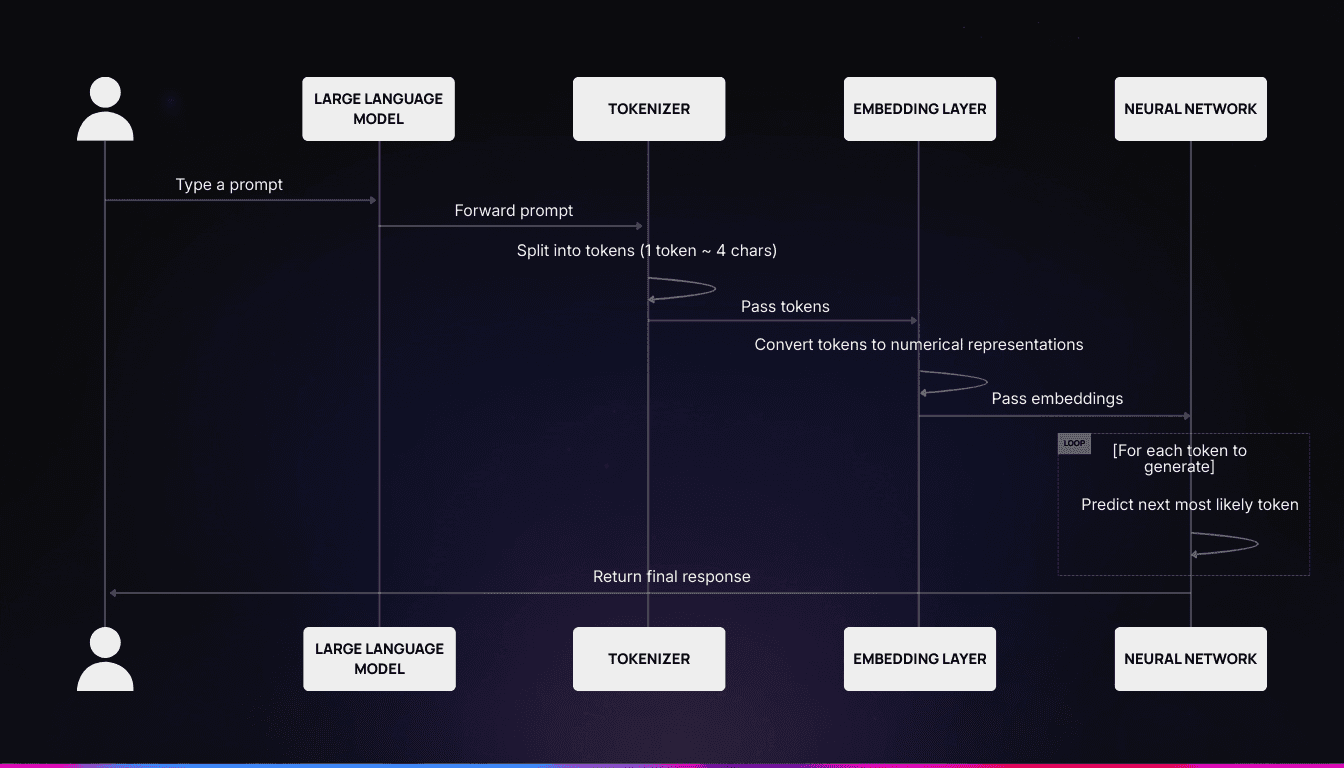
A sequence diagram showcasing how an LLM processes an input
Ever wondered what happens when you ask ChatGPT or any other AI chatbot a question? Here's a high-level overview:
You type a prompt that gets sent to a large language model (LLM).
The prompt is then:
Tokenized, or split into smaller pieces called tokens (1 token ≈ 4 characters);
Embedded, or turned into numerical representations.
The model then uses a neural network to predict the next most likely token. This is repeated for each token until the response is complete.
The final response is basically a statistical representation of what the LLM “thinks” should come next. The statistics come from the model's training data. The main limitation here is that the model only knows the data it’s been trained on: it cannot access your data directly, nor does it have real-time facts.
Now, remember the RAG I've mentioned above? It changes the game completely. Since a RAG engine has been added in between to fetch more data and append it to the user's original prompt, you get a more accurate and contextually aware LLM without retraining.
This also helps reduce hallucinations, which mostly originate from the model’s "overconfidence" and a lack of data on the topic. Generally speaking, an LLM does not want to appear dumb. However, this is a double-edged sword, and in the docs use case, you want an AI assistant that can say, "I don't know" when it doesn’t have the right answer to your question.
Many documentation tools out there offer an add-on AI assistant. However, they generally lack the ability to admit they are uncertain. Luckily, tools like Kapa have been purposely tuned to account for this limitation. They are confident when needed, but they aren’t afraid to say they don’t know something where applicable. This type of behavior is a key aspect for building users’ trust.
Benefits of Using AI in Documentation
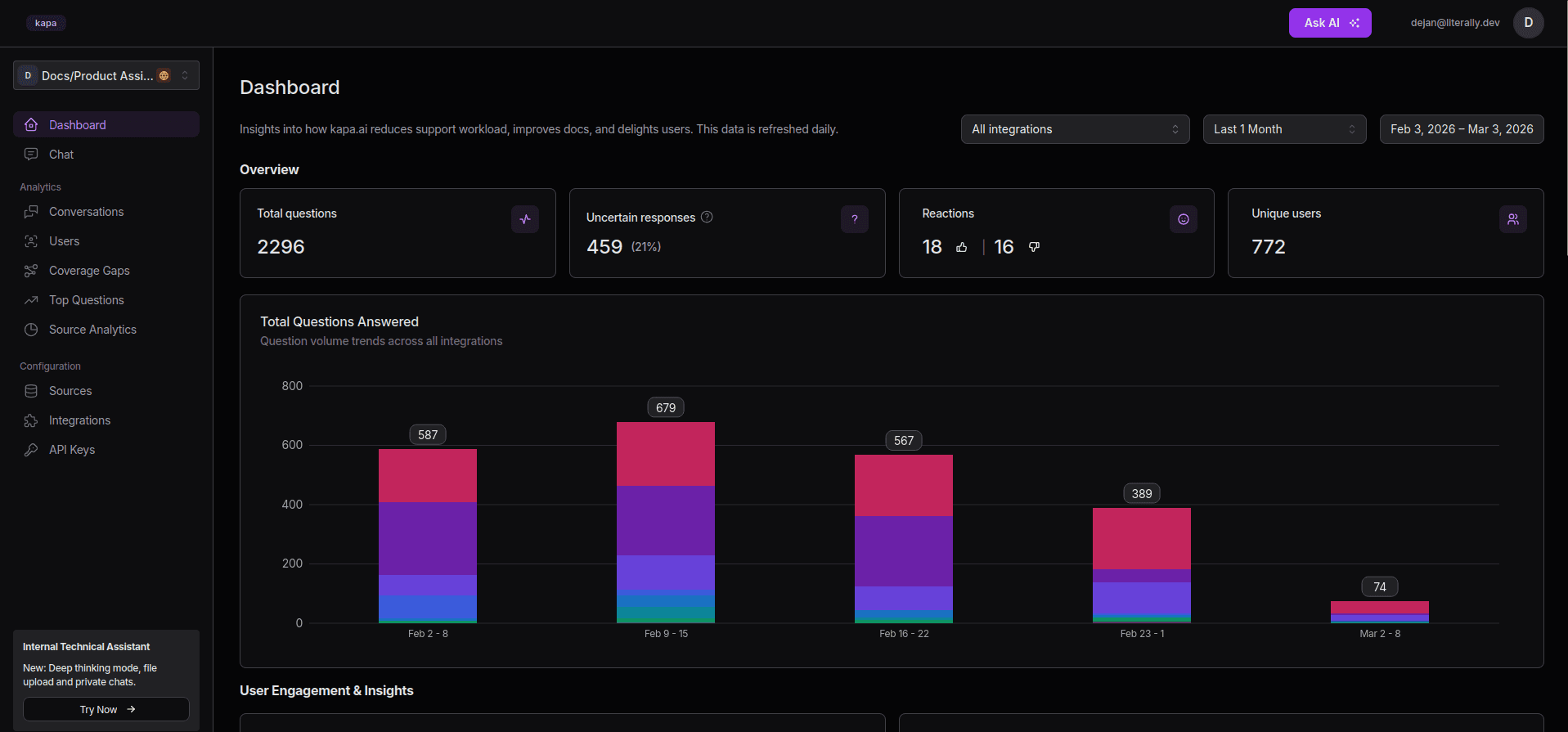
Kapa’s Analytical Dashboard
Let's explore the benefits that tools like Kapa bring, especially when paired with a right RAG engine. This makes a ton of difference since the quality and accuracy of your answers heavily depend on the output provided by such an engine.
Benefit | Why it matters |
|---|---|
Quick to answer developer questions without digging through docs | Developers already spend quite a bit of time in their AI tools. If your docs doesn’t provide accurate, contextually relevant answers, they will get generic ones elsewhere. |
Reduced repetitive support tickets | Repetitive tickets waste valuable support time that should be directed toward more important issues. |
Identified gaps or unclear areas in documentation | Every unanswered question is a signal of a doc gap. Kapa gives you a feedback loop from those unclear areas. |
Improved documentation ROI | You already wrote the docs; now, Kapa makes that content actually searchable and usable. |
Less frustration, more self-service | Documentation is not read, it is skimmed. Developers miss critical information buried in unindexed pages. Kapa gives them a plain-English answer instantly. |
But there’s no need for us to brag: see what the customers had to say about Kapa.
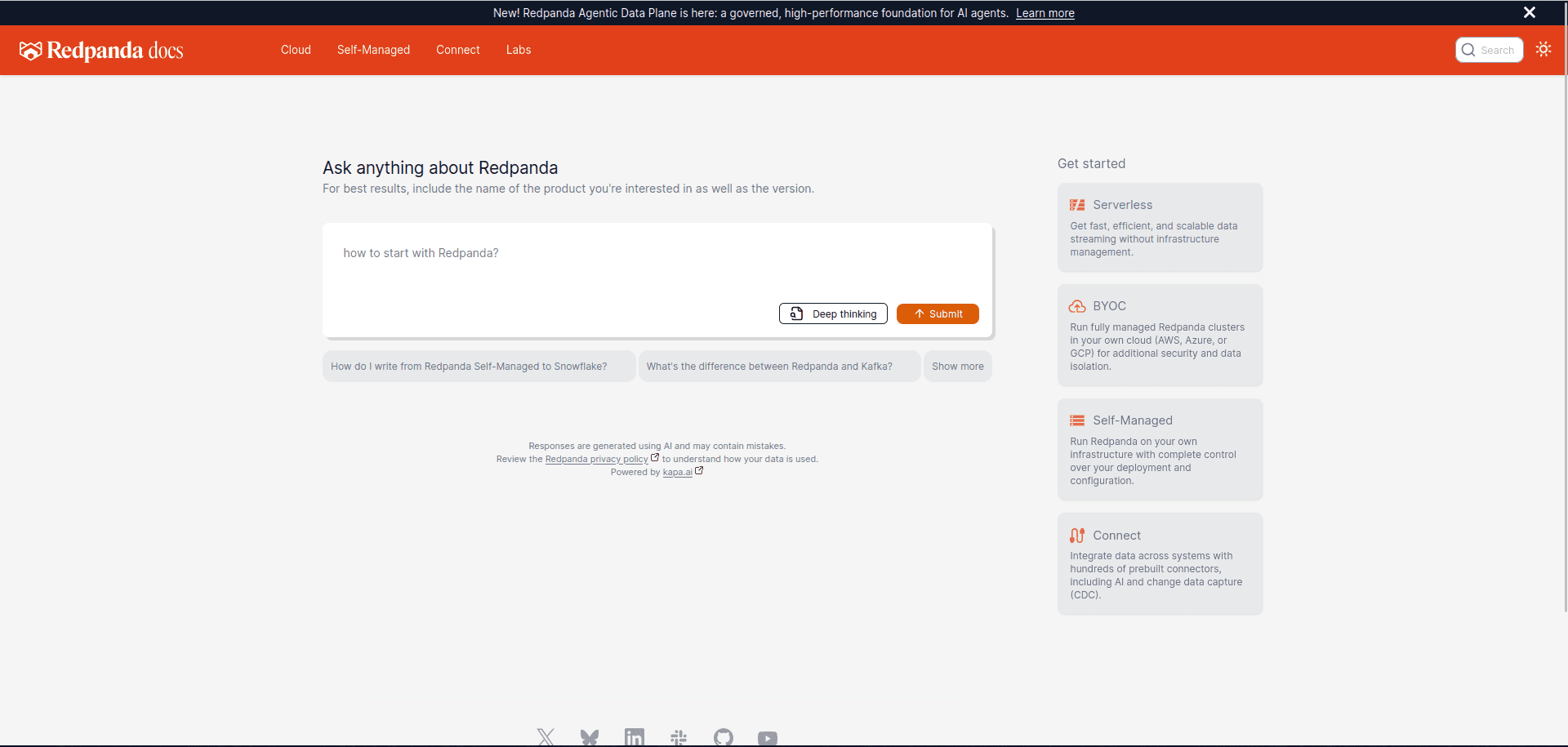
Redpanda’s AI-in-docs deployment by Kapa
"The value is irrefutable based on the numbers we're seeing. Kapa can answer up to 95% of questions based on the data in our knowledge base."
— Joyce Fee, Senior Technical Writing Manager, Redpanda
Getting Started
If you want to add an accurate AI assistant quickly on top of your documentation, start with Kapa. Simply connect a few data sources, deploy a, let's say, website widget, and you’ll be good to go in less than an hour.
Book a demo with the Kapa team, and we will show you how it works.
Frequently Asked Questions (FAQ)
What is the main advantage of using AI for documentation?
Speed. AI reduces the time needed for users to find what they are looking for.
How does AI know the answers from documentation?
AI uses large language models (LLMs) to understand natural user input. With an additional mid-step, retrieval-augmented generation (RAG), it can pull relevant context from your data, which gives it a deeper understanding of your documentation.
Can AI replace human-written documentation?
No. Human content still beats AI-generated content. AI should not be used as a replacement for writers; it should only serve as an enhancement tool for access and usability of documentation.
What if AI does not know the answer?
A good AI system, with a great underlying RAG engine (like Kapa), is designed to acknowledge when it does not know the answer. It prioritizes accuracy over making stuff up.
How quickly can I integrate AI into my documentation?
With a tool like Kapa, integrations take less than an hour. You connect a few data sources, deploy a website widget, and you are done.


