All articles
Remote MCP Servers: Hosting, Authentication & Best Practices
MCP makes AI more powerful by linking it to tools, resources, and workflows. Learn about local & remote servers and best practices.
Dejan Lukić
The explosive adoption of large language models (LLMs) is probably comparable to the rise of the internet itself. And once they became user-friendly, these models spread across every industry. Remember in 2022 when OpenAI only offered a Playground and an API for their GPT models? Though powerful, that UX was not really oriented toward someone who’s not tech-savvy. Yet, it paved a way for a much neater chat user interface.
Still, with no enhancements, LLMs can only help you with the data they’ve been trained on. A RAG system expands this by injecting external knowledge to the LLM, but that doesn’t help with how models should interact with other systems and tools.
Enter Model Context Protocol (MCP).
MCP might sound just like an API, but it is an open-source standard that allows AI systems to connect to external systems.
As the Linux Foundation (the organization behind the modelcontextprotocol.io) puts it:
"Think of MCP like a USB-C port for AI applications. Just as USB-C provides a standardized way to connect electronic devices, MCP provides a standardized way to connect AI applications to external systems."
What Is MCP?
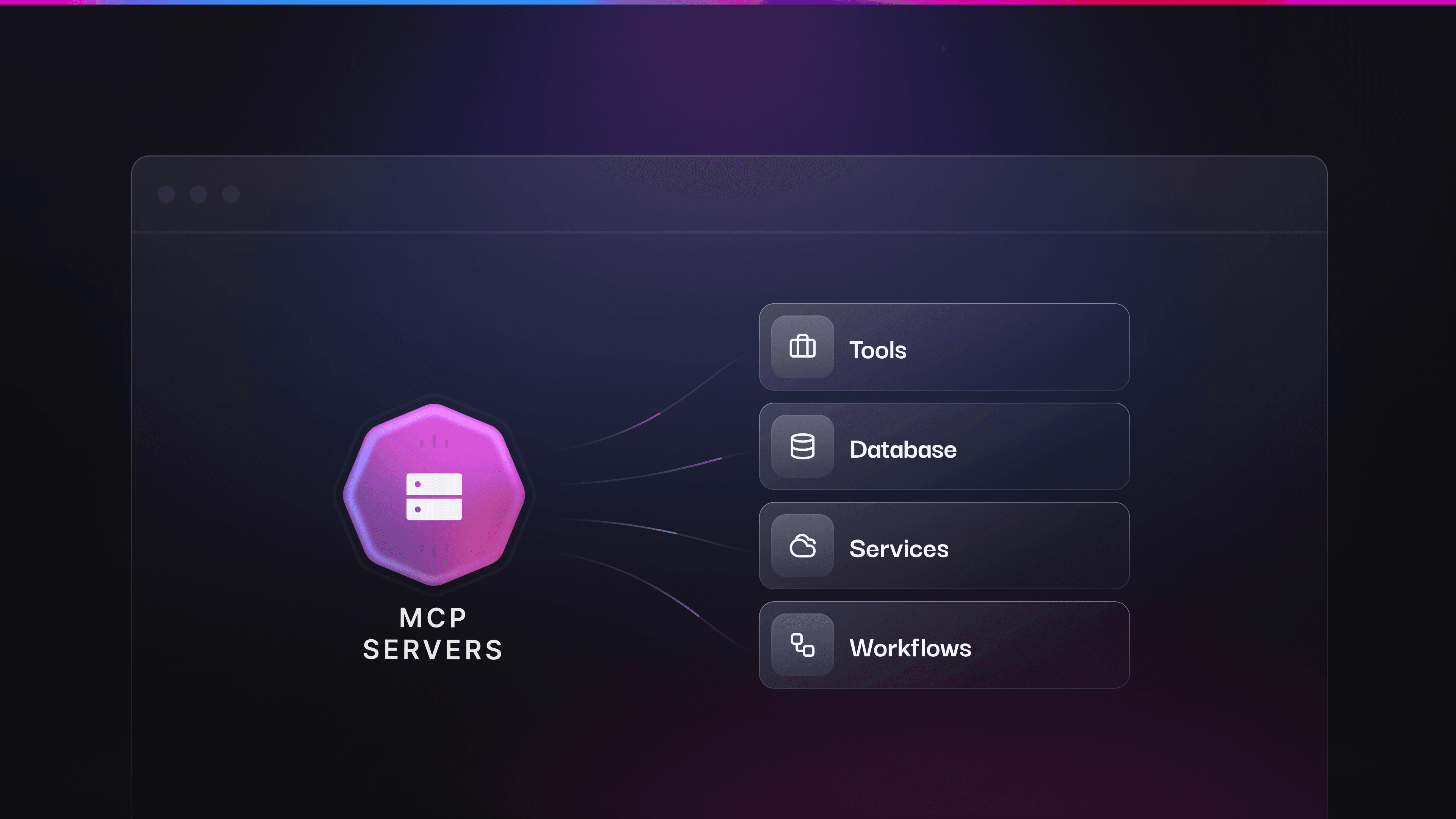
An MCP server exposes third-party tools, resources, prompts, and sampling capabilities and allows them to be used by AI systems via the standardized MCP interface. It does so through three core capability types: tools, which are executable actions a model can invoke to perform operations or communicate with external systems; resources, which provide data the model can read from external sources; and prompts, which are reusable instructions that guide model behavior and task workflows.
MCP supports two distinct deployment environments. On the client side (IDEs, desktop applications, and AI clients), it standardizes how clients discover one another, establish connections, and use external tools, resources, and prompts. On the workflow side, within programmatic and automated systems, MCP provides a consistent, standardized interface for LLM-oriented workflows, enabling reliable tool invocation, data processing, and structured outputs suitable for production environments.
Local vs. Remote MCP Servers
You can use an MCP server via two separate transport mechanisms depending on your needs.
Local: Studio Transport
A local transport method runs on a user's machine and is launched by the client (for example, Claude Desktop). The stdio transport method provides direct communication between internal machine processes without networking overhead and is very simple to implement.
Great for | Limitations |
|---|---|
Developer tooling | The server must be installed and configured locally. |
Personal usage | There’s no remote access. |
Simplicity | Scaling usually requires spawning more processes. |
Performance (no networking = low latency) | |
Local tools, CLIs, agents, and developer workflows |
Remote: Streamable HTTP
Streamable HTTP uses the HTTP protocol for message exchanges between the client and the server, with optional Server-Sent Events for streaming.
⚠️ The SSE transport was used before but has been deprecated in favor of HTTP Stream Transport.
Great for | Limitations |
|---|---|
Public MCP servers | You should consider adding authentication and authorization (via API keys, OAuth, or similar) if necessary. |
Public docs, SaaS products, and overall wider reach | The setup and operational complexity are not as simple as with |
Multi-client and multi-organizational environments | It introduces network latency compared to local |
Cloud deployments (Kubernetes, serverless, and more) | It must handle retries, timeouts, and partial failures. |
Below, you’ll find a few key points to keep in mind:
Claude, ChatGPT, Cursor, and similar tools now support remote MCP. Your users expect to connect without too much configuration.
Streaming enables progressive responses without WebSockets.
Transport is recommended for remote, shared, or commercial MCP servers
"Remote MCP is like the transition from desktop software to web apps." — Cloudflare
Authentication and Authorization in MCP Servers
💡 Let's not confuse authentication with authorization. Authentication allows a user to log in by verifying who they are. Authorization determines whether that user can access the right stuff with the correct permissions. See more about types of authorization.
Authentication and authorization are optional, and not strictly required by the MCP specification. Albeit, you might need to implement the two when:
Your tooling gets access to private, sensitive, or user-specific data;
You build an enterprise application;
You need to log and audit who performed which actions;
You require an access control system;
You need rate limiting.
For local MCP servers based on stdio transport, you can use environment-based credentials
Option A: OAuth (for Public/User-Facing MCP)
The MCP specification requires using OAuth 2.1 for remote server authentication. An MCP server functions as an OAuth 2.1 resource server, which accepts and responds to protected resource requests using access tokens.
Users can authenticate via a browser using social logins like Google, GitHub, or any other identity provider (IdP). To achieve this, your MCP servers must implement a proper WWW-Authenticate response header and define a Well-Known URI , which serves metadata for the MCP client.
With the endpoint /.well-known/oauth-protected-resource, clients fetch the metadata about how to communicate with the resource server, such as how tokens are presented, what scopes the server supports, and what authorization servers the resource can trust.
When it comes to endpoint /.well-known/oauth-authorization-server, the auth server issues access tokens (+ refresh tokens and auth codes). The endpoint serves metadata so the clients know where to send users for authorization, where to exchange auth codes for tokens. and what OAuth features it supports.
Instead of hard-coding how to talk to every resource server, clients can discover resource behavior dynamically.
Some pain points and pitfalls you should watch out for include:
Ensuring clients properly find and interpret server capabilities to prevent discovery flow failures;
Using robust, standardized methods for token validation and session management to avoid insecure implementation;
Avoiding the implementation of your own token validation or authorization logic;
Refraining from using long-lived access tokens;
Enforcing HTTPS rather than using HTTP;
Limiting permissions by following the zero-trust scope model.
Here’s what happens in a typical discovery flow:
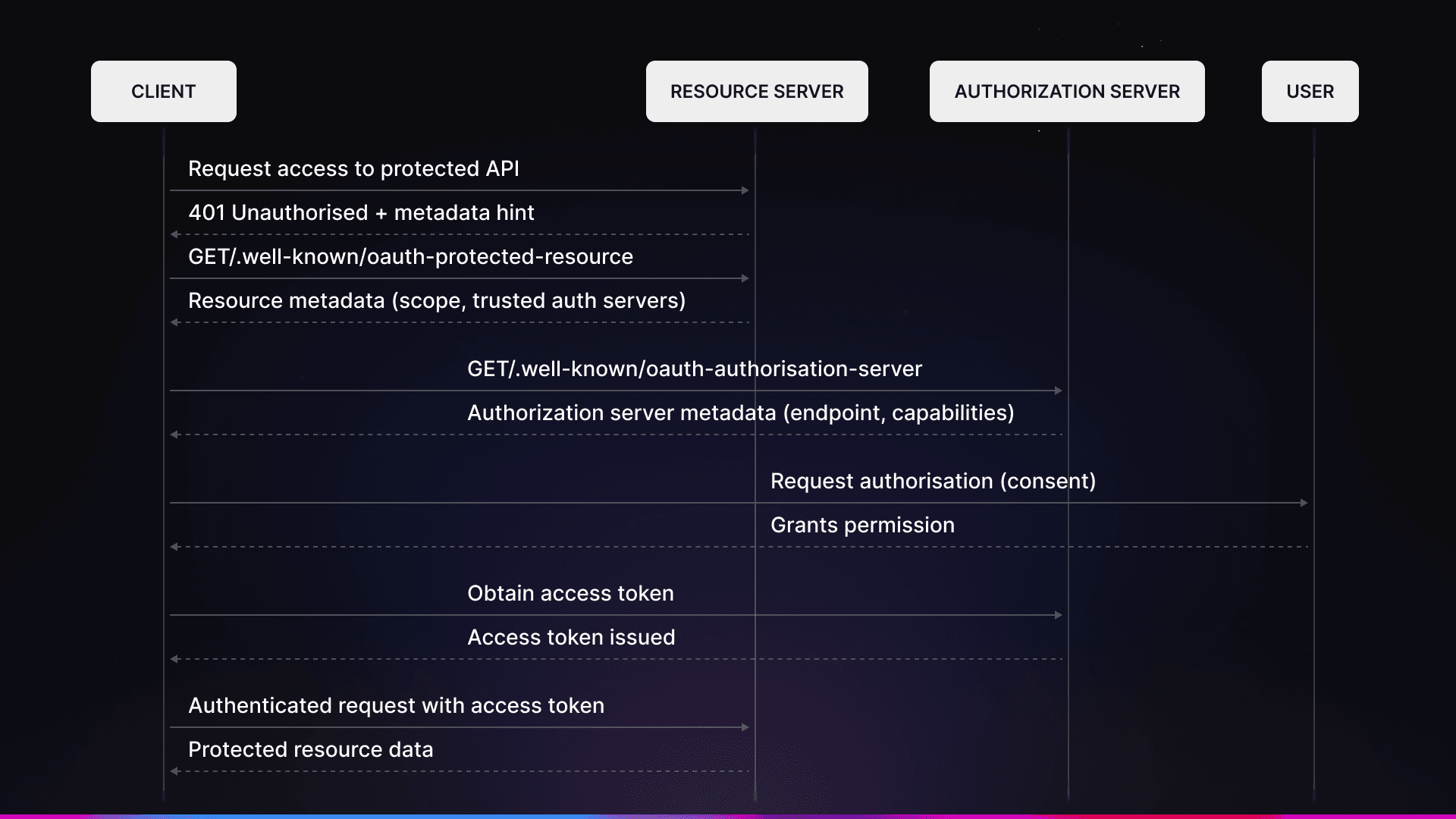
Discovery flow
A client tries to access a protected API (performs a handshake).
The resource returns a
401 UnauthorizedHTTP code.The client requests the
/.well-known/oauth-protected-resourceendpoint from the resource to see what scopes and trusted authorization servers it supports.Using the list of authorization servers, the client requests
/.well-known/oauth-authorization-serverto find out how to get a valid token.User authorization happens and the user gets the permission they need.
The user can now make authenticated requests.
OAuth is recommended for client-side MCP deployments, like AI-native apps (Cursor, Claude Desktop, ChatGPT, and similar tools)
Option B: API Key Auth (for Internal/Agent Use)
Another approach to authentication is via a simple API key. In this setup, your MCP server should expect an Authorization header containing, for example, a Bearer token. This method is good for your own agents, server-to-server communication, and internal tools. When using API keys, you are responsible for the issuance, rotation/refreshing, encryption, and rate limiting.
With this method, you do not need a browser OAuth flow.
Hosting Options
Here’s a quick overview of the main ways to host an MCP server:
Self-Host on Cloudflare Workers | Self-Host on Other Infrastructure | Hosted Solutions (kapa, etc.) |
|---|---|---|
Cloudflare's | Any platform that supports HTTP/SSE can be used for self hosting on other infrastructures. | A hosted solution like kapa.ai offers one-click deployment. |
Legacy SSE transport is supported | You implement OAuth yourself (or use an IdP like Auth0, Stytch, etc.) | Auths are handled for you. |
It’s good for custom logic and existing Cloudflare setups | This approach offers more flexibility but also requires more work. | Analytics are included. |
Interested? Learn more about Cloudlfare MCP. | Though there may be fewer customization options, it ships in minutes. |
Best Practices from Production Deployments
When hosting an MCP server, it’s important to follow best practices for security, reliability, discovery, and session management. Let’s elaborate on each.
Security
When it comes to security, never use user tokens without proper validation to avoid issues like the confused deputy problem. Always ensure that tokens are issued specifically to your MCP server, and use short-lived access tokens that are rotated frequently. API keys should be kept strictly server-side and never included in client code. If you need to show them, consider displaying them only once.
Reliability
For reliability, it’s important to implement rate limiting to protect your server from runaway agents and handle token refreshes gracefully. Always return meaningful errors so clients understand why authentication failed. Note that for stdio-based transport, you should avoid logging directly to stdout, as writing to it can corrupt JSON-RPC messages and break your server. This doesn’ apply to HTTP-based servers.
Discovery
As for discovery, always implement the /.well-known/ endpoints, as clients may fail silently without them. It’s also important to test your MCP server with multiple clients, such as Claude, Cursor, and ChatGPT, since they might behave differently.
Session Management
Here, you need to decide whether to use a stateless approach (that is, validate each request individually) or a stateful approach (with session tokens). For multi-tenant environment, it’s important to track usage on a per-user or per-org basis.
What others do
A tool like kapa.ai, a market leader in RAG and AI assistance serving over 200 companies, including Nokia, OpenAI, Logitech, offers an MCP server that allows you to expose your knowledge sources over the MCP standard. It has:
Public MCP → Google OAuth with minimal scopes (just
openid, no email/name);API key MCP → Bearer token in header;
Rate limits enforced automatically (40/hr user, 60/min API key).
Getting Started
If you’re building it yourself, you need to:
Start with Cloudflare's remote MCP template;
Use their OAuth provider library (don't roll your own, as it’s pretty easy to mess up);
Test with MCP Inspector before going live.
However, in case you want it done for you:
kapa's hosted MCP server handles auth, hosting, and analytics;
In just 5 clicks, you get live remote MCP for your docs.
Next Steps and Resources
Now that you’ve got the differences between local and remote MCP servers in mind, consider what you want to tackle next. If you want to save some money and reduce engineering efforts, you can opt for a solution like kapa.ai, which gives you a remote MCP server in a few clicks.
On the other hand, if you prefer to build it by yourself, exploring MCP's documentation and specifications will give you a better understanding of the standard and may spark some ideas. Cloudflare also has extensive guides on MCP, authentication/authorization, and tools, which are worth exploring.
Frequently Asked Questions
Why do I need a Model Context Protocol (MCP)?
MCP allows you to expand capabilities of your AI tools and create workflows by connecting them to external, third-party tools, prompts, resources and sampling capabilities. It serves as an interface between them.
When should I use local MCP servers?
Use local MCP servers if you’re working on personal projects, local tooling, CLIs, agents, and workflows. It’s fast and easy to implement - you can launch it in a client (e.g. Claude Desktop). Of course, remote MCPs work too, but it adds up unnecessary complexity and performance layers to think about.
When should I use remote MCP servers?
Use remote MCP servers for public and commercial use - docs, SaaS, multi-client and multi-organizational environments, cloud deployment… Essentially, in every use case where you need to greatly expand system capability for a user base.
Do MCP servers require authentication and authorization?
Authentication and authorization are not required by the MCP specification. However, it’s always recommended to implement them if your tooling handles access to sensitive data, if you’re building enterprise apps or if you need to perform audits.
When implementing authentication for remote, user-facing MCP servers, you need to use OAuth 2.1. For internal and private use, you don’t need the OAuth flow. Authentication via an API key is enough.